The Architecture of Isolation: A Narrative Journey Through Kernels, Containers, and Network Topologies
The Illusion of Computing and the Philosophy of Systems Engineering
In modern backend engineering, there is a pervasive tendency to hide complexity behind elegant abstractions. We deploy applications with a single command, instantiate databases with a few lines of YAML, and route global traffic through ingress controllers without a second thought. However, hiding complexity does not eliminate it; it merely obscures the underlying mechanics until a catastrophic failure or an inexplicable performance degradation forces an engineer to look under the hood. To achieve ultimate performance, efficiency, and security, an engineer must possess an “A to Z” understanding of their application. They must comprehend the exact lifecycle of a network packet, the precise cost of a context switch, and the immutable laws of kernel resource allocation.
The Foundation of Isolation: Bare Metal, Context Switches, and Hypervisors
At the lowest level of computing architecture, the processor operates in distinct privilege rings. The operating system kernel resides in Ring 0, possessing unfettered access to hardware, memory, and CPU scheduling. User applications reside in Ring 3, an unprivileged state. Whenever an application needs to read a file, allocate memory, or send a network packet, it cannot do so directly; it must issue a system call (syscall), transitioning execution from user mode to kernel mode.
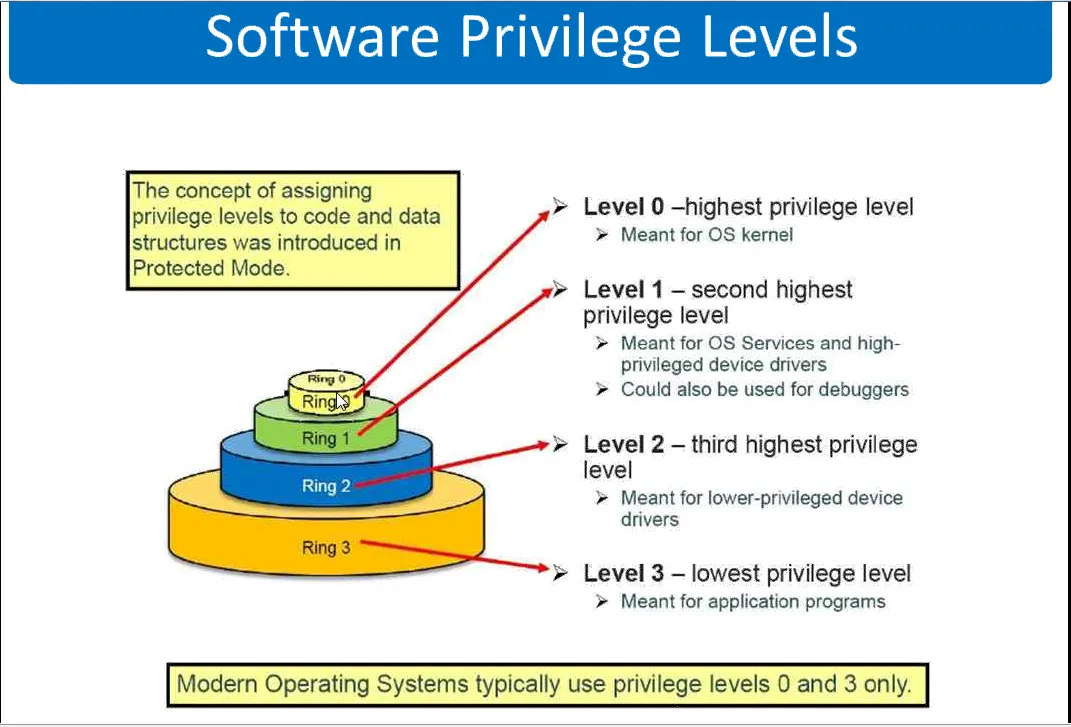
The transition between states requires a context switch. In a native Linux environment, the overhead of a standard context switch between processes or during a syscall is incredibly small, typically measured in the range of 100 to 150 nanoseconds. The kernel merely saves the execution state (registers and control structures) of the current process, flushes or updates necessary memory mappings, and loads the state of the next process.
Hardware virtualization, however, introduces a massive shift in this paradigm.
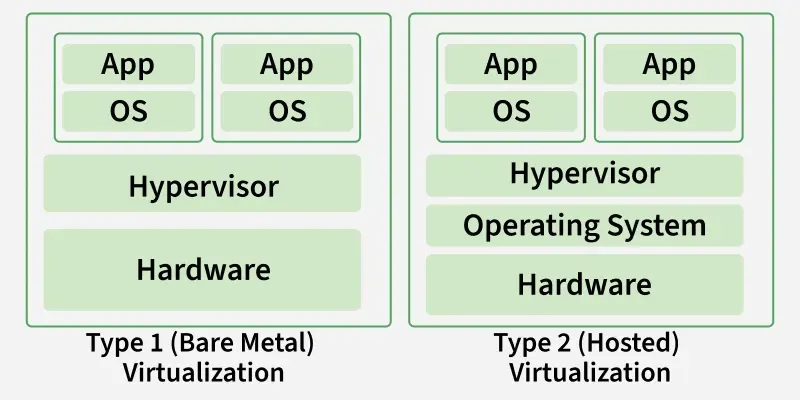
A Type-1 hypervisor, such as Proxmox Virtual Environment (which leverages the Kernel-based Virtual Machine, or KVM), runs directly on the bare metal. It utilizes hardware-assisted virtualization extensions, such as Intel VT-x or AMD-V, to run complete guest operating systems.
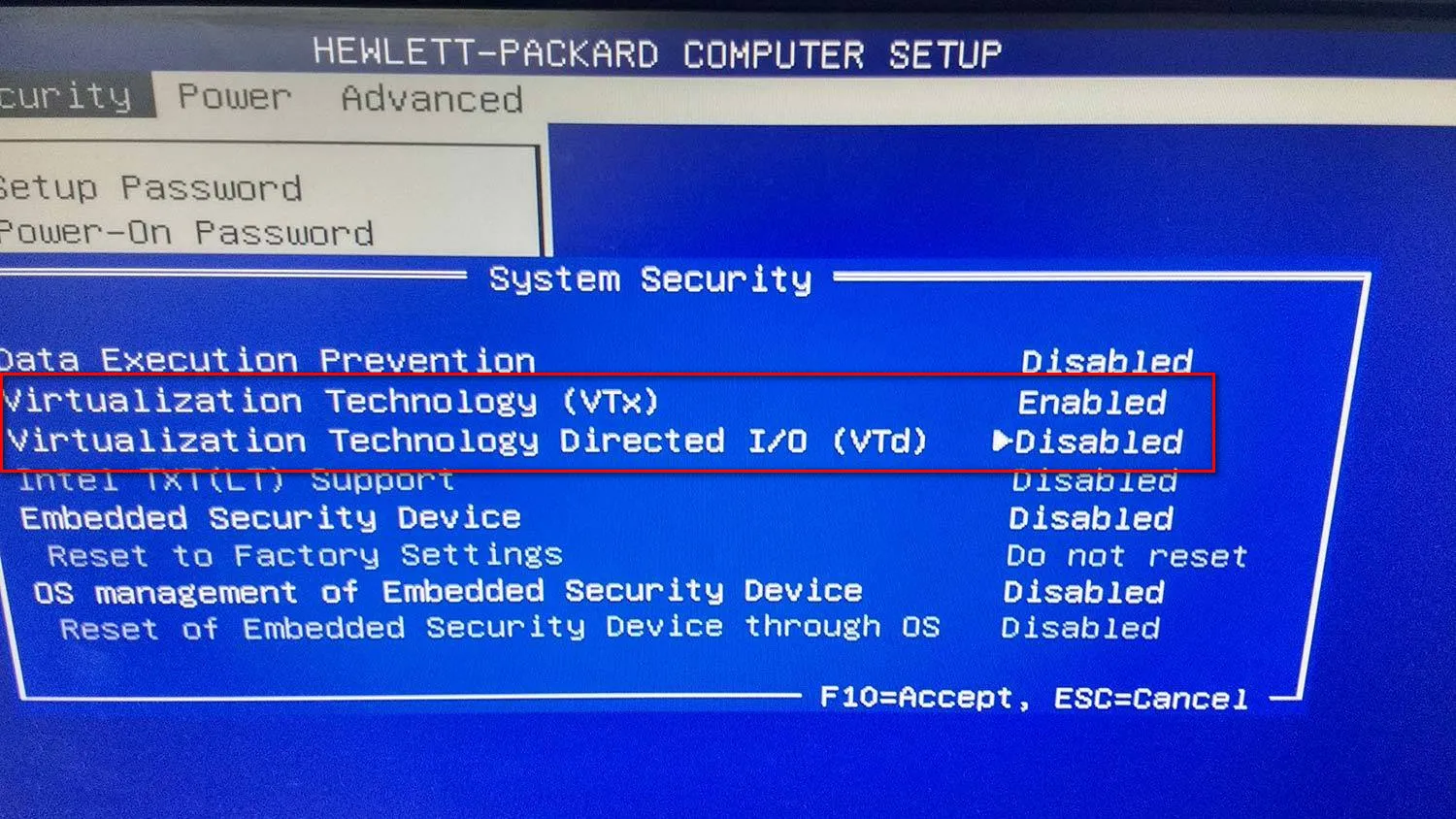
when we talk about virtualization, we’re usually talking about the Hypervisor (the VMM) lying to the Guest OS. In the old days, this was expensive because the CPU didn’t know how to handle two “masters.” The Hypervisor had to intercept every sensitive instruction, and emulate it. Absolute performance killer.
Then comes Intel VT-x and AMD-V. This is hardware-level genius. They introduced a new CPU mode—VMX root (for the hypervisor) and VMX non-root (for the guest).
Instead of software “trapping” every move, the hardware provides a Virtual Machine Control Structure (VMCS). It’s like a state-save object. When the Guest OS tries to do something privelaged—like touching network card or changing control register—the CPU pulls emergency brakes (triggers a VM Exit) ie freezes the Guest OS save its state in VMCS (Virtual Machine Control Structure), hands control to the Hypervisor so that it can oversee and prevent one Guest OS to touch anything used by another Guest OS and crash system like ovrwite memory and crash entire physical host , and when done, a VM Entry resumes the guest. It’s fast, it’s clean, and it removes the binary translation overhead.
Without this hardware-assisted “trap-and-emulate” dance, we’d be back in the dark ages of Binary Translation, where the Hypervisor has to manually rewrite every single instruction the Guest tries to run. That is a massive performance tax. By switching context at the silicon level, we keep the overhead low and the execution near-native.
Even with modern CPU enhancements like the Virtual Processor ID (VPID)—which mitigates the need to flush the Translation Lookaside Buffer (TLB)(TLB is a high-speed hardware cache inside the CPU that stores recent virtual-to-physical address mappings. Instead of searching slow system RAM (page tables) for every memory request) during these transitions—a VM exit incurs a severe performance penalty, with latency overheads measured in microseconds rather than nanoseconds.
This microsecond overhead cascades. Every disk read, every network packet, and every memory allocation within a Virtual Machine must traverse the guest kernel, the hypervisor’s emulation layer, and finally the host hardware. This brings us to the fundamental reason why operating-system-level virtualization—the container—revolutionized the industry.
The OS-Level Illusion: Namespaces, Cgroups, and Seccomp
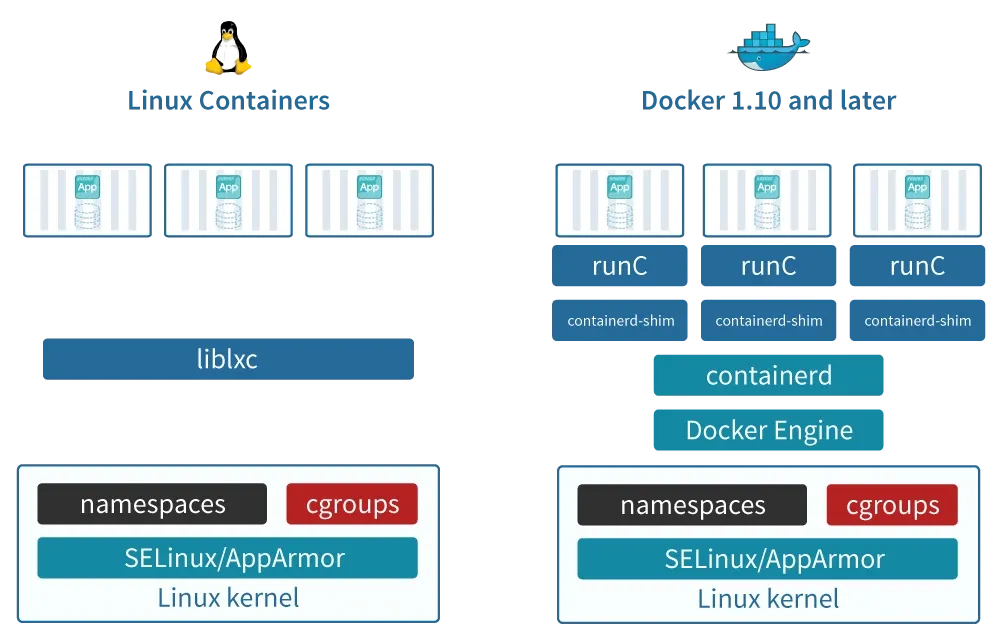
A container is not a tangible entity. It is not a virtual machine, and it does not possess its own kernel. A container is simply a standard Linux process wrapped in a carefully orchestrated illusion, constructed from three primary kernel primitives:
- Namespaces
- Control Groups (cgroups)
- Security Computing Mode (seccomp).
Namespaces: The Illusion of Solitude
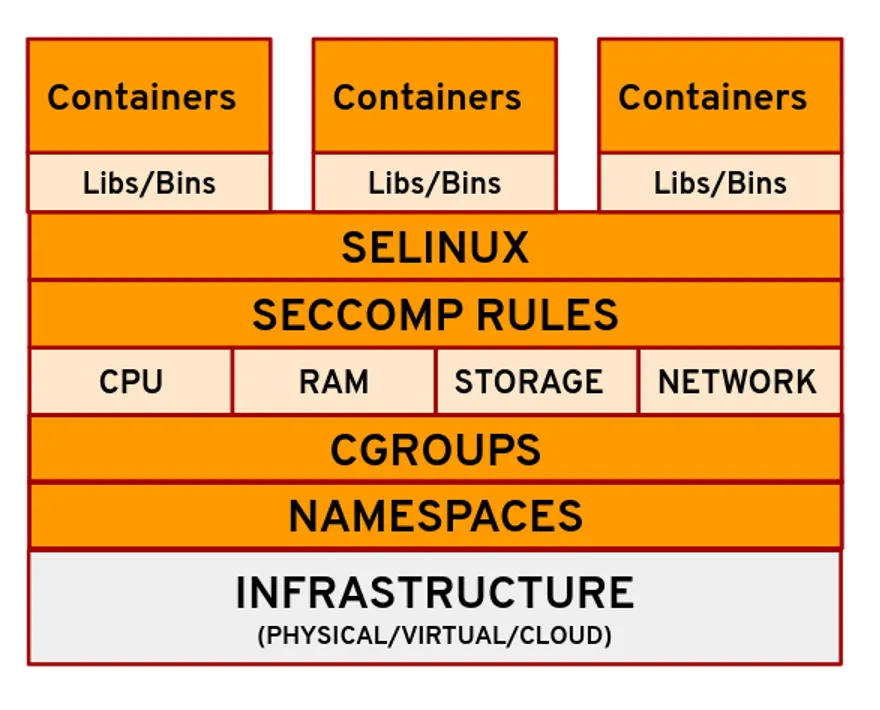
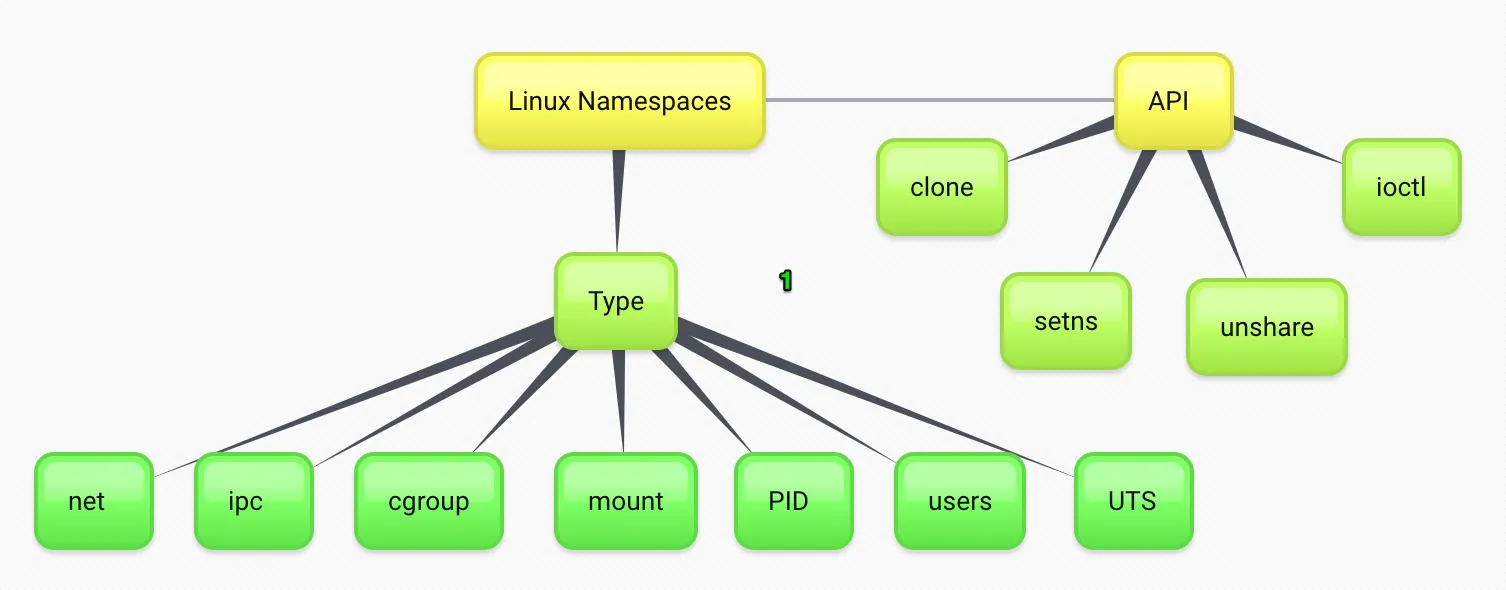
Namespaces partition kernel resources such that one set of processes perceives a completely different computing environment than another set of processes. When a container runtime initiates a process, it uses a system call with specific flags to isolate various system components.
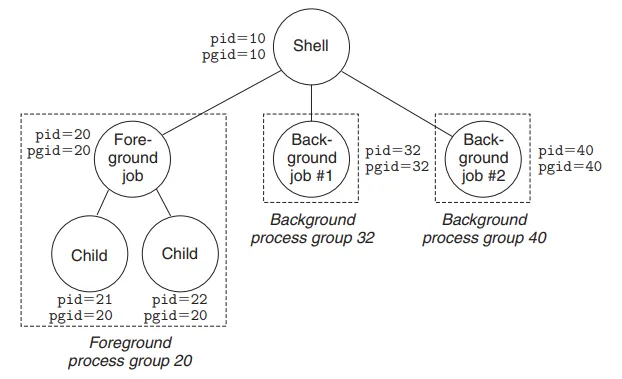
The PID (Process ID) namespace ensures that a process within a container views itself as PID 1, completely unaware of the myriad of other processes running on the host system.
To the host kernel, however, this process is just another standard, high-numbered PID. The mnt/ (Mount) namespace provides the process with an isolated view of the filesystem hierarchy, allowing the container to possess its own root directory without conflicting with the host.
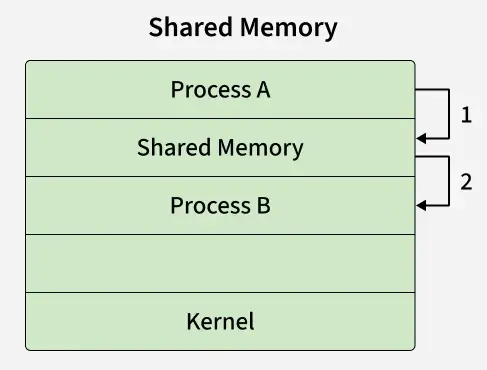
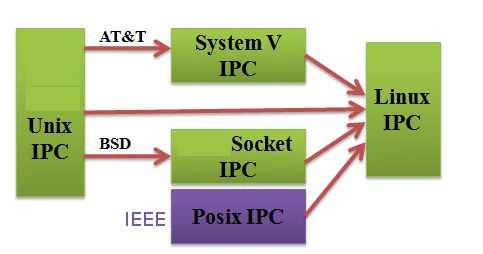
The IPC (Inter-Process Communication) namespace ensures that processes in different containers cannot utilize System V IPC or POSIX message queues to communicate with one another, effectively walling off memory-sharing exploits.
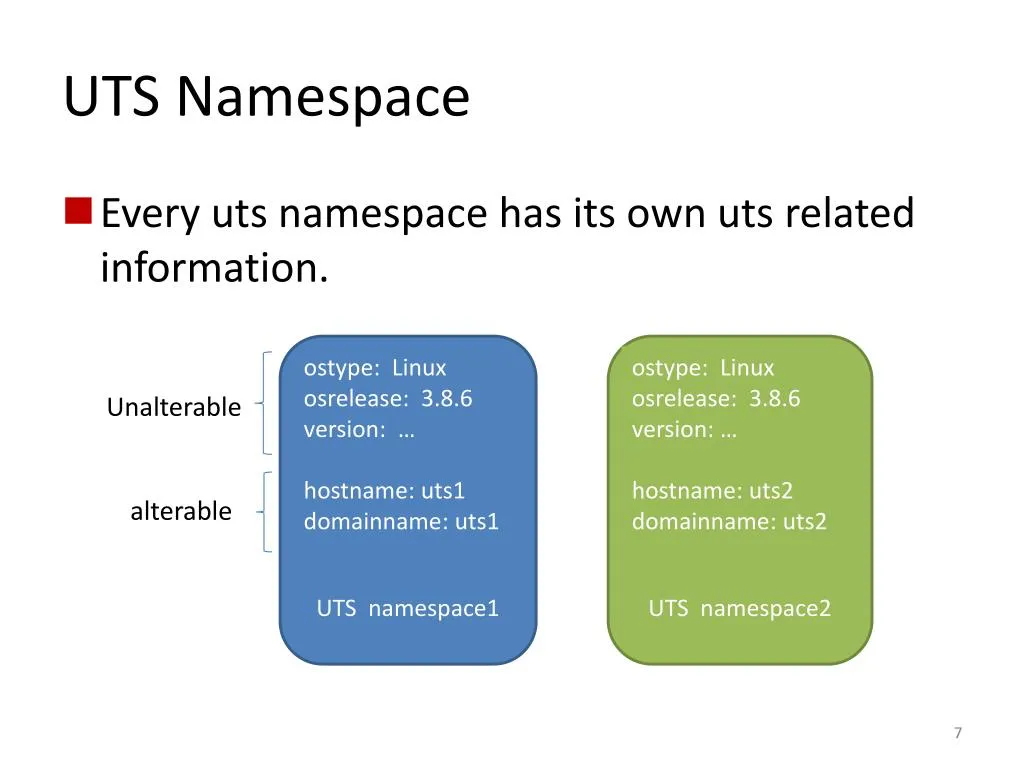
Finally, the UTS namespace isolates kernel and version identifiers, while the NET namespace isolates the network stack, providing the container with a distinct loopback interface, unique routing tables, and isolated firewall rules.
Cgroups: The Mechanics of Resource Equity
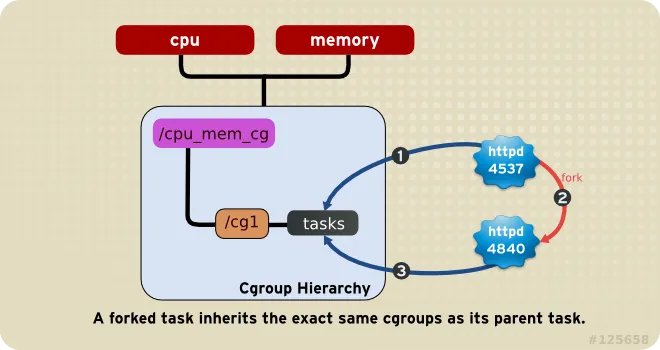
While namespaces dictate what a process can see, Control Groups (cgroups) dictate what a process can use. Introduced in the 2.6.24 Linux kernel, cgroups partition physical resources—such as CPU cycles, memory allocation, and block I/O bandwidth—among process groups.
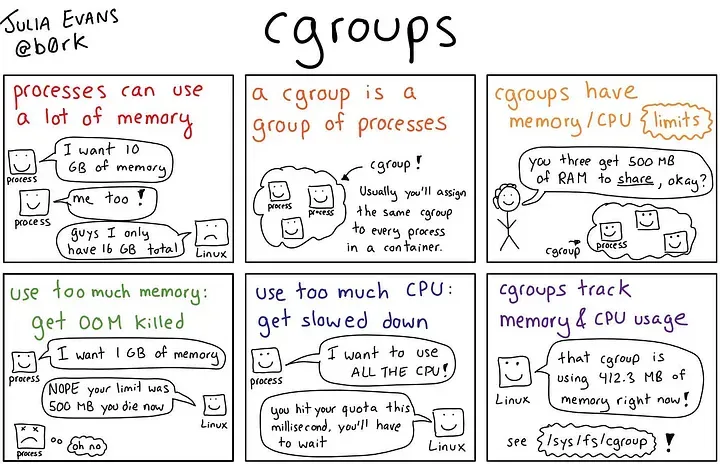
Without cgroups, a poorly written application within a container could consume 100% of the host’s CPU, starving all other containers. Modern schedulers, such as the Linux Completely Fair Scheduler (CFS), integrate deeply with cgroups. By utilizing tracking metrics like the tg->load_avg attribute, the kernel dynamically accounts for CPU time across multiple cores, ensuring that a highly utilized container is throttled when it exceeds its allocated quota. This CPU accounting, along with memory limit enforcement, adds negligible overhead (typically less than 1%) to the containerized workload, allowing for extreme density on a single host without sacrificing stability.
Seccomp: The Ultimate Line of Defense
If a container shares the host kernel, it inherently has access to the kernel’s entire system call interface. The Linux kernel exposes over 300 system calls, many of which provide vectors for privilege escalation if manipulated maliciously. This is where Secure Computing Mode (seccomp), specifically seccomp-bpf, acts as the ultimate line of defense for process isolation.
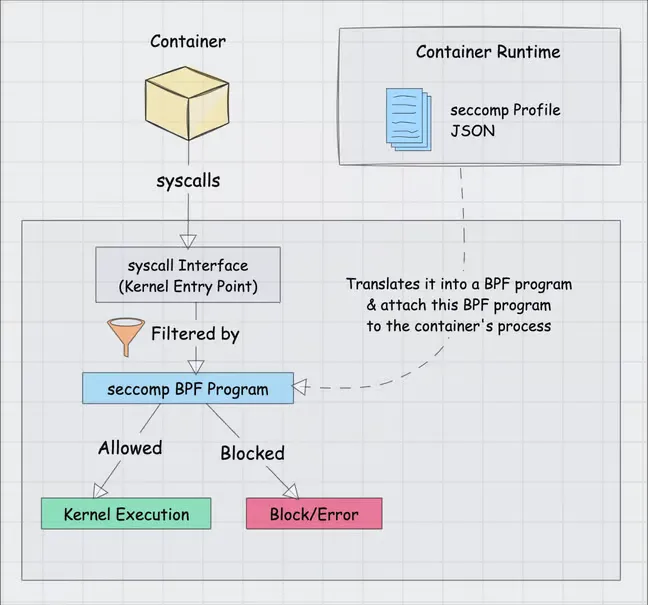
Seccomp-bpf utilizes Berkeley Packet Filter (BPF) programs to restrict exactly which system calls a process is permitted to execute. When a container engine like Docker spawns a process, it injects a default seccomp profile. This profile functions as a strict allowlist. It utilizes the SCMP_ACT_ERRNO action to return a “Permission Denied” error whenever a containerized application attempts to invoke an unapproved system call. Out of the 300+ available syscalls, Docker’s default profile outright disables approximately 44 of them.
This is not merely a theoretical protection. Historically, critical vulnerabilities such as CVE-2022-0185 relied on exploiting the unshare syscall to achieve container breakout. Because Docker’s default seccomp profile blocked the unshare syscall for standard containers, environments utilizing the default profile were immune to the exploit. By combining namespaces, cgroups, and seccomp filters, the Linux kernel constructs an exceptionally tight perimeter around a process, offering bare-metal execution speeds with security boundaries that rival traditional virtual machines.
Difference : Application Container & System Containers
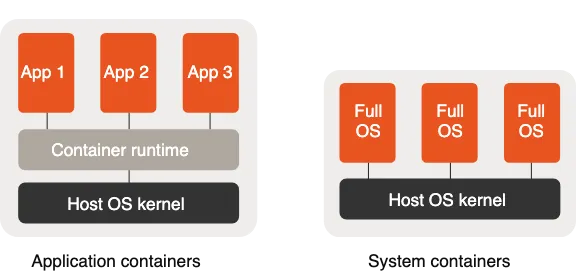
While LXC (Linux Containers) is the OG of system containers, the world of containerization has branched into two main philosophies: Application Containers and System Containers.
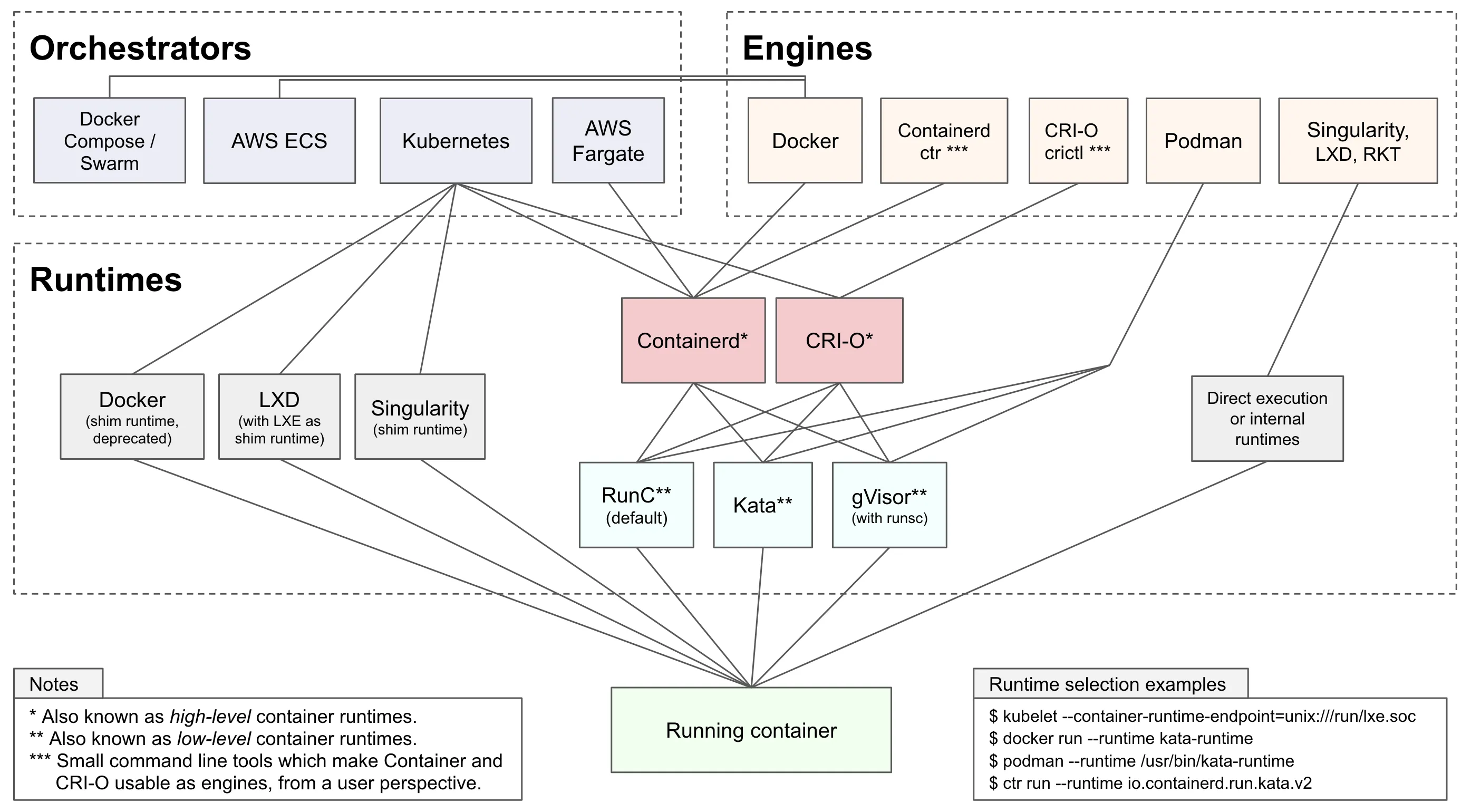
1. Application Containers
These are the most common today. Unlike LXC, which acts like a “mini-VM,” these are designed to run a single process or service.
- Docker: The industry standard. It uses a layered filesystem (UnionFS) and a central daemon to manage the lifecycle of applications.
- Podman: A “daemonless” alternative to Docker. It’s highly secure because it doesn’t require root privileges to run containers and integrates perfectly with
systemd. - containerd & CRI-O: These are “low-level” runtimes. You usually don’t interact with them directly; they sit under the hood of Kubernetes to pull images and manage the actual isolation.
2. System Containers
If you like LXC, these are its direct cousins. They feel like a full OS, running multiple services (ssh, cron, logging) inside one container.
- LXD: This is effectively “LXC on steroids.” It adds a REST API, image management, and support for snapshots. It makes managing LXC containers feel as easy as managing VMs in VMware or OpenStack.
- OpenVZ: A veteran in the space. It’s a container-based virtualization for Linux that requires a modified kernel but offers near-native performance for high-density VPS hosting.
3. Specialized & Sandbox Containers
- Kata Containers: These are “Secure Containers.” They use a tiny, lightweight VM (using those Intel VT-x extensions we discussed!) for each container. You get the speed of a container with the hardware isolation of a VM.
- gVisor: Created by Google, it intercepts system calls from the application and handles them in “user-space” to prevent a compromised container from attacking the host kernel.
The Container Engine Divide: LXC, Docker, and Podman
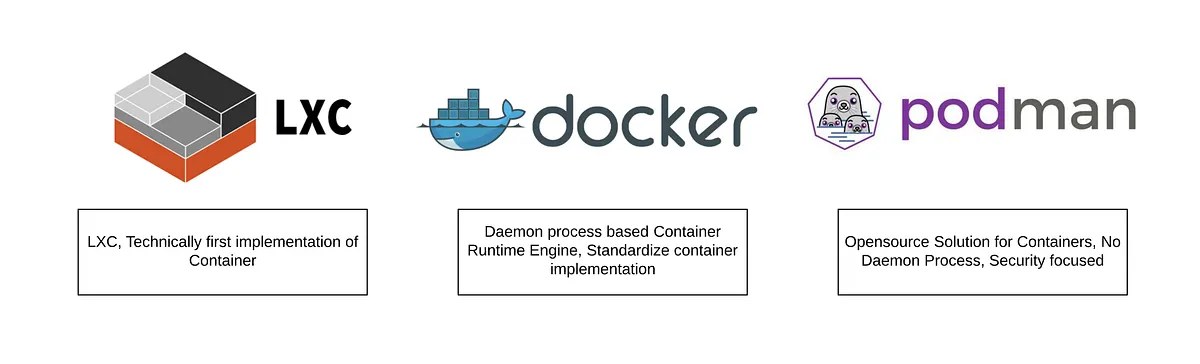
Understanding the kernel primitives is only the first step. The choice of container runtime dictates how an application interacts with these primitives, how it manages persistent storage, and how it handles security contexts. LXC, Docker, and Podman represent three distinct evolutionary stages in OS-level virtualization, each engineered to solve specific operational challenges.
LXC: The Machine Container
Linux Containers (LXC) represent the earliest mainstream implementation of OS-level virtualization, championed heavily by Canonical and IBM. LXC focuses on creating “machine containers.” The philosophy behind LXC is to emulate an entirely new host environment without the overhead of hardware emulation.
When you boot an LXC environment, the runtime executes a standard operating system initialization process (like systemd or init). This allows an LXC to behave exactly like a bare-metal server or a virtual machine. System administrators can SSH directly into the container, manage it using standard configuration management tools like Ansible, and assign it persistent IP addresses on the local network via bridging.
However, running applications like Docker inside an LXC on a hypervisor platform like Proxmox introduces severe architectural friction. To achieve this nested virtualization, the host administrator must configure the LXC with specific parameters, such as enabling nesting=true and allowing keyctl access. Operating an unprivileged LXC (a crucial security best practice) requires complex user namespace mapping (UID/GID) to allow the container to securely access bind-mounted host directories, making storage management incredibly tedious. Furthermore, LXC is highly sensitive to host-level kernel and filesystem upgrades. For example, during a major Proxmox upgrade, the default filesystem altered in a way that the Docker overlay2 storage driver did not support, completely breaking nested Docker deployments and forcing administrators to rely on inefficient, slow storage drivers like vfs.
Docker: The Application Container and the OCI Standard
While LXC focused on providing lightweight operating systems for system administrators, Docker revolutionized the industry by pivoting entirely toward developers, establishing the era of the “application container”. Originally, Docker utilized LXC under the hood as its execution environment. However, as Docker’s ambitions grew, it shed LXC in favor of its own dedicated runtime, libcontainer (which eventually evolved into runc).
Docker’s overwhelming popularity stems from its developer-centric user experience and its pioneering of the layered image format. Before Docker, migrating a workload required moving entire virtual machine disk images, which were bloated and slow. Docker introduced the concept of packaging the application, its binaries, and its exact dependencies into a standardized, portable artifact.
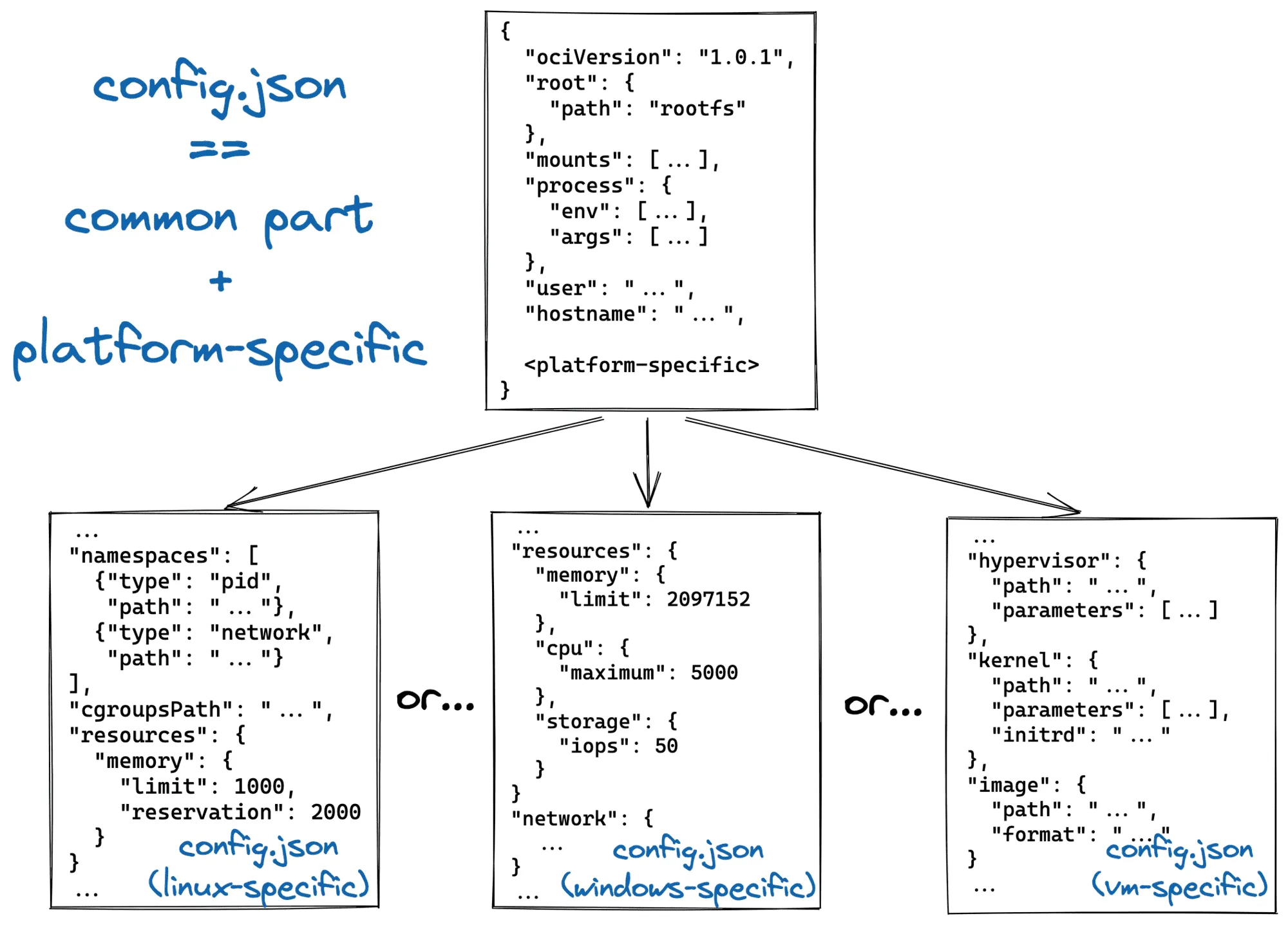
This layered image format was eventually formalized by the industry as the Open Container Initiative (OCI) Image Specification. An OCI image is not a single, monolithic file; it is a meticulously constructed set of components including an Image Manifest, an Image Index, an Image Configuration, and filesystem changeset layers. The base layer of an image contains the root filesystem (for example, a minimal Alpine Linux distribution). Every subsequent command executed during the build process (such as RUN apt-get install nginx) creates a new layer that contains only the variations—the filesystem changeset—compared to the layer below it, packed as a tarball.
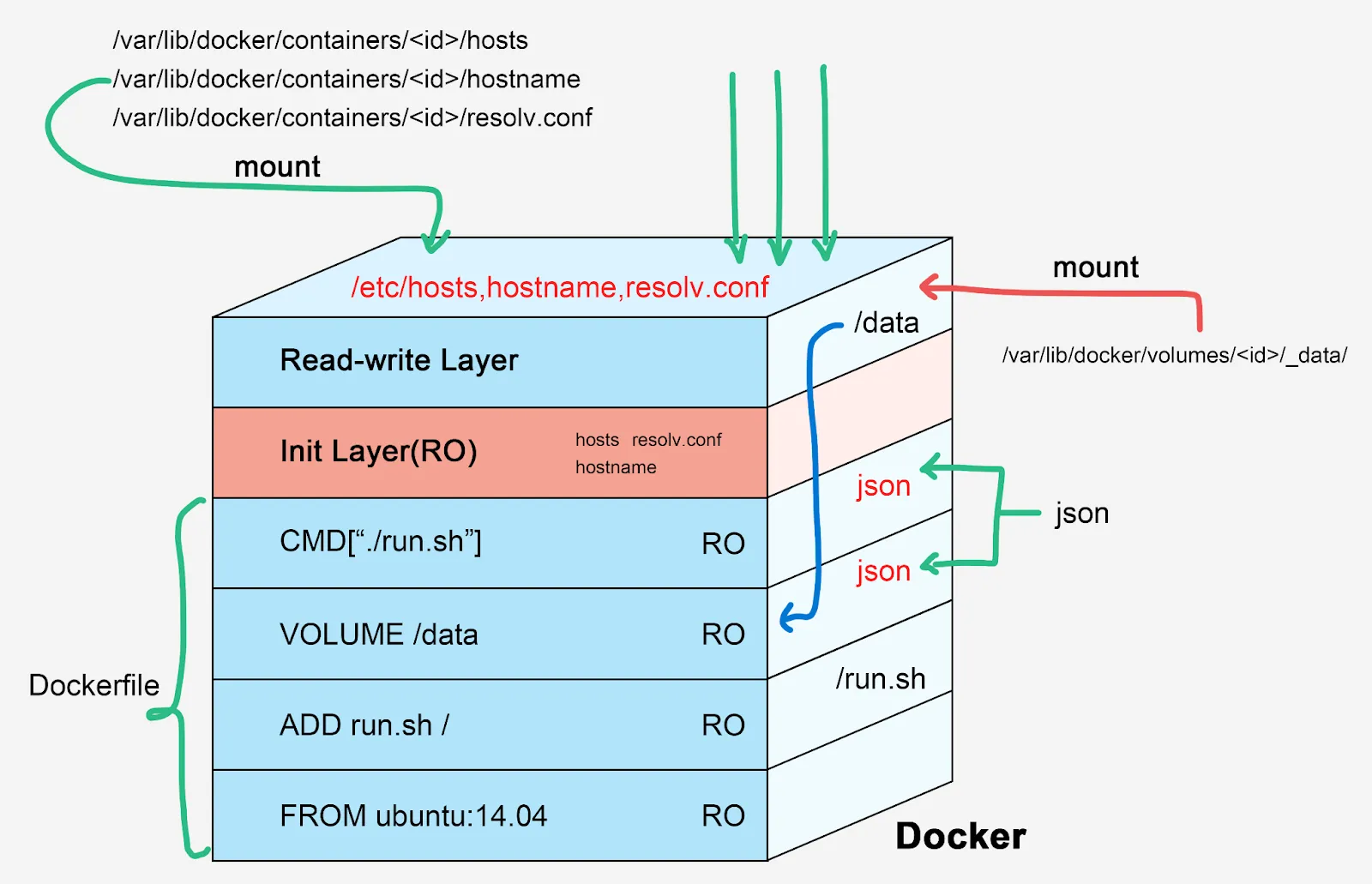
This architecture allows the container runtime to heavily optimize storage and network transfer. If ten different containers require the same base Ubuntu layer, the Docker engine only downloads and stores that layer once, utilizing an overlay filesystem (like overlay2) to share it across all instances. This drastically reduces storage consumption, enables near-instantaneous container startup times, and provides a level of portability that LXC could never match. Coupled with Docker Hub—a massive, centralized public registry providing thousands of ready-made community images—Docker achieved absolute dominance in the developer ecosystem.
Podman: The Daemonless Revolution
Despite its ubiquity, Docker’s underlying architecture possesses a fundamental flaw: it relies on a centralized client-server model. When a user executes a docker run command, the Docker CLI sends an API request to a background daemon, dockerd. This daemon runs continuously, manages the lifecycle of all containers, networks, and volumes, and—most critically—typically requires root privileges to operate.
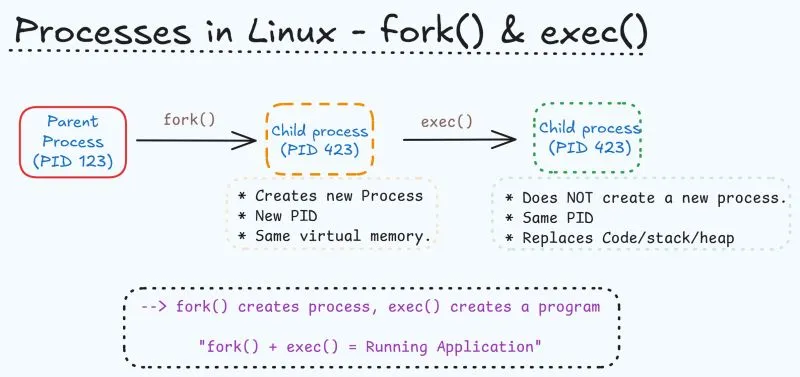
Podman (Pod Manager), developed primarily by Red Hat, was engineered specifically to dismantle this centralized architecture. Operating on a fork-exec model rather than a client-server model, the Podman CLI directly interacts with the container registry, pulls the OCI image, and interfaces with the Linux kernel to start the container process directly as a child of the executing user’s shell.
The most profound architectural advantage of Podman is its native, out-of-the-box support for rootless containers. Because there is no persistent daemon holding system resources or running as the root user, inactive containers consume strictly zero CPU cycles, and the attack surface of the host machine is drastically reduced. Furthermore, Podman integrates seamlessly with the host’s systemd initialization system. Rather than relying on complex Docker Compose workflows, administrators can generate standard systemd unit files (or use Quadlets) for their containers, allowing the host OS to manage container startup, dependency resolution, and auto-restarts natively.
| Feature | Podman | Docker | Winner / Context |
|---|---|---|---|
| Architecture | Daemonless (direct fork-exec process execution) | Centralized client-server daemon (dockerd) | Podman (Security, Resource Efficiency) |
| Security Posture | Rootless by default; requires fewer kernel privileges | Requires root daemon unless manually configured | Podman (Lower host attack surface) |
| Resource Overhead | Zero idle CPU overhead; faster initialization (~0.8s) | Daemon consumes background RAM (~100MB) | Podman (Scalability and Efficiency) |
| Ecosystem & UX | Strong Red Hat integration; OCI-native strictness | Massive community; Docker Hub; Swarm support | Docker (Ubiquity and Documentation) |
Orchestration at Scale: Kubernetes and the CRI Evolution
As container deployments scale beyond isolated single nodes, manual management becomes impossible, necessitating orchestration systems like Kubernetes. To understand high-level deployment performance, one must examine how Kubernetes communicates with the underlying containers.
Historically, Kubernetes was tightly coupled with Docker. The kubelet—the primary “node agent” running on every Kubernetes worker node—relied on a hardcoded, direct integration component known as dockershim to communicate with the Docker Engine. However, Docker was designed as a full-stack tool for human developers, not as a minimal runtime for a machine orchestrator. It included features like Swarm, build tools, and volume management that Kubernetes simply did not need.
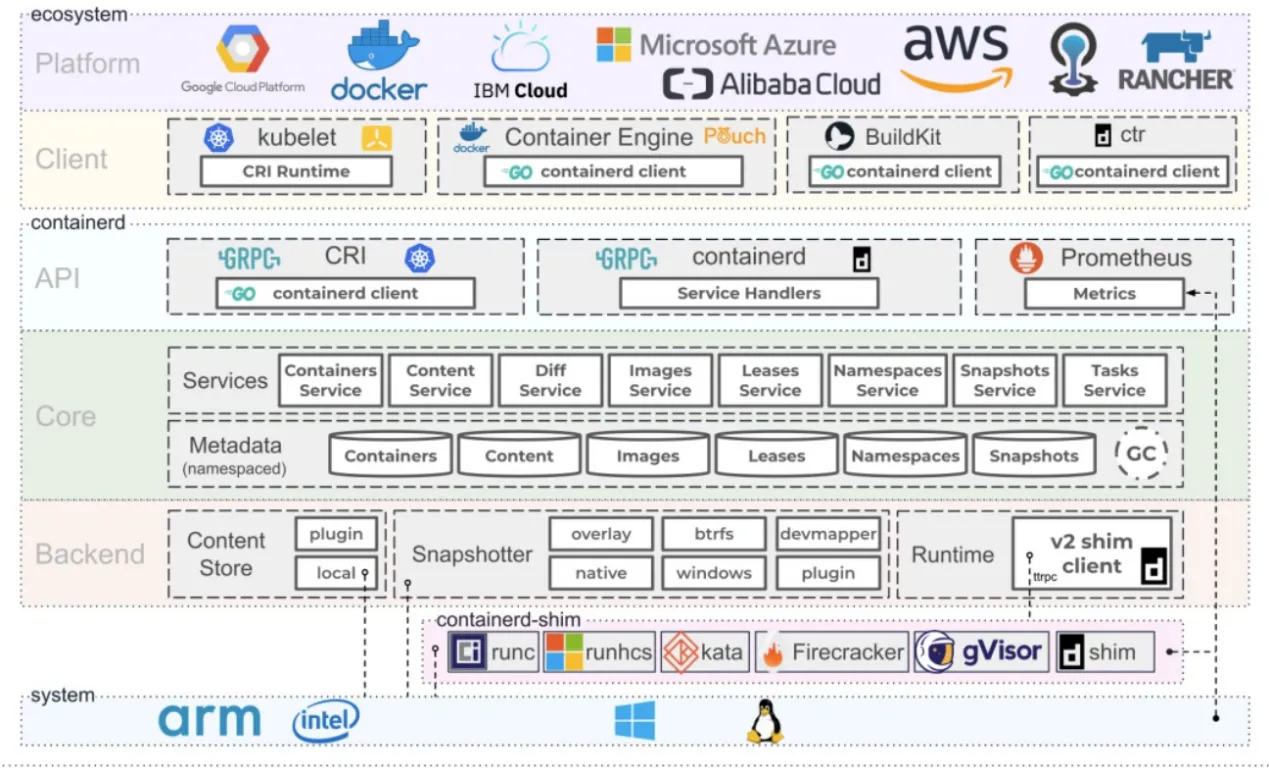
To achieve modularity and performance, Kubernetes introduced the Container Runtime Interface (CRI). The CRI is a strictly defined API that allows the kubelet to communicate with any compliant container runtime over gRPC. This architectural shift led to the formal deprecation and removal of dockershim in Kubernetes v1.24, forcing the industry to adopt leaner, purpose-built runtimes.
This evolution produced two primary successors: containerd and CRI-O.
- containerd: Originally a core component of the Docker Engine,
containerdwas spun out as a standalone, general-purpose runtime. It handles the complete container lifecycle, including image transfer, storage execution, and low-level task management via theruncshim. It remains highly extensible and is the default in many managed cloud environments like AKS and GKE.
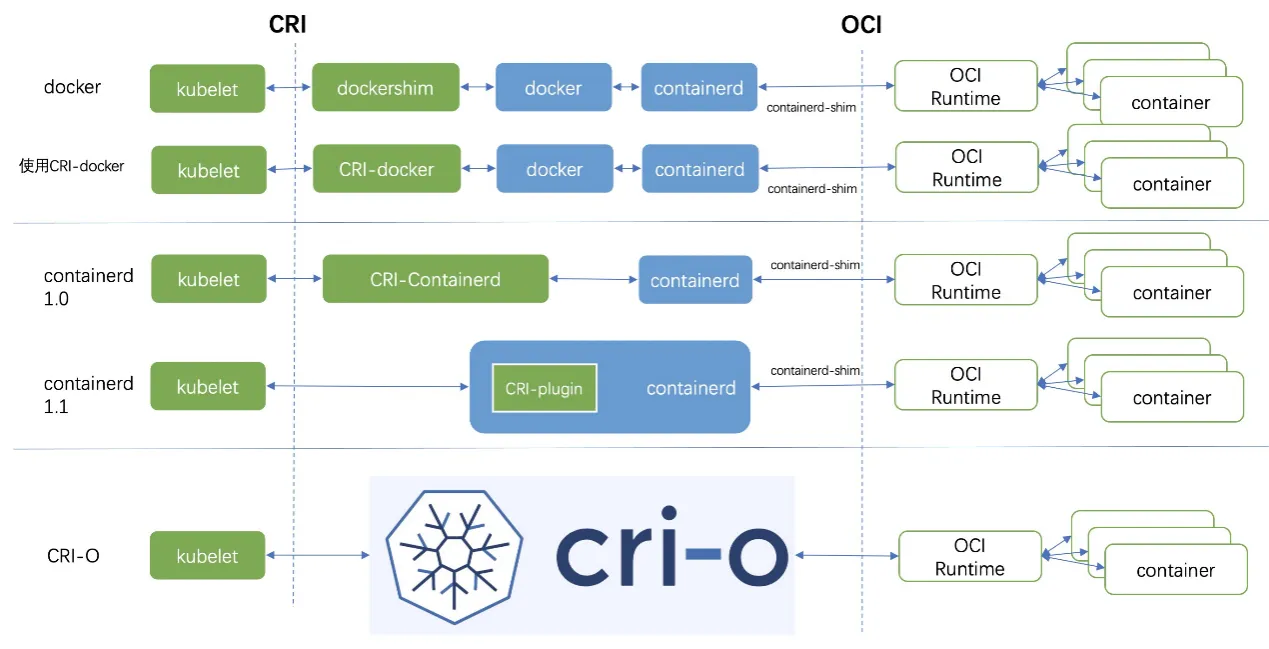
- CRI-O: Developed explicitly as a lightweight alternative to Docker for Kubernetes, CRI-O strips away all non-Kubernetes features. It does not attempt to support standalone container management. CRI-O strictly adheres to OCI standards, possessing a minimal attack surface. When the
kubeletissues a command, CRI-O speaks directly via the CRI to pull the image and launch the low-level runtime (likerunc), which in turn interfaces with the Linux kernel to establish the namespaces, cgroups, and seccomp filters. For organizations utilizing Red Hat OpenShift or prioritizing absolute minimalism and security, CRI-O is the optimal architectural choice.
The Client-Side Sandbox: Mirroring Server Isolation in the Browser
The rigorous principles of kernel isolation that govern server-side containers are exquisitely mirrored in the architecture of modern web browsers. Understanding browser sandboxing is crucial, as the browser is the ultimate client-side container, tasked with executing untrusted, potentially hostile code derived from arbitrary internet sources.
Historically, browsers operated as single monolithic processes. A crash in one tab brought down the entire application, and a vulnerability in the rendering engine provided an attacker with direct access to the user’s filesystem. Chromium revolutionized this by introducing a multi-process architecture, separating the highly privileged “Browser Process” from the unprivileged “Renderer Processes.”
The Sandbox and Mojo IPC
If a malicious payload compromises a renderer process, the attacker finds themselves trapped within a highly restricted sandbox enforced at the operating system level—utilizing seccomp-bpf filters on Linux, Job objects and process mitigation policies on Windows, or the App Sandbox/Seatbelt framework on macOS.
The sandboxed renderer process lacks direct access to the disk, the network interface, and user input devices. To perform any meaningful action—such as fetching an image from a remote server or writing a file—the sandboxed renderer must request that the highly privileged Browser Process perform the action on its behalf.
This communication relies on Inter-Process Communication (IPC). Chromium utilizes the Mojo IPC framework, which abstracts common underlying IPC primitives (such as named pipes on Windows or socketpair() on Linux and macOS) to facilitate fast, asynchronous message passing.
Architectural Scenarios and the Pursuit of Performance
Applying these kernel mechanics, virtualization principles, and network routing rules enables the evaluation of specific deployment scenarios. When an engineer must run a PostgreSQL database, a Nextcloud instance, and custom applications behind a proxy, the choice of the underlying host operating system and virtualization boundary dictates the success of the deployment.
Scenario 1: Base Machine Running Proxmox VE
Proxmox VE is a Type-1 bare-metal hypervisor, making it a robust, enterprise-grade foundation. When deploying a transactional database like PostgreSQL on Proxmox, the configuration of storage and virtualization boundaries is paramount.
The Deployment Topology: VM vs. LXC While Proxmox supports running LXC natively, running Docker inside an unprivileged LXC is an architectural anti-pattern for production. Host upgrades routinely break nested Docker environments due to filesystem driver mismatches. Furthermore, a compromised Docker container escaping to the LXC layer leaves only one thin kernel namespace barrier before total host compromise. Managing bind mounts between the host and an unprivileged LXC also requires complex UID/GID mapping, leading to permission nightmares for Nextcloud data volumes.
The Optimal Architecture: Deploy a dedicated Virtual Machine on Proxmox backed by an LVM storage pool for the database disks to maximize IOPS. Install a minimal Linux distribution inside the VM, and run Docker (or Podman) natively. The VM boundary provides absolute security isolation from the Proxmox host, shields the container engine from hypervisor upgrades, and guarantees dedicated block I/O performance.
Scenario 2: Base Machine Running Ubuntu Server with Multipass
Consider a scenario where the base machine is installed with Ubuntu Server natively, and the administrator utilizes Canonical’s Multipass to spin up virtual machines to host Docker. This is an incredibly inefficient architecture.
Multipass is designed primarily as a developer tool to quickly orchestrate virtual environments. Depending on the OS, it relies on hypervisors like Hyper-V, VirtualBox, or QEMU/KVM. By installing Multipass on an OS that is already running the Linux kernel, the system forces workloads into a redundant hypervisor loop.
When a network packet arrives, it must traverse the host Ubuntu network stack, cross a virtual bridge into the Multipass VM, traverse the guest VM’s kernel stack, cross another virtual bridge (docker0), and finally enter the container. Similarly, every disk I/O operation from PostgreSQL must be translated by the hypervisor’s emulation layer before hitting the physical disk. This nested virtualization destroys throughput and adds intolerable microsecond latency.
The Optimal Architecture: If the base operating system is already Ubuntu Server, completely abandon Multipass. Install Docker or Podman directly on the bare-metal Ubuntu kernel. This eliminates all VM exit overhead, avoids nested network bridging, and grants PostgreSQL direct, uninhibited access to the host’s ext4 or XFS filesystem, maximizing IOPS and reducing memory context switch latency to mere nanoseconds.