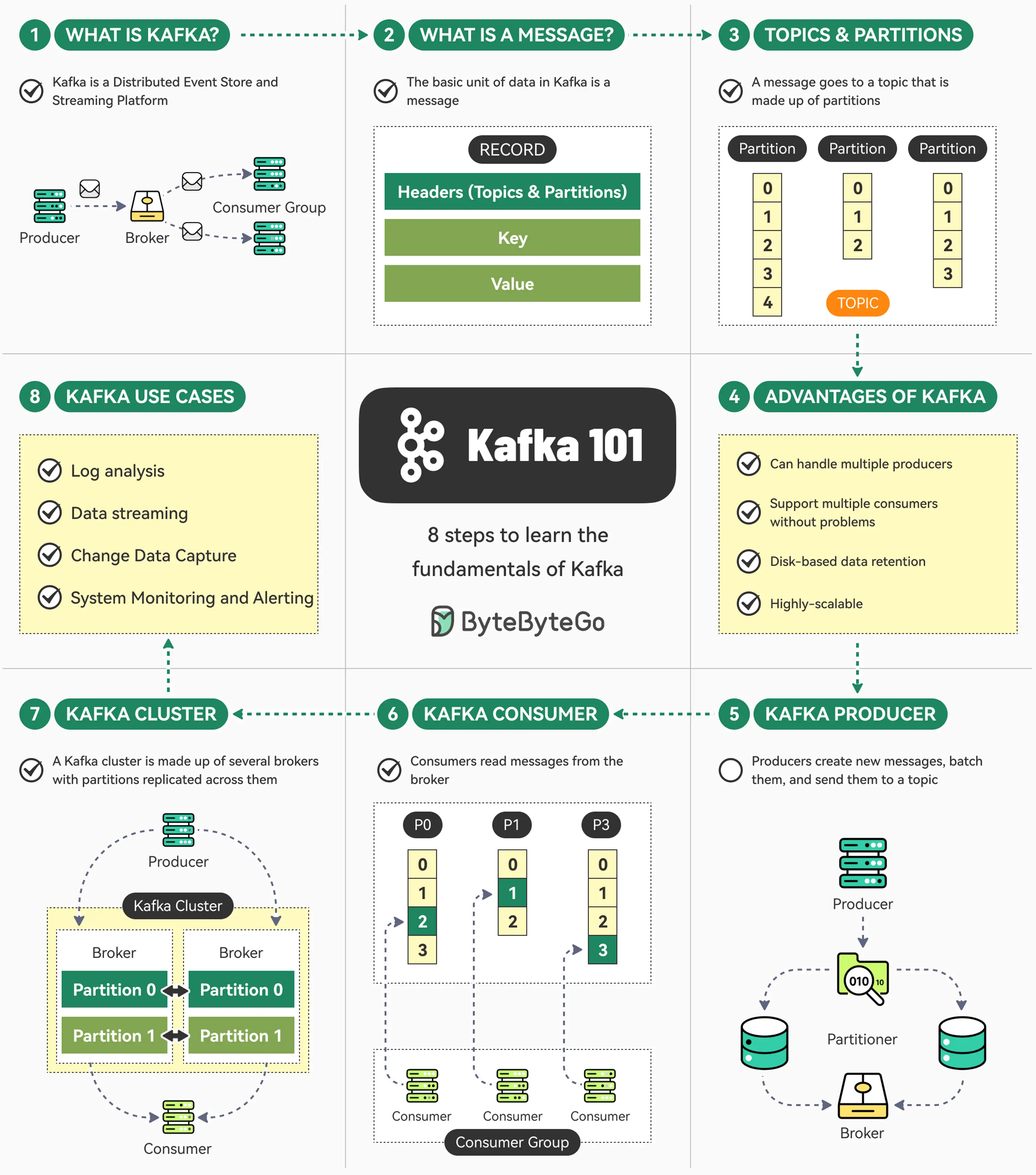
Apache Kafka Part 1
Apache Kafka Part 1
Kafka in 100 Seconds
too fast too much data let’s slow down the pace a little and let’s understand apache kafka
Key Components in Architecture
- Brokers: Kafka brokers are the servers that form the core of the Kafka cluster. They are responsible for receiving, storing, and replicating data across the cluster.
- Topics: Topics are the channels through which data is transmitted in Kafka. Producers write data to topics, and consumers read data from topics.
- Producers: Producers are the applications that write data to Kafka topics. They can be any application that generates data, such as a website, mobile app, or IoT device.
- Consumers: Consumers are the applications that read data from Kafka topics. They can be any application that needs to process data, such as a data warehouse, real-time analytics engine, or machine learning model.
Now let’s understand them in more detail
Connection
- Producer Produces content to the broker, consumer consumes content from the broker
- The process of connection in Kafka is abstracted , the producer connects to kafka broker using custom binary relying on a request-response message pair system to stream data, rather than common protocols like AMQP or HTTP. TCP connection is bidirectional ( broker and producer both can send information to each other
- Consumer also establish a TCP connection to the broker, using a custom binary protocol over TCP with the client initiating a direct socket connection to the broker to exchange request response message without requiring a complex handshake on the configured port
- Producers and consumers talk directly to brokers
- TLS may encrypt traffic, but it’s not HTTPS !
- Batching and persistent connections are first-class citizens
- Kafka networking is deterministic, not magical
Kafka does NOT use HTTP or HTTPS. TLS may be enabled for encryption, but the protocol itself is Kafka’s own binary wire protocol.
Why Kafka Does Not Use HTTP
HTTP is great for:
- Stateless request–response
- Human-readable APIs
- Short-lived connections
Kafka needs:
- Long-lived connections
- Extremely low latency
- High throughput
- Minimal overhead
- Precise control over bytes
So Kafka chose:
A persistent TCP connection + a custom binary protocol
This decision alone is responsible for Kafka’s performance characteristics.
High-Level Architecture View
Before going packet-level, let’s align on the big picture.
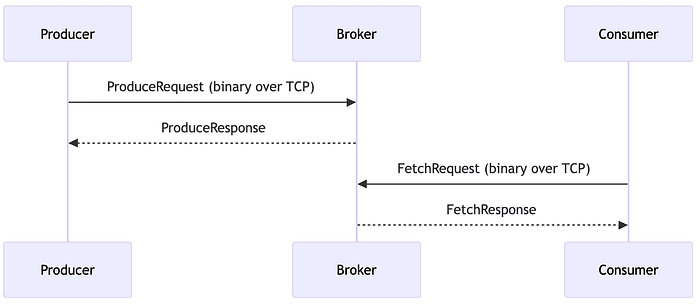
No REST endpoints. No URLs. No HTTP verbs.
Just binary messages flowing through TCP sockets.
Kafka Network Stack (Layer by Layer)
Think in layers:
1
2
3
4
5
6
7
8
9
Kafka API (Produce / Fetch / Metadata)
↓
Kafka Binary Protocol
↓
(Optional) SSL / TLS Encryption
↓
TCP
↓
Operating System Socket
Important distinction:
- TLS ≠ HTTPS ( topic for later Day)
- HTTPS = HTTP + TLS
- Kafka = Kafka Protocol + TLS
Same encryption, different language.
How This Differs from HTTP (Conceptually)
Kafka networking behaves closer to:
- A database replication protocol
- A distributed commit log
Not a web API. Kafka messages are:
- Stateful
- Offset-driven
- Batch-oriented
- Connection-aware
Topics
- Logical Partition where you write content
- Producers publish events to topics, and consumers subscribe to them. Topics are multi-subscriber (pub-sub model) and can handle massive volumes of data.
Producer
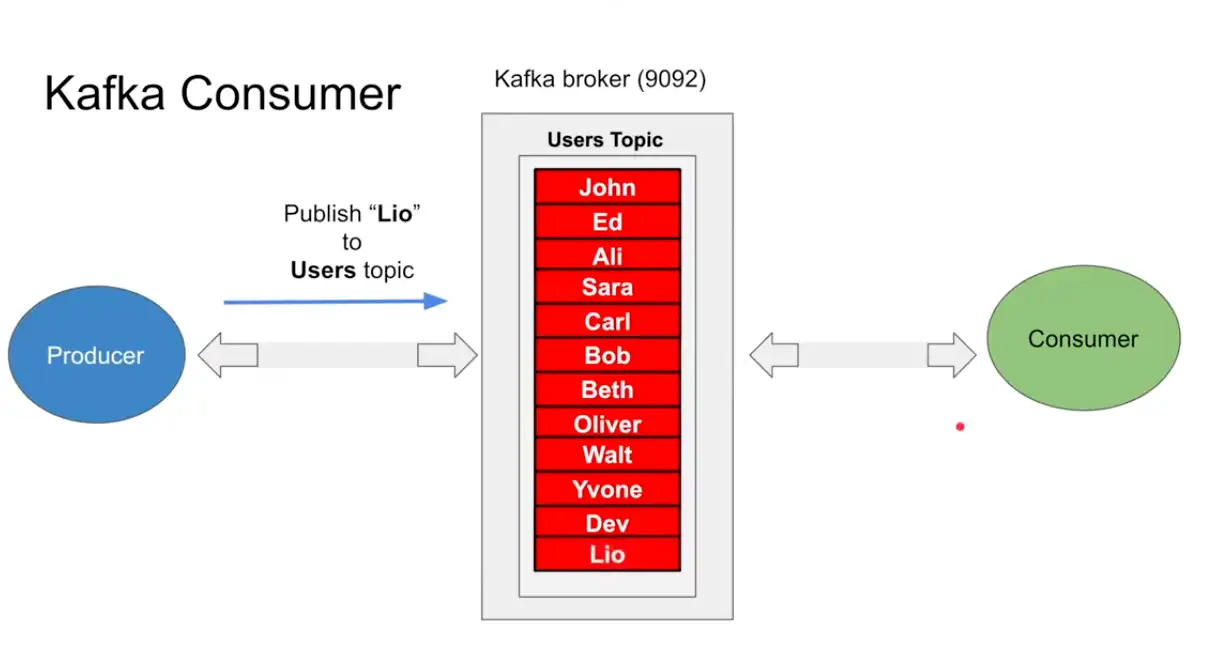
- Producer publish a message to a topic in the broker , which is append only in the topic and there is position operation which keeps a track of every message in the broker
Consumer
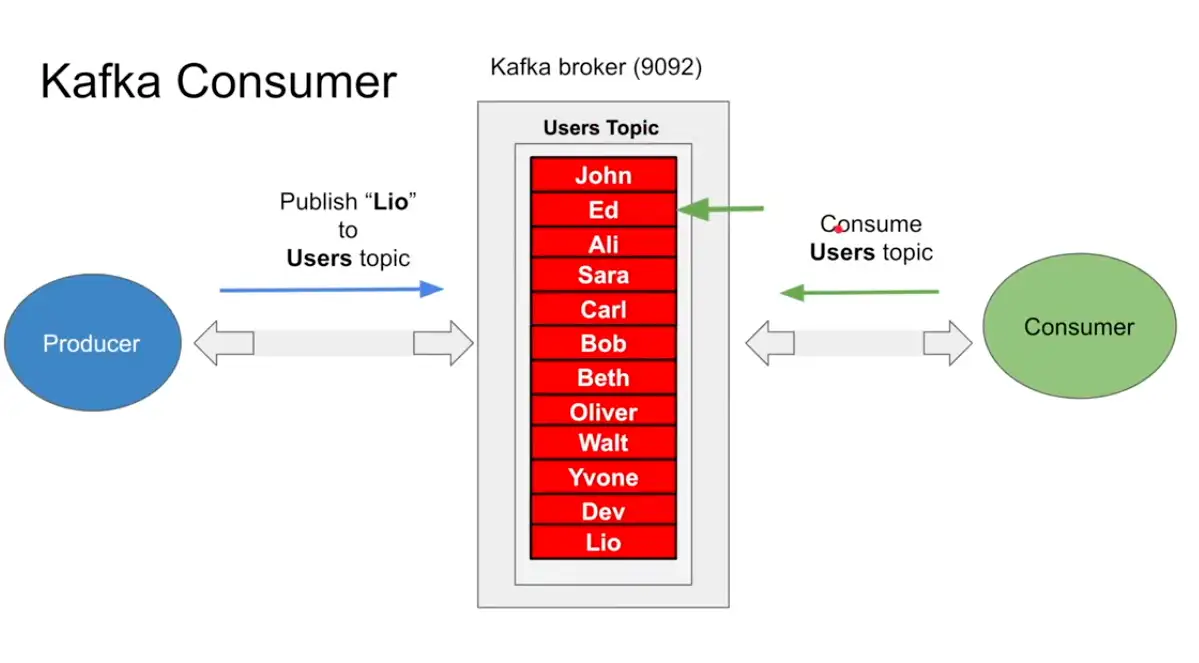
- Consumer consumes from the topic from position zero, and asks for more after reading from topic
Kafka Partition
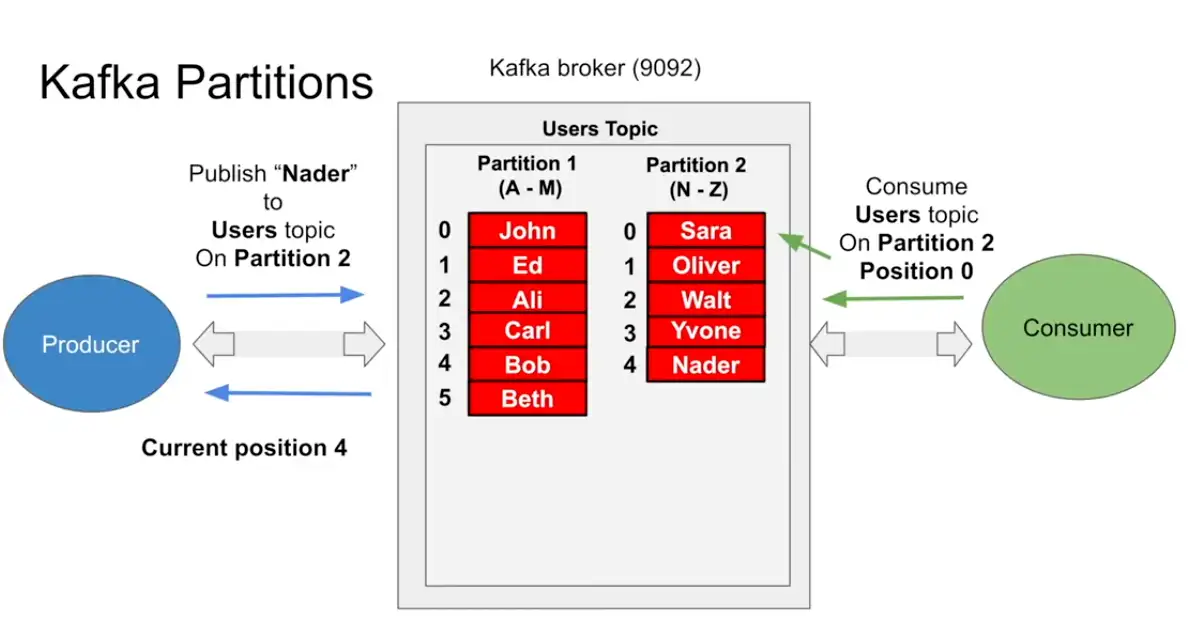
- What happens when database becomes larger , we do Sharding
- Same sharding concept is called partitions in kafka
- the moment the partitions are introduced the producer and consumer should know which partition to read from and from which partition to write to
- All due to scalability factor the Producer should know about it, now when the producer writes to the partition it receives the position
- When consumers reads from position zero and reads until it reaches the end position , and it will keep updating the position until it reaches the end position when there is nothing else more left to read
- This is fast because one stars and process using the position and not using any filter and random position
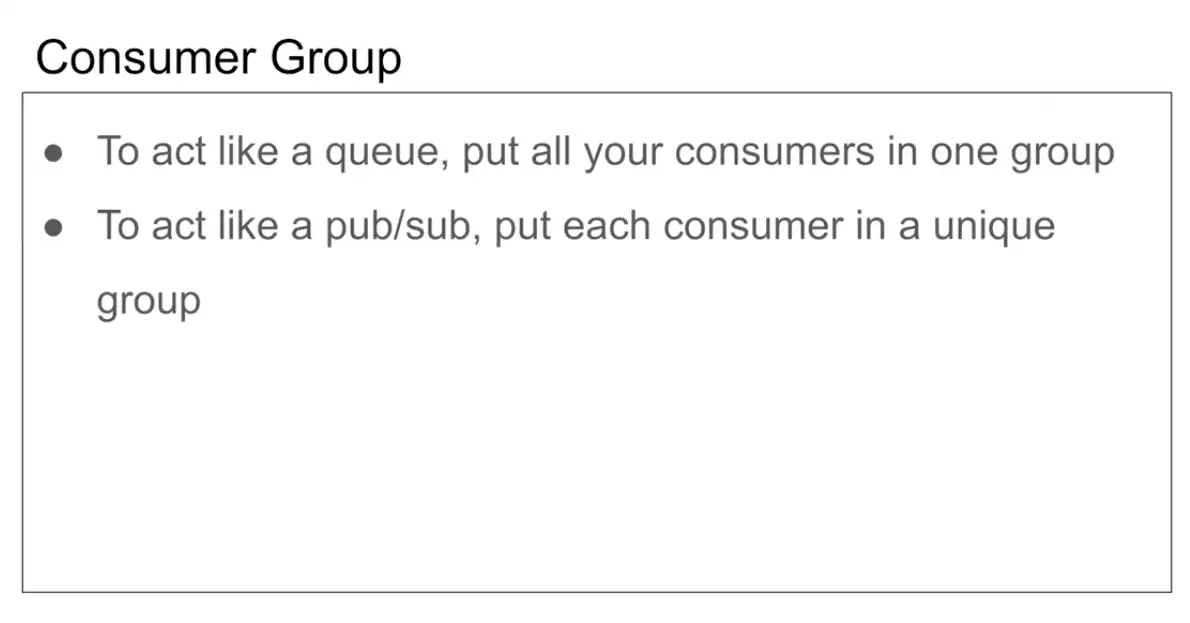
Queue vs Pub Sub vs Kafka
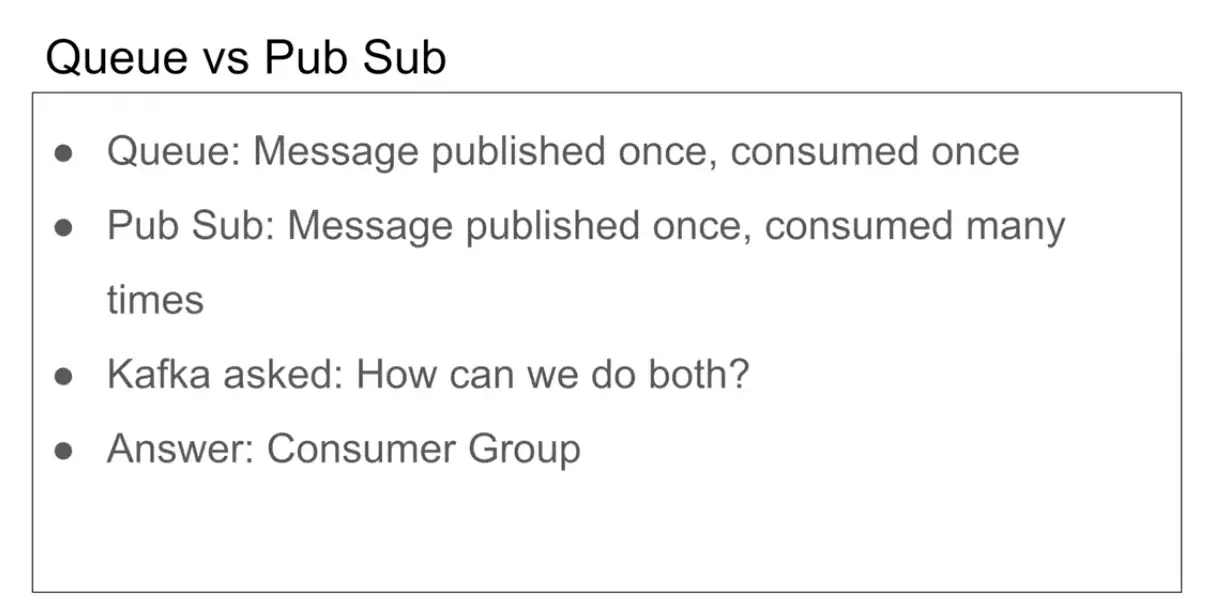
- Have feature of of both Queue and Pub Sub
- Answer : Consumer Group
Event-Driven
Kafka acts as a central event log where producers publish events and consumers react to them asynchronously.
Example: An e-commerce system publishes an “OrderPlaced” event to Kafka. Multiple services (inventory, shipping, notifications) independently consume this event and perform their respective actions without waiting for each other.
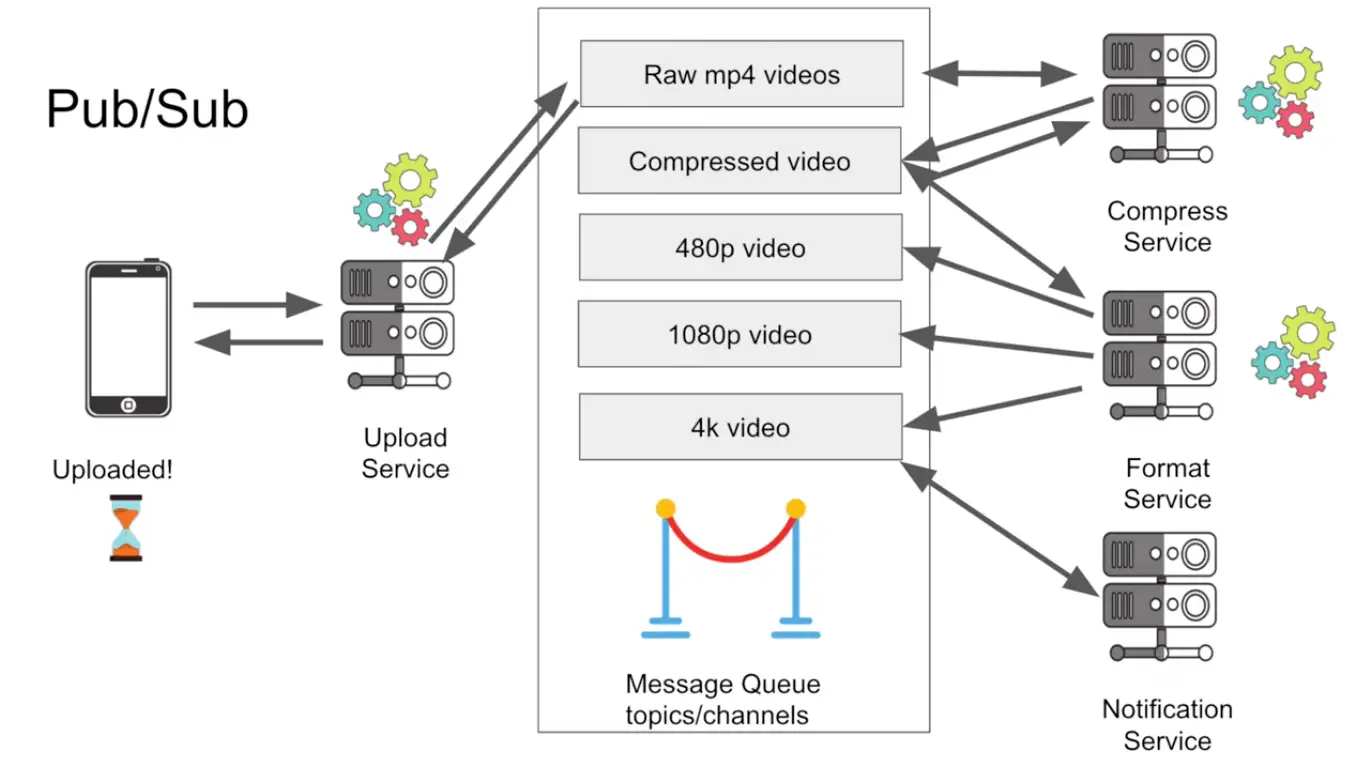
Pub-Sub (Publish-Subscribe)
Multiple consumers can independently read all messages from a topic using different consumer groups.
Example: A payment service publishes “PaymentCompleted” events. Three different consumer groups read the same events: one for analytics, one for sending receipts, and one for fraud detection. Each consumer group processes all events independently.
Queue
Kafka enables queue-like behavior where messages are distributed across consumers within the same consumer group for parallel processing.
Example: A topic has 3 partitions with order processing tasks. Three consumers in the same consumer group each take one partition, processing orders in parallel. Each message is processed by only one consumer in the group.
The key is that Kafka achieves both patterns through consumer groups: different consumer groups enable pub-sub, while consumers within the same group enable queue behavior.
- Scaling : Zookeeper
- Parellel Processing
pub sub …(nextime)
Consumer Group
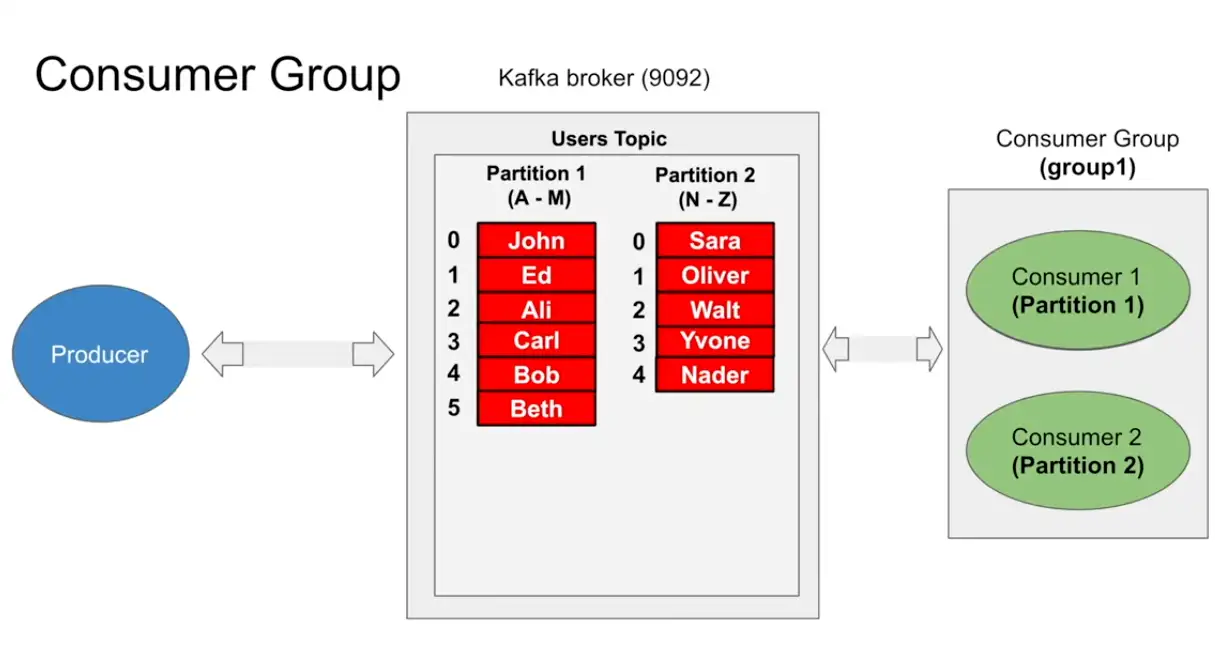
- Consumer groups where invented to do parallel processing on partitions
- It can run consume parallel information from partition
- Each partition must have one and only one consumer in consumer group (but possible to be read from consumer in different consumer group)
- Single consumer can read from partition 1,2 and more but each partition can only have one consumer only and consumer group makes sure of it
Kafka Distributed System
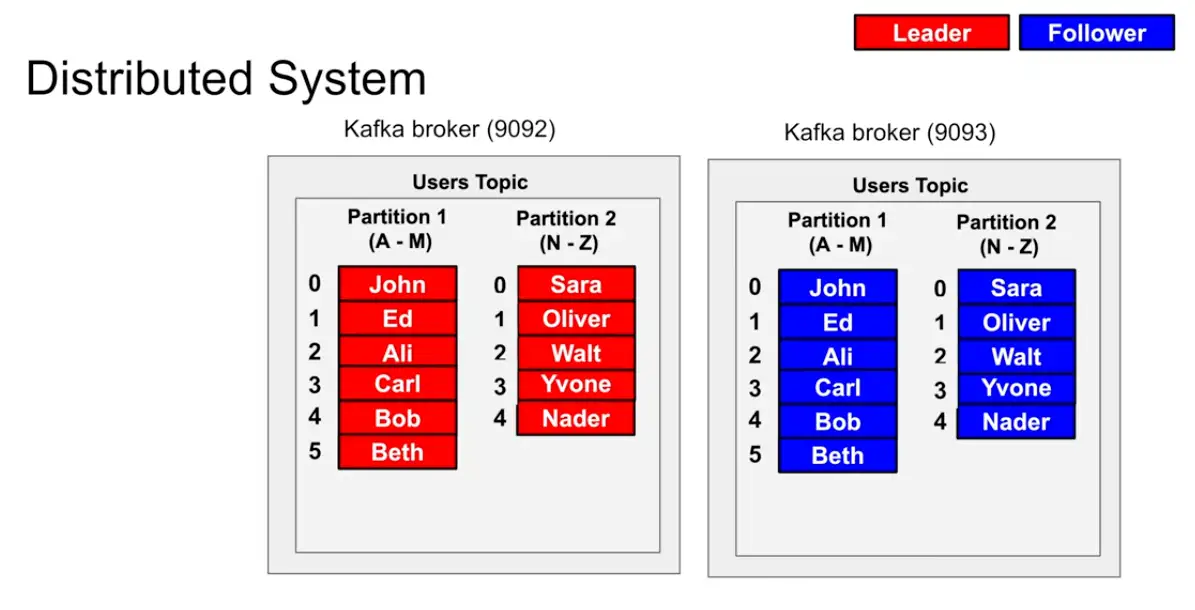
- Take a broker and copy it , and make it leader and follower system in which the leader takes in all the requests and the follower just reads from the leader
- How to identify which is Leader and Follower : The ZooKeeper System in Kafka
- Two different broker with one broker is leader of partition X and another broker is leader of partition Y
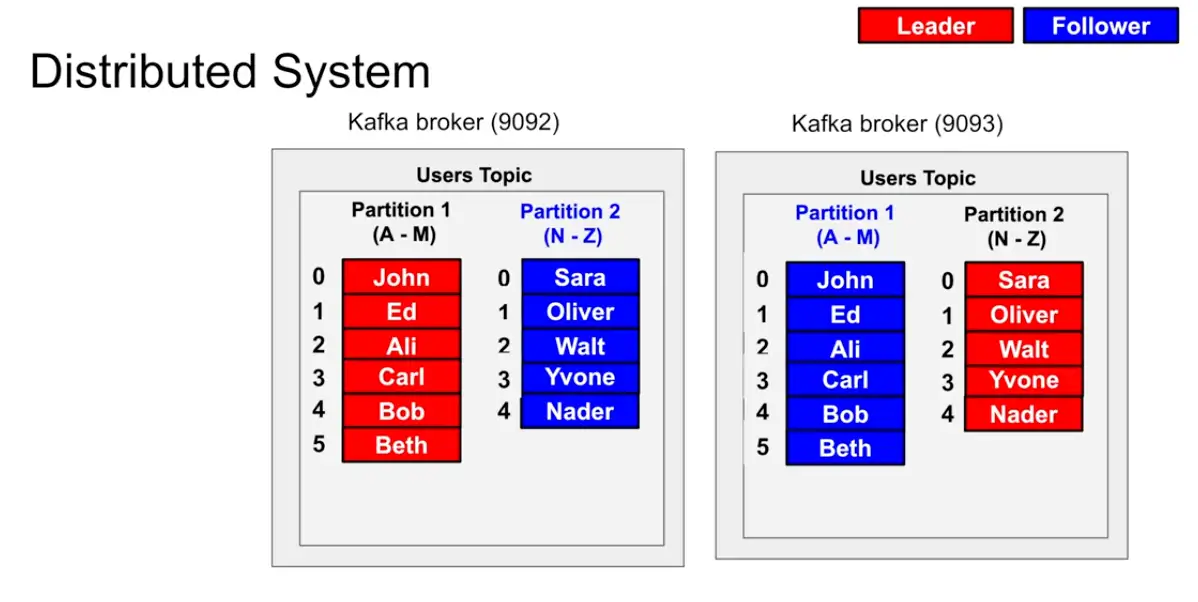
Example :
A producer wants to write to partition it asks the zookeeper where should I write to where to write it so The producer sends a Metadata request with a list of topics to one of the brokers in the broker-list you supplied when configuring the producer. The broker responds with a list of partitions in those topics and the leader for each partition. The producer caches this information and knows where to redirect its produce messages. In case of failure while producing, failed broker’s data (topics and its partitions) dynamically linked to existing replica which is present on another broker via topic’s replication and new leader’s information is communicated to the client (producer).
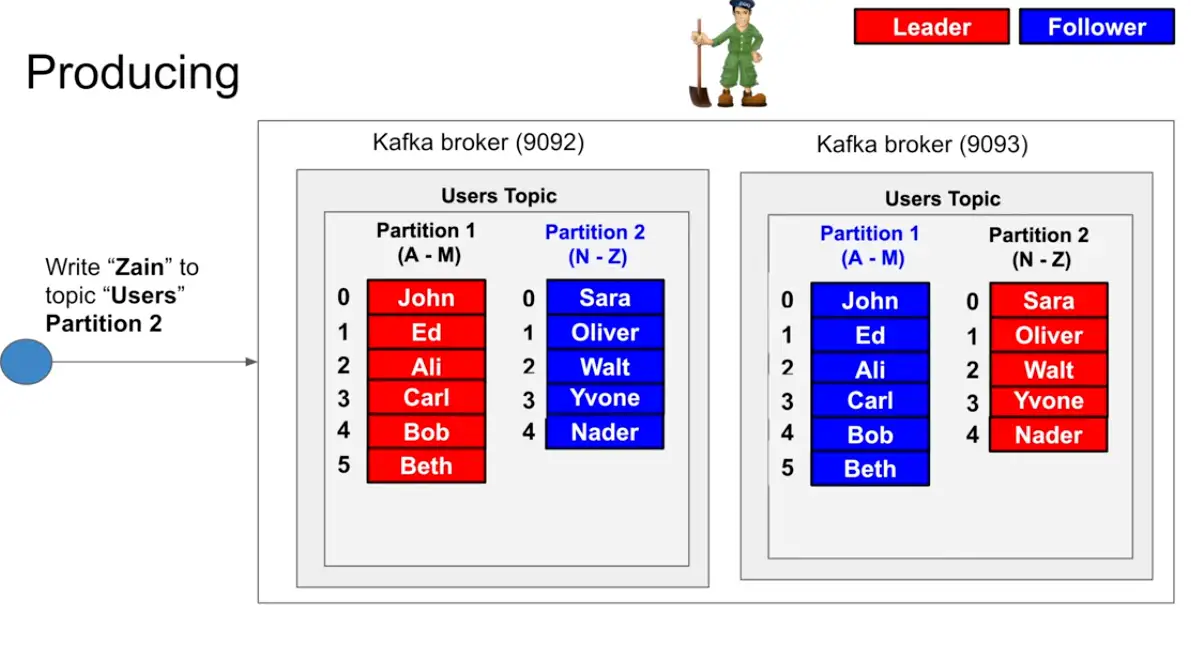
- Kafka is append only no Delete ?
Kafka Pros
- Append only commit log , all writes goes to log which is append only since iterating from start to end is extremely fast
- Performance : Partitions and position seeking is fast
- Distributed : Zookeeper
- Long Polling : Since consumer cannot be fast as producer so pushing model not works, where consumer asks for message and not respond immediately and reply and send back messages when there are X number of messages or X bytes of messages ie dont send empty responses to avoid empty misses to avoid bandwidth saturation and CPU cycles
- Event Driven, Pub sub and queue
Kafka Cons
- Zookeeper
- Producer Explicit partition can lead to problem : increased complexity
- Complex to install , configure and manage
Need for Apache Kafka
To understand why LinkedIn built Kafka, you have to look at the “Spaghetti Architecture” they faced in 2010. They had two distinct types of data: Operational Data (stored in SQL/NoSQL) and Analytical Data (logs, metrics, and user clicks).
Existing systems like ActiveMQ or RabbitMQ worked for small-scale tasks, but they choked under LinkedIn’s massive scale. Jay Kreps and the team outlined four specific “detailed reasons” for Kafka’s birth
1. The “Smart Broker” Bottleneck
In traditional systems, the Broker was responsible for keeping track of which consumer had read which message.
- The Problem: This required the broker to maintain complex metadata and “locks” for every single message. As the number of consumers grew, the broker spent more time managing state than moving data.
- Kafka’s Fix: Kafka moved the responsibility to the Consumer. The broker is a “dumb” append-only log. The consumer simply remembers its “offset” (a pointer to the last message read). This allows the broker to handle millions of messages per second because it doesn’t have to care about the consumers’ state.
2. Throughput vs. Latency (The Disk Problem)
Most existing brokers tried to keep messages in memory to stay fast, only spilling to disk for “persistence.”
- The Problem: When memory filled up, performance dropped off a cliff.
- Kafka’s Fix: Kafka was built to embrace the disk from the start. By using Sequential I/O (writing to the end of a file) rather than random-access patterns, Kafka proved that disk access can be almost as fast as memory. It also uses Zero-Copy technology, which sends data from the disk directly to the network card without copying it into the application’s memory space.
3. The Need for “Replayability”
Traditional brokers used a “destructive” consumption model: once a message was delivered and acknowledged, it was deleted.
- The Problem: If a search indexer crashed and needed to re-process the last 2 hours of data, the data was gone. Or, if a new team wanted to start an experimental analytics project, they couldn’t access historical data.
- Kafka’s Fix: Kafka is a Distributed Log, not a queue. Data stays on the disk for a set period (e.g., 7 days) regardless of whether it’s been read. Multiple different systems (Hadoop, Real-time dashboards, Security monitors) can “replay” the same data at different speeds without interfering with each other.
Key Features
- Scalability: Kafka can handle a massive amount of data and can scale horizontally across multiple servers, making it easy to accommodate large data streams.
- Fault-tolerance: Kafka is designed to be highly fault-tolerant, with built-in replication and backup capabilities that ensure that data is never lost.
- Real-time: Kafka is optimized for real-time data streaming, with ultra-low latency and high throughput that makes it ideal for use cases where data needs to be processed and analyzed in real-time.
- Open-source: Kafka is an open-source platform, which means that anyone can use it and contribute to its development.
Use Cases
Apache Kafka is widely used in a variety of industries for a range of applications, including:
- Messaging: Kafka is commonly used as a messaging system for real-time data streams, such as log messages, system metrics, and application events.
- Data Integration: Kafka can be used to integrate data from multiple sources, such as databases, applications, and IoT devices, into a single data stream.
- Stream Processing: Kafka can be used for stream processing, allowing organizations to analyze data in real-time as it is streamed into the platform.
Recap