OpenClaw Architecture Part 1
The Engineering Behind Clawdbot: A Deep Dive into Local-First AI Orchestration
So, I was looking at this project, Clawdbot (or OpenClaw, as it’s being rebranded). This is fascinating. Most people look at AI assistants and think, “Oh, it’s just a wrapper around an LLM API.” But when you look under the hood of how this thing is actually architected, it’s not just a wrapper—it’s a sophisticated piece of backend engineering designed to solve the problem of
- state
- persistence
- agency.
Let’s talk about how this actually works.
The Architecture: The “Fat Gateway” Model
In a typical chatbot, you have a thin client (your browser) talking to a fat server (OpenAI/Anthropic). All your state is there. In Clawdbot, the architecture is flipped. You have what I call a Fat Gateway.
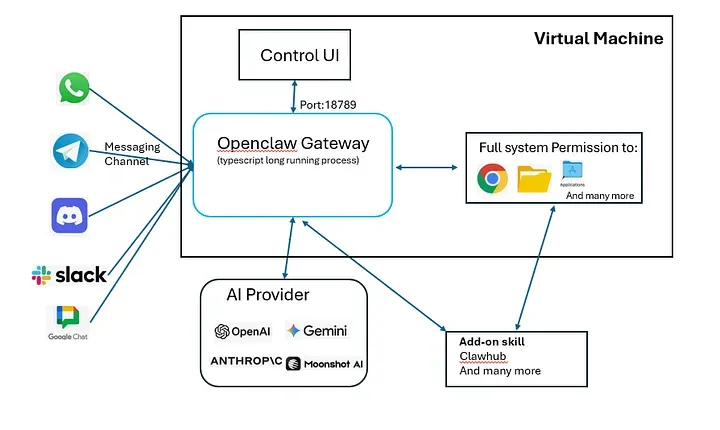
- The Gateway is a long-lived daemon, usually running on your own hardware—a Mac Mini, a Linux VPS, or even a Raspberry Pi.
- It’s built on Node.js (v22+) and acts as the central nervous system. It owns the messaging connections, it owns the databases, and it owns the execution environment.
What’s interesting here is that the LLM (Claude, GPT-5) is treated as a stateless inference utility. The Gateway handles all the “intelligence” around how that model interacts with your actual machine.
Networking: Why WebSockets?
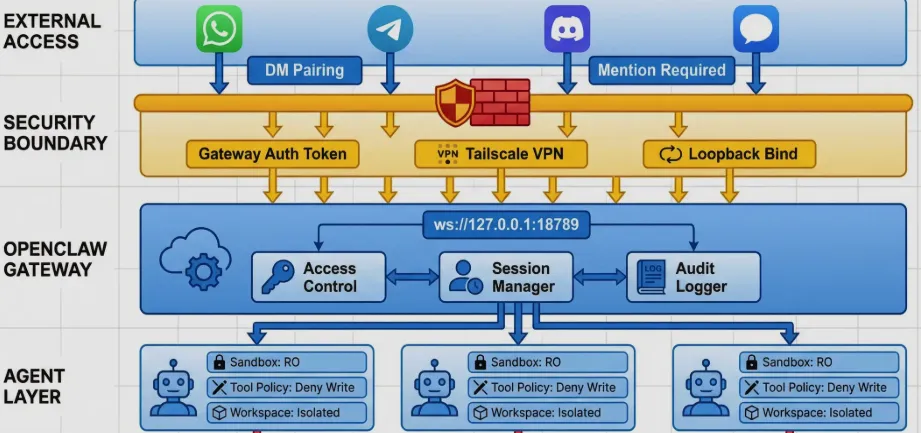
If you look at the communication protocol, Clawdbot doesn’t just use standard REST. It uses a WebSocket control plane (defaulting to port 18789).
Why WebSockets? Because an agent isn’t a request-response entity. It’s an event-driven entity. When the agent is running a long-running task—like checking your disk space, writing a Python script, and generating a PDF report—you need a persistent, bi-directional pipe to stream those events back to the user.
The protocol itself is strictly typed.
- They’re using TypeBox for the schema and AJV for validation.
- Every connection starts with a mandatory handshake.
- If you don’t send a valid
connectframe as the first message, the Gateway just drops the socket.
That’s good engineering—don’t even talk to me unless you know the protocol.
The Workflow Engine: “Lobster” and Determinism
One of the biggest problems with LLMs is that they are probabilistic. You don’t want your “agent” to hallucinate a rm -rf / command.
- Clawdbot solves this with a native engine called Lobster.
- This is a typed workflow shell. Instead of the LLM just “guessing” what to do next, the Gateway can trigger deterministic pipelines defined in YAML or JSON. These pipelines have explicit approval gates.
Think of it like this: the LLM decides when to deploy to production, but the how is handled by a rigid, typed Lobster script that checks git status, runs tests, and executes the deploy command. You get the reasoning of an AI with the reliability of a Bash script.
The Memory System: SQLite Meets Markdown
How do you handle long-term memory? Most people just throw everything into a vector database and hope RAG (Retrieval-Augmented Generation) works. Clawdbot uses a Hybrid Memory System.
- Semantic Memory: They use SQLite with the
sqlite-vecextension for vector search andFTS5for keyword search. This is local-first. No external Pinecone or Weaviate required. - Explicit Memory: This is the clever part. The agent maintains Markdown files (
MEMORY.md,SOUL.md) in its workspace.
Why Markdown? Because it’s human-readable and version-controllable. If the AI learns something wrong about you, you don’t have to run a database query to fix it. You just open the file and edit the text. The Gateway uses a file watcher to re-index the changes into the SQLite vector store automatically.
Distributed Sensory Nodes: The Bridge Protocol
- Clawdbot isn’t limited to the machine it’s running on. It uses something called the Bridge Protocol (TCP JSONL on port
18790) to pair “Nodes”. - These nodes can be your iPhone or Android device.
- The node exposes hardware-level APIs—like the camera, GPS, or screen snapshots—to the central Gateway.
- When you’re out and you message the bot on Telegram asking “Where are my keys?”, the Gateway can reach out to your phone at home, snap a photo via the camera node, and process the image to find your keys.
Security: The “Blast Radius” Problem
- Giving an AI terminal access is terrifying. Clawdbot handles this with Docker Sandboxing.
- By default, any “non-main” session (like a group chat or an untrusted channel) runs in an isolated container.
- You can configure the workspace access to be
none,ro(read-only), orrw(read-write). It even has a DM Pairing Protocol—if an unknown number messages you on WhatsApp, the bot won’t even process the message until you manually approve the pairing code on the server.
Summary of the Tech Stack
- Runtime: Node.js 22+ (Non-blocking I/O is perfect for this).
- Languages: TypeScript (Core/Gateway), Swift (macOS/iOS), Kotlin (Android).
- Database: SQLite with
sqlite-vecandFTS5. - Discovery: Bonjour/mDNS for finding nodes on the local network.
- Inference: Pluggable providers (Anthropic, OpenAI, or local Ollama).
This is a very clean architecture. It’s local-first, it respects privacy, and it treats the LLM as a component rather than the whole system. If you’re interested in backend engineering and how to build “agentic” systems that actually work, this is a repo you should be reading.
Key Technical Components
| Component | Technology | Role |
|---|---|---|
| Gateway | Node.js / TypeScript | The “Always-on” control plane and message router. |
| Communication | WebSockets (JSON-RPC) | Bi-directional event streaming and tool calls. |
| Memory | SQLite + Markdown | Hybrid semantic/keyword search with human-editable files. |
| Workflows | Lobster Engine | Deterministic, typed pipelines for safe execution. |
| Isolation | Docker | Sandboxing tool execution to prevent system damage. |
| Connectivity | Tailscale / WireGuard | Secure remote access without opening ports. |
Reference
- https://gohsoonheng00.medium.com/openclaw-demystified-from-installation-to-architecture-29dd2580ed42
- https://vertu.com/ai-tools/openclaw-clawdbot-architecture-engineering-reliable-and-controllable-ai-agents/
- https://binds.ch/blog/openclaw-systems-analysis/
- https://eastondev.com/blog/en/posts/ai/20260205-openclaw-architecture-guide/
- https://www.analyticsvidhya.com/blog/2026/02/how-to-build-an-openclaw-agent/
- https://github.com/HKUDS/nanobot