Video coming soon. Start with the reading below.
By offloading requests to the file store and the CDN, Cruder is able to serve significantly more requests than before. But the free lunch is only going to last so long. Because there is a single application server, it will inevitably fall over if the number of requests directed at it keeps increasing. To avoid that, we can create multiple application servers, each running on a different machine, and have a load balancer distribute requests to them. The thinking is that if one server has a certain capacity, then, in theory, two servers should have twice that capacity. This is an example of the more general scalability pattern we referred to as scaling out or scaling horizontally.
The reason we can scale Cruder horizontally is that we have pushed the state to dedicated services (the database and the managed file store). Scaling out a stateless application doesn’t require much effort, assuming its dependencies can scale accordingly as well. As we will discuss in Data storage (lesson 04.07), scaling out a stateful service, like a data store, is a lot more challenging since it needs to replicate state and thus requires some form of coordination, which adds complexity and can also become a bottleneck. As a general rule of thumb, we should try to keep our applications stateless by pushing state to third-party services designed by teams with years of experience building such services.
Distributing requests across a pool of servers has many benefits. Because clients are decoupled from servers and don’t need to know their individual addresses, the number of servers behind the load balancer can increase or decrease transparently. And since multiple redundant servers can interchangeably be used to handle requests, a load balancer can detect faulty ones and take them out of the pool, increasing the availability of the overall application.
As you might recall from Introduction (lesson 01.01), the availability of a system is the percentage of time it’s capable of servicing requests and doing useful work. Another way of thinking about it is that it’s the probability that a request will succeed.
The reason why a load balancer increases the theoretical availability is that in order for the application to be considered unavailable, all the servers need to be down. With N servers, the probability that they are all unavailable is the product of the servers’ failure rates[1]. By subtracting this product from 1, we can determine the theoretical availability of the application.
For example, if we have two servers behind a load balancer and each has an availability of 99%, then the application has a theoretical availability of 99.99%:
1 −(0.01 ⋅0.01) = 0.9999
Intuitively, the nines of independent servers sum up.[2] Thus, in the previous example, we have two independent servers with two nines each, for a total of four nines of availability. Of course, this number is only theoretical because, in practice, the load balancer doesn’t remove faulty servers from the pool immediately. The formula also naively assumes that the failure rates are independent, which might not be the case. Case in point: when a faulty server is removed from the load balancer’s pool, the remaining ones might not be able to sustain the increase in load and degrade.
In the following sections, we will take a closer look at some of the core features offered by a load balancer.
Load balancing
The algorithms used for routing requests can vary from roundrobin to consistent hashing to ones that take into account the servers’ load.
As a fascinating side note, balancing by load is a lot more challenging than it seems in a distributed context. For example, the load balancer could periodically sample a dedicated load endpoint exposed by each server that returns a measure of how busy the server is (e.g., CPU usage). And since constantly querying servers can be costly, the load balancer can cache the responses for some time.
Using cached or otherwise delayed metrics to distribute requests to servers can result in surprising behaviors. For example, if a server that just joined the pool reports a load of 0, the load balancer will hammer it until the next time its load is sampled. When that happens, the server will report that it’s overloaded, and the load balancer will stop sending more requests to it. This causes the server to alternate between being very busy and not being busy at all.
As it turns out, randomly distributing requests to servers without accounting for their load achieves a better load distribution. Does that mean that load balancing using delayed load metrics is not possible? There is a way, but it requires combining load metrics with the power of randomness. The idea is to randomly pick two servers from the pool and route the request to the least-loaded one of the two. This approach works remarkably well in practice[3].
Service discovery
Service discovery is the mechanism the load balancer uses to discover the pool of servers it can route requests to. A naive way to implement it is to use a static configuration file that lists the IP ad-dresses of all the servers, which is painful to manage and keep up to date.
A more flexible solution is to have a fault-tolerant coordination service, like, e.g., etcd or Zookeeper, manage the list of servers. When a new server comes online, it registers itself to the coordination service with a TTL. When the server unregisters itself, or the TTL expires because it hasn’t renewed its registration, the server is removed from the pool.
Adding and removing servers dynamically from the load balancer’s pool is a key functionality cloud providers use to implement autoscaling[4], i.e., the ability to spin up and tear down servers based on load.
Health checks
A load balancer uses health checks to detect when a server can no longer serve requests and needs to be temporarily removed from the pool. There are fundamentally two categories of health checks: passive and active.
A passive health check is performed by the load balancer as it routes incoming requests to the servers downstream. If a server isn’t reachable, the request times out, or the server returns a non-retriable status code (e.g., 503), the load balancer can decide to take that server out of the pool.
Conversely, an active health check requires support from the downstream servers, which need to expose a dedicated health endpoint that the load balancer can query periodically to infer the server’s health. The endpoint returns 200 (OK) if the server can serve requests or a 5xx status code if it’s overloaded and doesn’t have more capacity to serve requests. If a request to the endpoint times out, it also counts as an error.
The endpoint’s handler could be as simple as always returning 200 OK, since most requests will time out when the server is degraded. Alternatively, the handler can try to infer whether the server is degraded by comparing local metrics, like CPU usage, available memory, or the number of concurrent requests being served, with configurable thresholds.
But here be dragons[5]: if a threshold is misconfigured or the health check has a bug, all the servers behind the load balancer may fail the health check. In that case, the load balancer could naively empty the pool, taking the application down. However, in practice, if the load balancer is “smart enough,” it should detect that a large fraction of the servers are unhealthy and consider the health checks to be unreliable. So rather than removing servers from the pool, it should ignore the health checks altogether so that new requests can be sent to any server.
Thanks to health checks, the application behind the load balancer can be updated to a new version without any downtime. During the update, a rolling number of servers report themselves as unavailable so that the load balancer stops sending requests to them. This allows in-flight requests to complete (drain) before the servers are restarted with the new version. More generally, we can use this mechanism to restart a server without causing harm.
For example, suppose a stateless application has a rare memory leak that causes a server’s available memory to decrease slowly over time. When the server has very little physical memory available, it will swap memory pages to disk aggressively. This constant swapping is expensive and degrades the performance of the server dramatically. Eventually, the leak will affect the majority of servers and cause the application to degrade.
In this case, we could force a severely degraded server to restart. That way, we don’t have to develop complex recovery logic when a server gets into a rare and unexpected degraded mode. Moreover, restarting the server allows the system to self-heal, giving its operators time to identify the root cause.
To implement this behavior, a server could have a separate background thread — a watchdog — that wakes up periodically and monitors the server’s health. For example, the watchdog could monitor the available physical memory left. When a monitored metric breaches a specific threshold for some time, the watchdog considers the server degraded and deliberately crashes or restarts it.
Of course, the watchdog’s implementation needs to be well-tested and monitored since a bug could cause servers to restart continuously. That said, I find it uncanny how this simple pattern can make an application a lot more robust to gray failures.
DNS load balancing
Now that we are familiar with the job description of a load balancer, let’s take a closer look at how it can be implemented. While you won’t have to build your own load balancer given the abundance of off-the-shelf solutions available, it’s important to have a basic knowledge of how a load balancer works. Because every request needs to go through it, it contributes to your applications’ performance and availability.
A simple way to implement a load balancer is with DNS. For example, suppose we have a couple of servers that we would like to load-balance requests over. If these servers have public IP ad-dresses, we can add those to the application’s DNS record and have the clients pick one[6] when resolving the DNS address, as shown in Figure 18.1.
Although this approach works, it’s not resilient to failures. If one of the two servers goes down, the DNS server will happily continue to serve its IP address, unaware that it’s no longer available. Even if we were to automatically reconfigure the DNS record when a failure happens and take out the problematic IP, the change needs
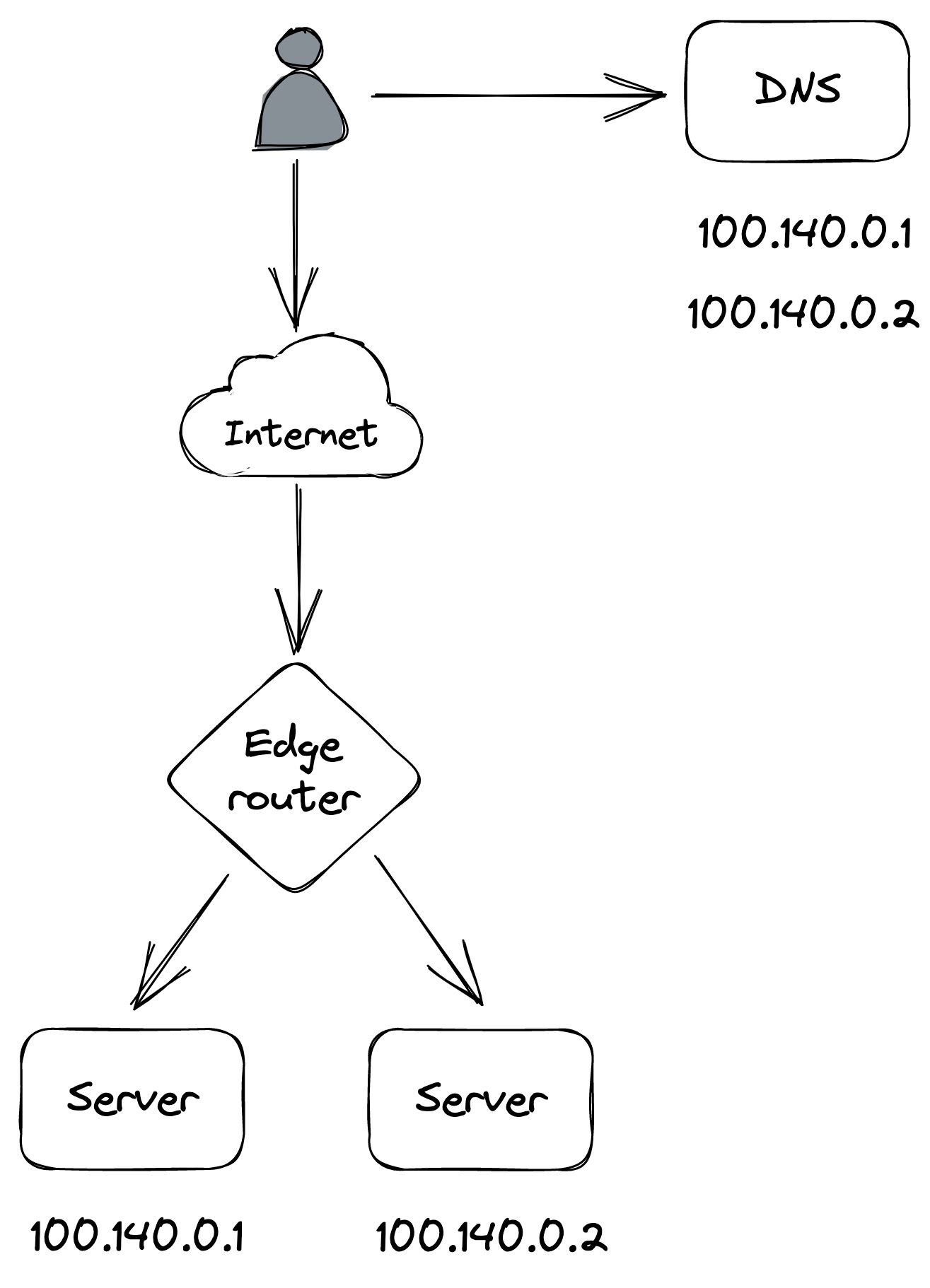
Figure 18.1: DNS load balancing
time to propagate to the clients, since DNS entries are cached, as discussed in Discovery (lesson 02.04).
The one use case where DNS is used in practice to load-balance is for distributing traffic to different data centers located in different regions (global DNS load balancing). We have already encountered a use for this when discussing CDNs.
Transport layer load balancing
A more flexible load-balancing solution can be implemented with a load balancer that operates at the TCP level of the network stack (aka L4 load balancer[7]) through which all the traffic between clients and servers flows.
A network load balancer has one or more physical network interface cards mapped to one or more virtual IP (VIP) addresses. A VIP, in turn, is associated with a pool of servers. The load balancer acts as an intermediary between clients and servers — clients only see the VIP exposed by the load balancer and have no visibility of the individual servers associated with it.
When a client creates a new TCP connection with a load balancer’s VIP, the load balancer picks a server from the pool and henceforth shuffles the packets back and forth for that connection between the client and the server. And because all the traffic goes through the load balancer, it can detect servers that are unavailable (e.g., with a passive health check) and automatically take them out of the pool, improving the system’s reliability.
A connection is identified by a tuple (source IP/port, destination IP/port). Typically, some form of hashing is used to assign a connection tuple to a server that minimizes the disruption caused by a server being added or removed from the pool, like consistent hashing[8].
To forward packets downstream, the load balancer translates[9] each packet’s source address to the load balancer’s address and its destination address to the server’s address. Similarly, when the load balancer receives a packet from the server, it translates its source address to the load balancer’s address and its destination address to the client’s address (see Figure 18.2).
As the data going out of the servers usually has a greater volume than the data coming in, there is a way for servers to bypass the load balancer and respond directly to the clients using a mechanism called direct server return[10], which can significantly reduce the load on the load balancer.
A network load balancer can be built using commodity machines
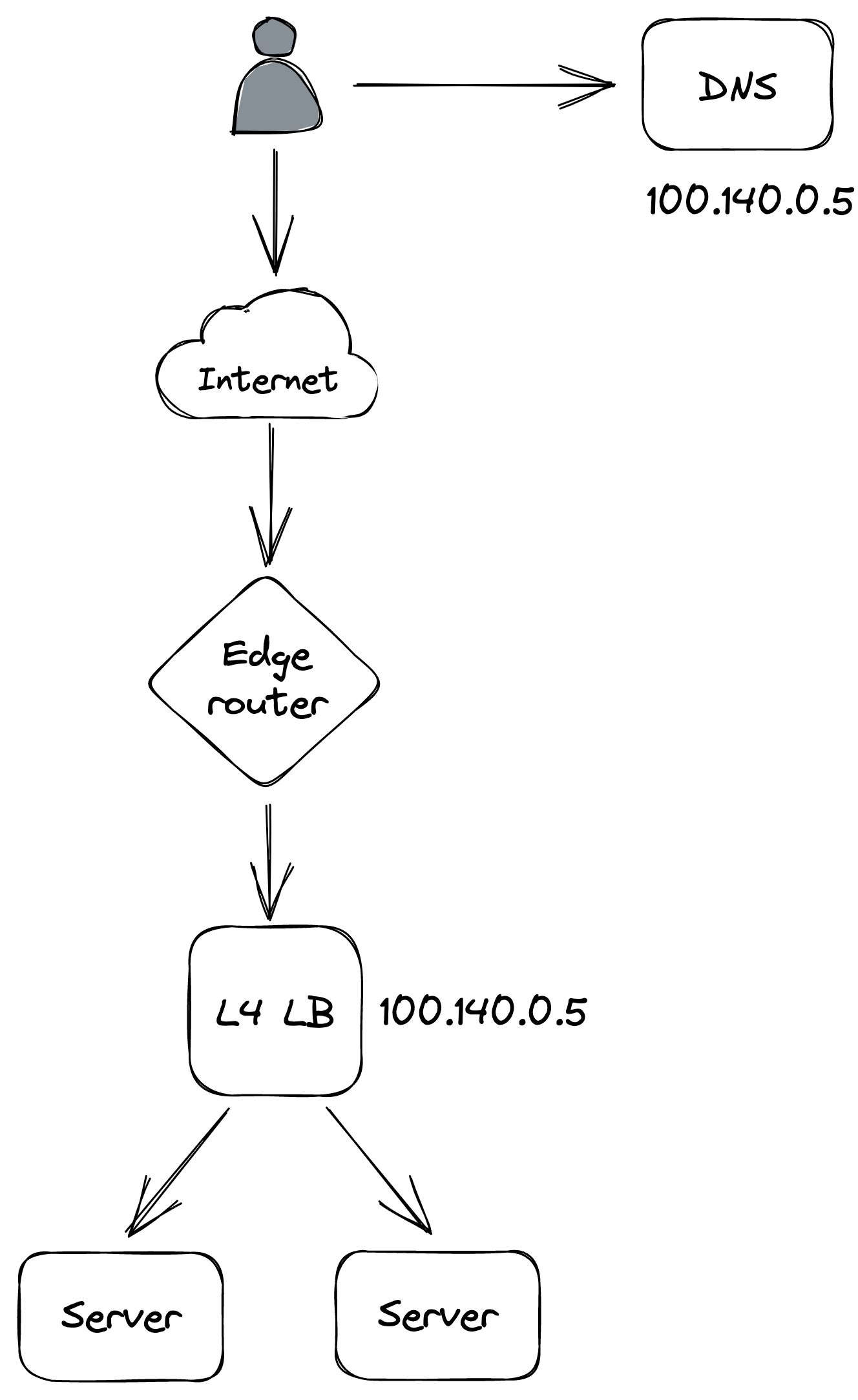
Figure 18.2: Transport layer load balancing
and scaled out using a combination of Anycast[11] and ECMP[12]. Load balancer instances announce themselves to the data center’s edge routers with the same Anycast VIP and identical BGP weight. Using an Anycast IP is a neat trick that allows multiple machines to share the same IP address and have routers send traffic to the one with the lowest BGP weight. If all the instances have the same identical BGP weight, routers use equal-cost multi-path routing (consistent hashing) to ensure that the packets of a specific connection are generally routed to the same load balancer instance.
Since Cruder is hosted in the cloud, we can leverage one of the many managed solutions for network load balancing, such as AWS Network Load Balancer[13] or Azure Load Balancer[14].
Although load balancing connections at the TCP level is very fast, the drawback is that the load balancer is just shuffling bytes around without knowing what they actually mean. Therefore, L4 load balancers generally don’t support features that require higher-level network protocols, like terminating TLS connections. A load balancer that operates at a higher level of the network stack is required to support these advanced use cases.
Application layer load balancing
An application layer load balancer (aka L7 load balancer[15]) is an HTTP reverse proxy that distributes requests over a pool of servers. The load balancer receives an HTTP request from a client, inspects it, and sends it to a backend server.
There are two different TCP connections at play here, one between the client and the L7 load balancer and another between the L7 load balancer and the server. Because a L7 load balancer operates at the HTTP level, it can de-multiplex individual HTTP requests sharing the same TCP connection. This is even more important with HTTP 2, where multiple concurrent streams are multiplexed on the same TCP connection, and some connections can be a lot more expensive to handle than others.
The load balancer can do smart things with application traffic, like rate-limit requests based on HTTP headers, terminate TLS connections, or force HTTP requests belonging to the same logical session to be routed to the same backend server. For example, the load balancer could use a cookie to identify which logical session a request belongs to and map it to a server using consistent hashing. That allows servers to cache session data in memory and avoid fetching it from the data store for each request. The caveat is that sticky sessions can create hotspots, since some sessions can be much more expensive to handle than others.
A L7 load balancer can be used as the backend of a L4 load balancer that load-balances requests received from the internet. Although L7 load balancers have more capabilities than L4 load balancers, they also have lower throughput, making L4 load balancers better suited to protect against certain DDoS attacks, like SYN floods[16].
A drawback of using a dedicated load balancer is that all the traffic directed to an application needs to go through it. So if the load balancer goes down, the application behind it does too. However, if the clients are internal to the organization, load balancing can be delegated to them using the sidecar pattern. The idea is to proxy all a client’s network traffic through a process co-located on the same machine (the sidecar proxy). The sidecar process acts as a L7 load balancer, load-balancing requests to the right servers. And, since it’s a reverse proxy, it can also implement various other functions, such as rate-limiting, authentication, and monitoring.
This approach[17] (aka “service mesh”) has been gaining popularity with the rise of microservices in organizations with hundreds of services communicating with each other. As of this writing, popular sidecar proxy load balancers are NGINX, HAProxy, and Envoy. The main advantage of this approach is that it delegates load-balancing to the clients, removing the need for a dedicated load balancer that needs to be scaled out and maintained. The drawback is that it makes the system a lot more complex since now we need a control plane to manage all the sidecars[18].
References
- “AWS Well-Architected Framework, Availability,” https://docs.aws.amazon.com/wellarchitected/latest/reliability-pillar/availability.html
- Another way to think about it is that by increasing the number of servers linearly, we increase the availability exponentially.
- “The power of two random choices,” https://brooker.co.za/blog/2012/01/17/two-random.html
- “Autoscaling,” https://docs.microsoft.com/en-us/azure/architecture/best-practices/auto-scaling
- “Implementing health checks,” https://aws.amazon.com/builders-library/implementing-health-checks/
- “Round-robin DNS,” https://en.wikipedia.org/wiki/Round-robin_DNS
- layer 4 is the transport layer in the OSI model
- “SREcon19 Americas - Keeping the Balance: Internet-Scale Loadbalancing Demystified,” https://www.youtube.com/watch?v=woaGu3kJ-xk
- “Network address translation,” https://en.wikipedia.org/wiki/Network_address_translation
- “Introduction to modern network load balancing and proxying,” https://blog.envoyproxy.io/introduction-to-modern-network-load-balancing-and-proxying-a57f6ff80236
- “Anycast,” https://en.wikipedia.org/wiki/Anycast
- “Equal-cost multi-path routing,” https://en.wikipedia.org/wiki/Equal-cost_multi-path_routing
- “Network Load Balancer,” https://aws.amazon.com/elasticloadbalancing/network-load-balancer/
- “Azure Load Balancer,” https://azure.microsoft.com/en-us/services/load-balancer/
- layer 7 is the application layer in the OSI model
- A SYN flood is a form of denial-of-service attack in which an attacker rapidly initiates a TCP connection to a server without finalizing the connection.
- “Service mesh data plane vs. control plane,” https://blog.envoyproxy.io/service-mesh-data-plane-vs-control-plane-2774e720f7fc
- “Service Mesh Wars, Goodbye Istio,” https://blog.polymatic.systems/service-mesh-wars-goodbye-istio-b047d9e533c7