Video coming soon. Start with the reading below.
Now that we have discussed how to reduce the impact of faults at the architectural level with redundancy and partitioning, we will dive into tactical resiliency patterns that stop faults from propagating from one component or service to another. In this lesson, we will discuss patterns that protect a service from failures of downstream dependencies.
Timeout
When a network call is made, it’s best practice to configure a time-out to fail the call if no response is received within a certain amount of time. If the call is made without a timeout, there is a chance it will never return, and as mentioned in Common failure causes (lesson 05.02), network calls that don’t return lead to resource leaks. Thus, the role of timeouts is to detect connectivity faults and stop them from cascading from one component to another. In general, timeouts are a must-have for operations that can potentially never return, like acquiring a mutex.
Unfortunately, some network APIs don’t have a way to set a time-out in the first place, while others have no timeout configured by default. For example, JavaScript’s XMLHttpRequest is the web API to retrieve data from a server asynchronously, and its default time-out is zero[1], which means there is no timeout:
var xhr = new XMLHttpRequest();
xhr.open("GET", "/api", true);
// No timeout by default, so it needs to be set explicitly!
xhr.timeout = 10000; // 10K milliseconds
xhr.onload = function () {
  // Request finished
};
xhr.ontimeout = function (e) {
  // Request timed out
};
xhr.send(null);
The fetch web API is a modern replacement for XMLHttpRequest that uses Promises. When the fetch API was initially introduced, there was no way to set a timeout at all[2]. Browsers have only later added support for timeouts through the Abort API[3]. Things aren’t much rosier for Python; the popular requests library uses a default timeout of infinity[4]. And Go’s HTTP package doesn’t use timeouts[5] by default.
Modern HTTP clients for Java and .NET do a better job and usually, come with default timeouts. For example, .NET Core HttpClient has a default timeout of 100 seconds[6]. It’s lax but arguably better than not having a timeout at all.
As a rule of thumb, always set timeouts when making network calls, and be wary of third-party libraries that make network calls but don’t expose settings for timeouts.
But how do we determine a good timeout duration? One way is to base it on the desired false timeout rate[7]. For example, suppose we have a service calling another, and we are willing to accept that 0.1% of downstream requests that would have eventually returned a response time out (i.e., 0.1% false timeout rate). To accomplish that, we can configure the timeout based on the 99.9th percentile of the downstream service’s response time.
We also want to have good monitoring in place to measure the entire lifecycle of a network call, like the duration of the call, the status code received, and whether a timeout was triggered. We will talk more about monitoring later in this learning path, but the point I want to make here is that we have to measure what happens at the integration points of our systems, or we are going to have a hard time debugging production issues.
Ideally, a network call should be wrapped within a library function that sets a timeout and monitors the request so that we don’t have to remember to do this for each call. Alternatively, we can also use a reverse proxy co-located on the same machine, which intercepts remote calls made by our process. The proxy can enforce timeouts and monitor calls, relieving our process ofthis responsibility. We talked about this in Application layer load balancing in Network load balancing when discussing the sidecar pattern and the service mesh.
Retry
We know by now that a client should configure a timeout when making a network request. But what should it do when the request fails or times out? The client has two options at that point: it can either fail fast or retry the request. If a short-lived connectivity issue caused the failure or timeout, then retrying after some backoff time has a high probability of succeeding. However, if the downstream service is overwhelmed, retrying immediately after will only worsen matters. This is why retrying needs to be slowed down with increasingly longer delays between the individual retries until either a maximum number of retries is reached or enough time has passed since the initial request.
Exponential backoff
To set the delay between retries, we can use a capped exponential function, where the delay is derived by multiplying the initial backoff duration by a constant that increases exponentially after each attempt, up to some maximum value (the cap):
delay = min(cap, initial-backoff ⋅2attempt)
For example, if the cap is set to 8 seconds, and the initial backoff duration is 2 seconds, then the first retry delay is 2 seconds, the second is 4 seconds, the third is 8 seconds, and any further delay will be capped to 8 seconds.
Although exponential backoff does reduce the pressure on the downstream dependency, it still has a problem. When the downstream service is temporarily degraded, multiple clients will likely see their requests failing around the same time. This will cause clients to retry simultaneously, hitting the downstream service with load spikes that further degrade it, as shown in Figure 27.1.
To avoid this herding behavior, we can introduce random jitter[8] into the delay calculation. This spreads retries out over time, smoothing out the load to the downstream service:
delay = random(0, min(cap, initial-backoff ⋅2attempt))
Actively waiting and retrying failed network requests isn’t the only way to implement retries. In batch applications that don’t have strict real-time requirements, a process can park a failed
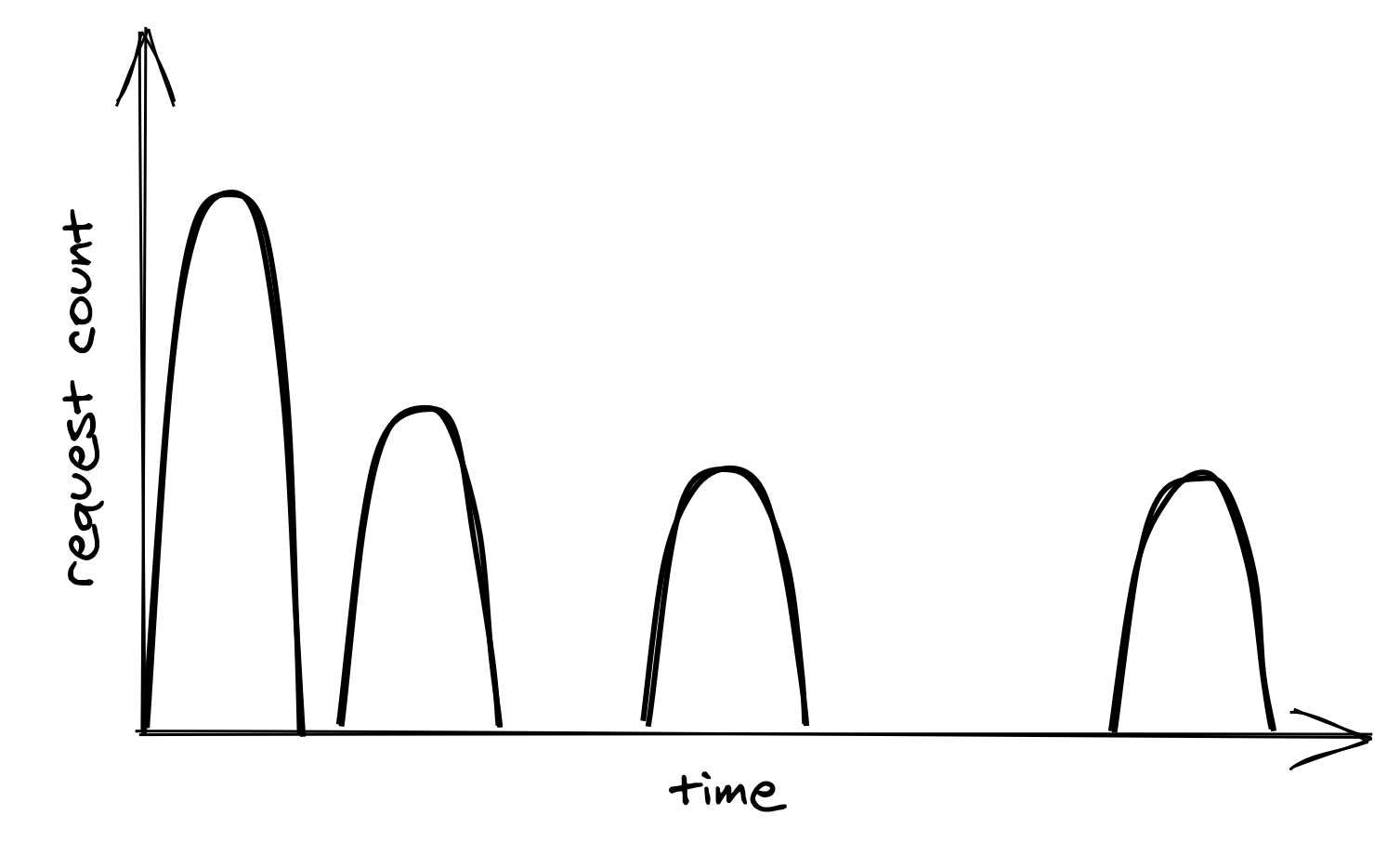
Figure 27.1: Retry storm
request into a retry queue. The same process, or possibly another, can read from the same queue later and retry the failed requests.
Just because a network call can be retried doesn’t mean it should be. If the error is not short-lived, for example, because the process is not authorized to access the remote endpoint, it makes no sense to retry the request since it will fail again. In this case, the process should fail fast and cancel the call right away. And as discussed in Idempotency in APIs, we should also understand the consequences of retrying a network call that isn’t idempotent and whose side effects can affect the application’s correctness.
Retry amplification
Suppose that handling a user request requires going through a chain of three services. The user’s client calls service A, which calls service B, which in turn calls service C. If the intermediate request from service B to service C fails, should B retry the request or not? Well, if B does retry it, A will perceive a longer execution time for its request, making it more likely to hit A’s timeout. If that happens, A retries the request, making it more likely for the client to hit its timeout and retry.
Having retries at multiple levels of the dependency chain can amplify the total number of retries — the deeper a service is in the chain, the higher the load it will be exposed to due to retry amplification (see Figure 27.2).
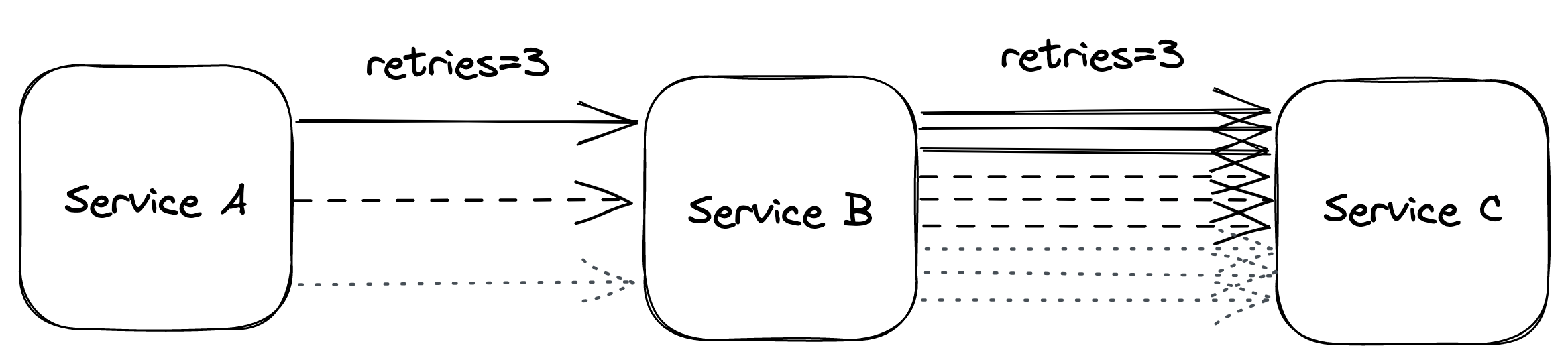
Figure 27.2: Retry amplification in action
And if the pressure gets bad enough, this behavior can easily overload downstream services. That’s why, when we have long dependency chains, we should consider retrying at a single level of the chain and failing fast in all the others.
Circuit breaker
Suppose a service uses timeouts to detect whether a downstream dependency is unavailable and retries to mitigate transient failures. If the failures aren’t transient and the downstream dependency remains unresponsive, what should it do then? If the service keeps retrying failed requests, it will necessarily become slower for its clients. In turn, this slowness can spread to the rest of the system.
To deal with non-transient failures, we need a mechanism that detects long-term degradations of downstream dependencies and stops new requests from being sent downstream in the first place. After all, the fastest network call is the one we don’t have to make. The mechanism in question is the circuit breaker, inspired by the same functionality implemented in electrical circuits.
The goal of the circuit breaker is to allow a sub-system to fail without slowing down the caller. To protect the system, calls to the failing sub-system are temporarily blocked. Later, when the subsystem recovers and failures stop, the circuit breaker allows calls to go through again.
Unlike retries, circuit breakers prevent network calls entirely, making the pattern particularly useful for non-transient faults. In other words, retries are helpful when the expectation is that the next call will succeed, while circuit breakers are helpful when the expectation is that the next call will fail.
A circuit breaker can be implemented as a state machine with three states: open, closed, and half-open (see Figure 27.3).
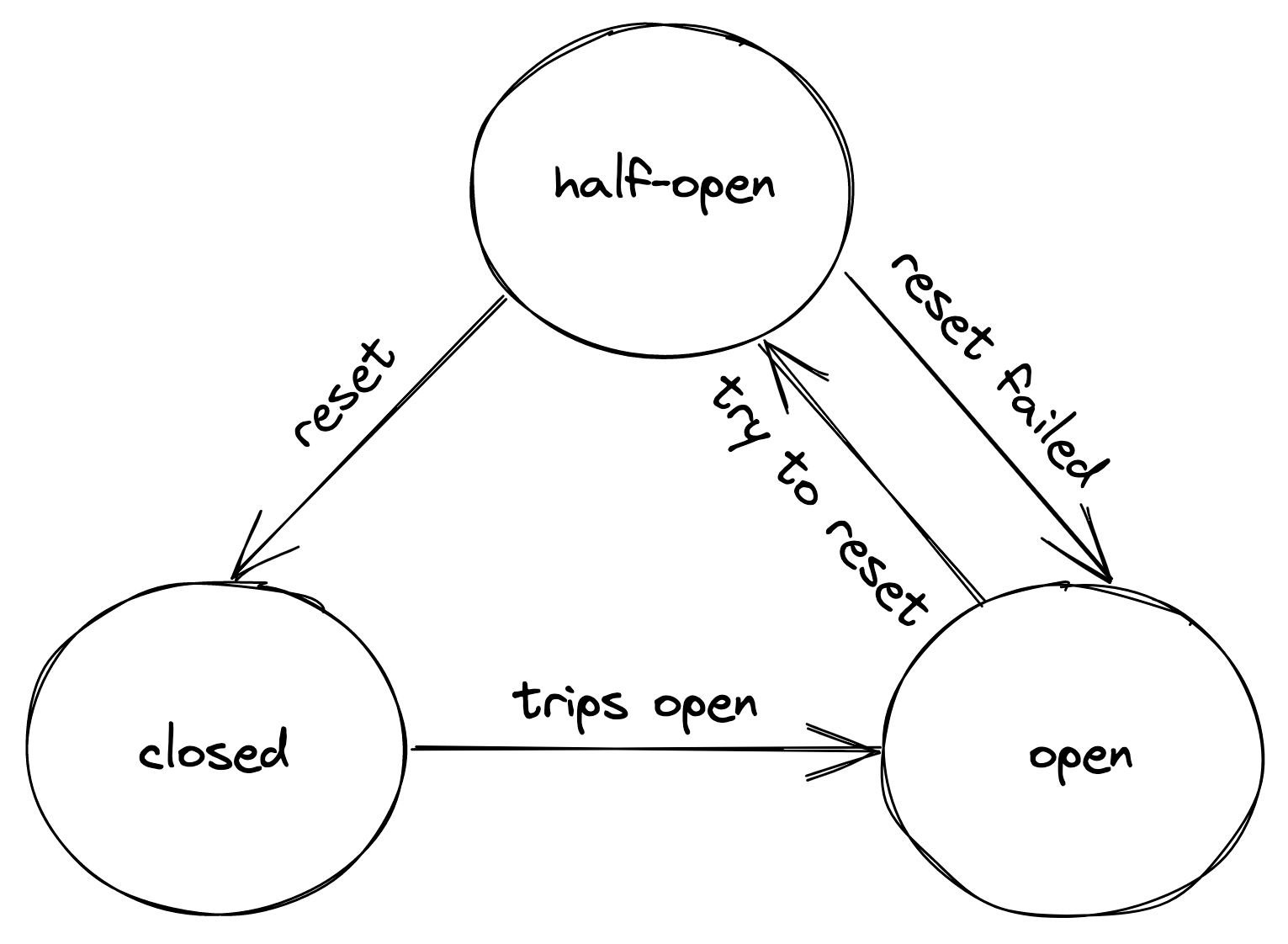
Figure 27.3: Circuit breaker state machine
In the closed state, the circuit breaker merely acts as a pass-through for network calls. In this state, the circuit breaker tracks the number of failures, like errors and timeouts. If the number goes over a certain threshold within a predefined time interval, the circuit breaker trips and opens the circuit.
When the circuit is open, network calls aren’t attempted and fail immediately. As an open circuit breaker can have business implications, we need to consider what should happen when a downstream dependency is down. If the dependency is non-critical, we want our service to degrade gracefully rather than to stop entirely. Think of an airplane that loses one of its non-critical sub-systems in flight; it shouldn’t crash but rather gracefully degrade to a state where the plane can still fly and land. Another example is Amazon’s front page; if the recommendation service is unavailable, the page renders without recommendations. It’s a better outcome than failing to render the whole page entirely.
After some time has passed, the circuit breaker gives the downstream dependency another chance and transitions to the half-open state. In the half-open state, the next call is allowed to pass through to the downstream service. If the call succeeds, the circuit breaker transitions to the closed state; if the call fails instead, it transitions back to the open state.
You might think that’s all there is to understand how a circuit breaker works, but the devil is in the details. For example, how many failures are enough to consider a downstream dependency down? How long should the circuit breaker wait to transition from the open to the half-open state? It really depends on the specific context; only by using data about past failures can we make an informed decision.
References
- “Web APIs: XMLHttpRequest.timeout,” https://developer.mozilla.org/en-US/docs/Web/API/XMLHttpRequest/timeout
- “Add a timeout option, to prevent hanging,” https://github.com/whatwg/fetch/issues/951
- “Web APIs: AbortController,” https://developer.mozilla.org/en-US/docs/Web/API/AbortController
- “Requests Quickstart: Timeouts,” https://requests.readthedocs.io/en/master/user/quickstart/#timeouts
- “net/http: make default configs have better timeouts,” https://github.com/golang/go/issues/24138
- “HttpClient.Timeout Property,” https://docs.microsoft.com/en-us/dotnet/api/system.net.http.httpclient.timeout?view=net-6.0#remarks
- “Timeouts, retries, and backoff with jitter,” https://aws.amazon.com/builders-library/timeouts-retries-and-backoff-with-jitter/
- “Exponential Backoff And Jitter,” https://aws.amazon.com/blogs/architecture/exponential-backoff-and-jitter/