C# Beginner
Unit -1
- .NET OVERVIEW: overview of distributed computing; origin of .NET technology; understanding .NET platform; do’s and don’ts of .NET; benefits and limitations of .NET approach; building blocks of .NET framework; .NET programming languages; .NET types and .NET namespaces; C# and the .NET.
What does Distributed Computing System mean?
It refers to multiple computer systems working on a single problem. In distributed computing, a single problem is divided into many parts, and each part is solved by different computers. As long as the computers are networked, they can communicate with each other to solve the problem
Advantages and Disadvantages of using .net
Advantages:
- Support Newest technology from MS for app development
— WPF and WCF are the new way of buildign UI’s and Communicating between processes and systems
— Fully integrated IDE available
— Linux and Mac support through 3rd parties (Mono)
— Many languages available, both dynamic (IronPython and IronRuby) and static (C#, VB.NET, C++), both object oriented (C#, VB.NET, C++) and functional (F#)
- Disadvantages
- Multi platform support isn’t available from MS and isn’t available straight after installing Visual Studio
— Managed code can be slower than native code
Unit -2
2. VISUAL STUDIO .NET AND ITS. MAJOR COMPONENTS: understanding CLR; CTS and CLS; role of MSIL and Metadata; developing C# Applications using Visual Studio .Net.
What is Common Type System (CTS) means ?
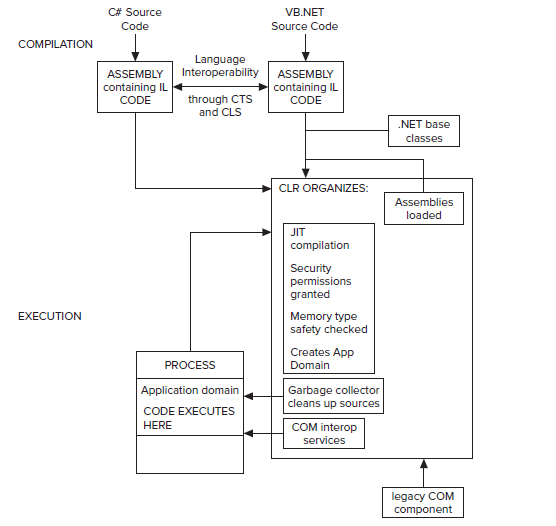
This data type problem is solved in .NET using the Common Type System (CTS). The CTS defines the predefined data types available in IL so that all languages that target the .NET Framework can produce compiled code ultimately based on these types.
What does Common Language Runtime (CLR) mean?
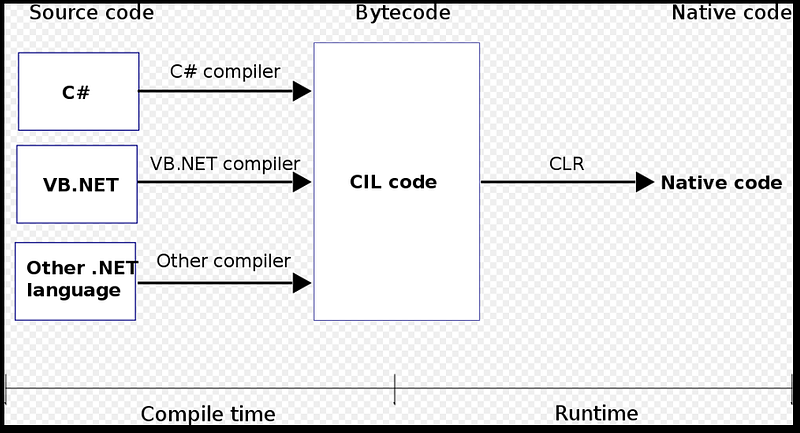
Common Language Runtime (CLR) is a managed execution environment that is part of Microsoft NET framework. CLR manages the execution of programs written in different supported languages.
CLR transforms source code into a form of bytecode known asCommon Intermediate Language (CIL).At run time, CLR handles the execution of the CIL code.
The runtime provides the following features:
- The ability to easily use components developed in other languages.
- Extensible types provided by a class library.
- Language features such as inheritance, interfaces, and overloading for object-oriented programming.
- Support forthreadsthat allows creation of multithreaded, scalable applications.
- Support for structured exception handling.
- Support for custom attributes.
- Garbage collection.
- Use of delegates instead of function pointers for increased type safety and security
What is Visual Studio ?
Microsoft Visual Studiois an integrated development environment (IDE) from Microsoft. It is used to develop computer programs for Microsoft Windows, as well as web sites, web apps, web services and mobile apps. Visual Studio uses Microsoft software development platforms such as Windows API, Windows Forms, Windows Presentation Foundation, Windows Store and Microsoft Silverlight. It can produce both native code and managed code.
Visual Studio includes a code editor supporting IntelliSense (the code completion component) as well as code refactoring. The integrated debugger works both as a source-level debugger and a machine-level debugger. Other built-in tools include a code profiler, forms designer for building GUI applications,
Metadata, in theCommon Language Infrastructure(CLI), refers to certain data structures embedded within theCommon Intermediate Language(CIL) code that describes the high-level structure of the code. Metadata describes allclassesand class members that are defined in the assembly, and the classes and classmembersthat the current assembly will call from another assembly. The metadata for a method contains the complete description of the method, including the class (and the assembly that contains the class), thereturn typeand all of the methodparameters.
Unit -3
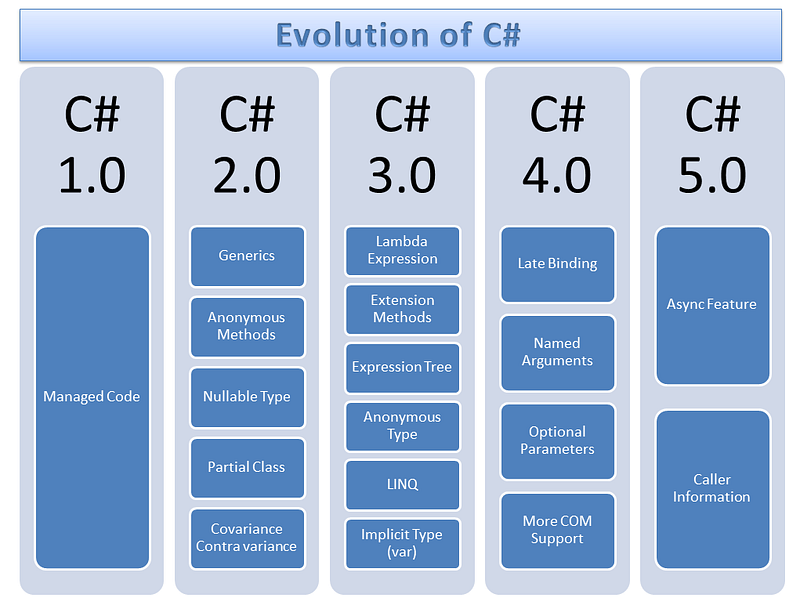
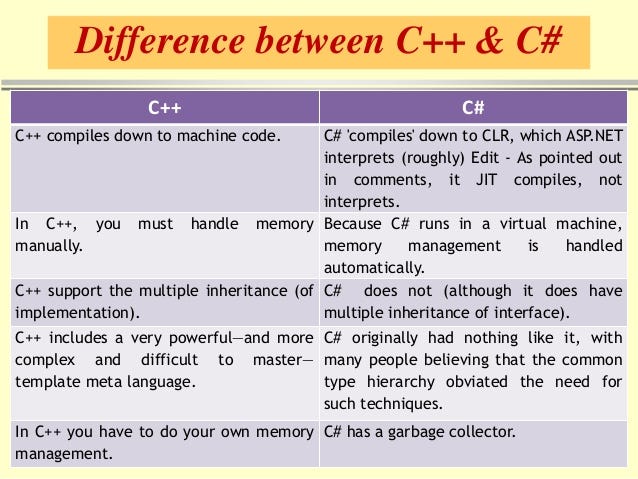
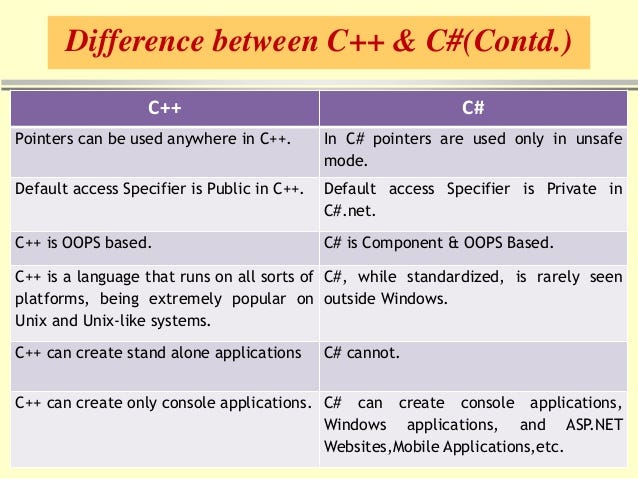
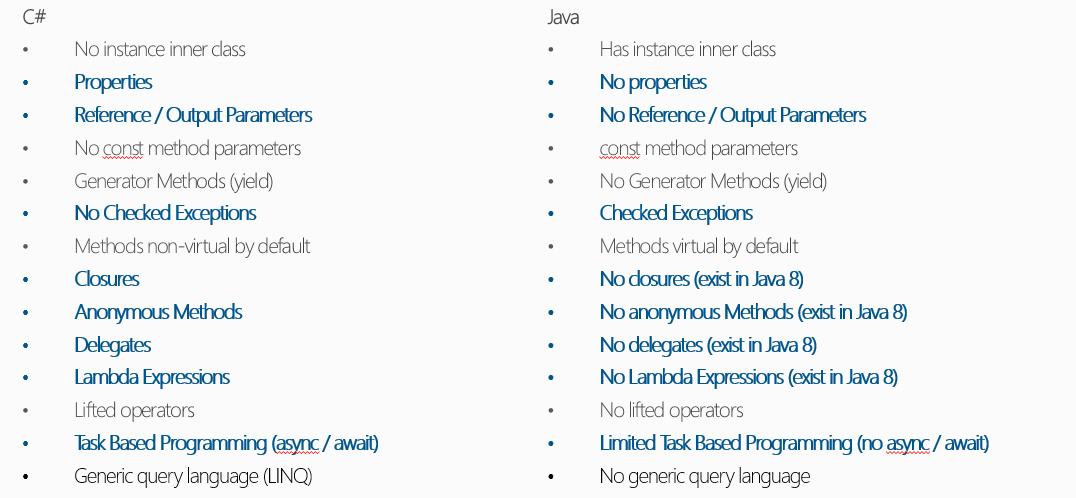
- INTRODUCTION TO C#:Evolution of C#; Characteristics of C#; C++ and C#; Java and C#; object-oriented programming using C#; Applications of C#.
C# vs Java
Hello World Program in c#
1
| using System;namespace HelloWorldApplication{ class HelloWorld { static void Main(string[] args) { /* my first program in C# */ Console.WriteLine("Hello World"); Console.ReadKey(); } }}
|
Unit -4
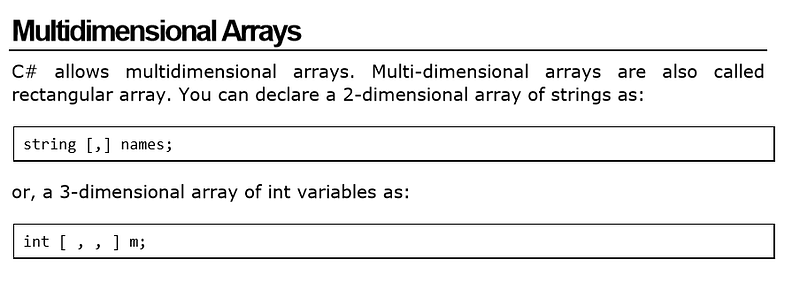
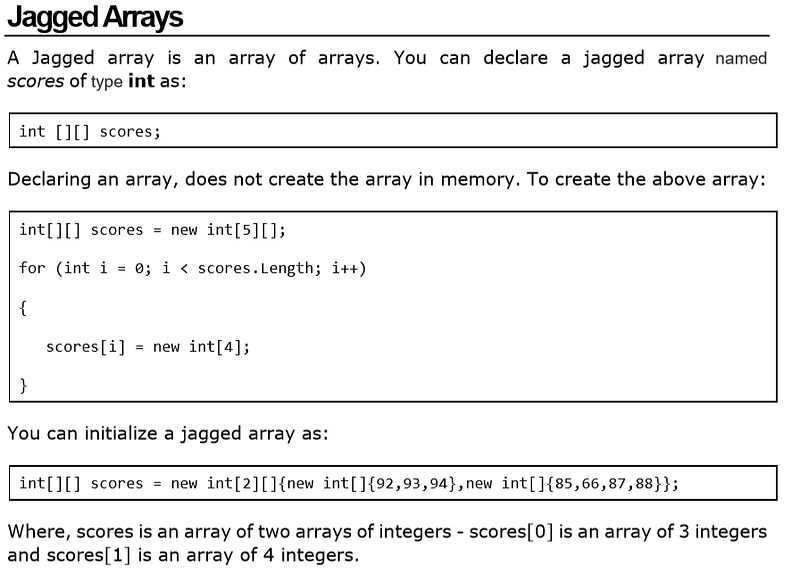
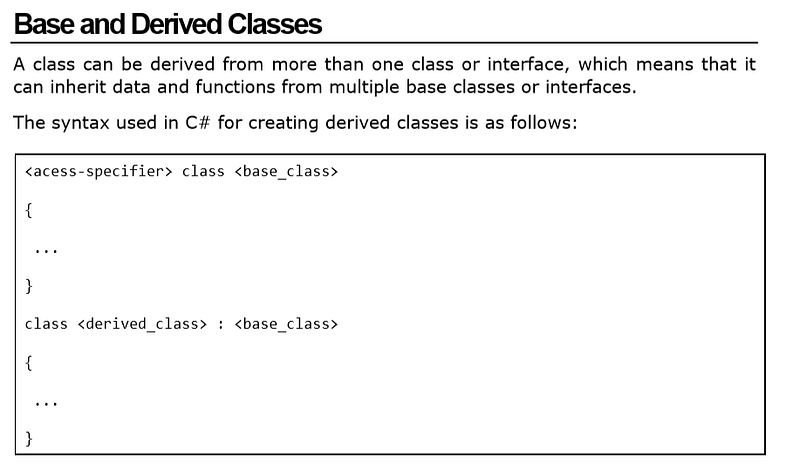
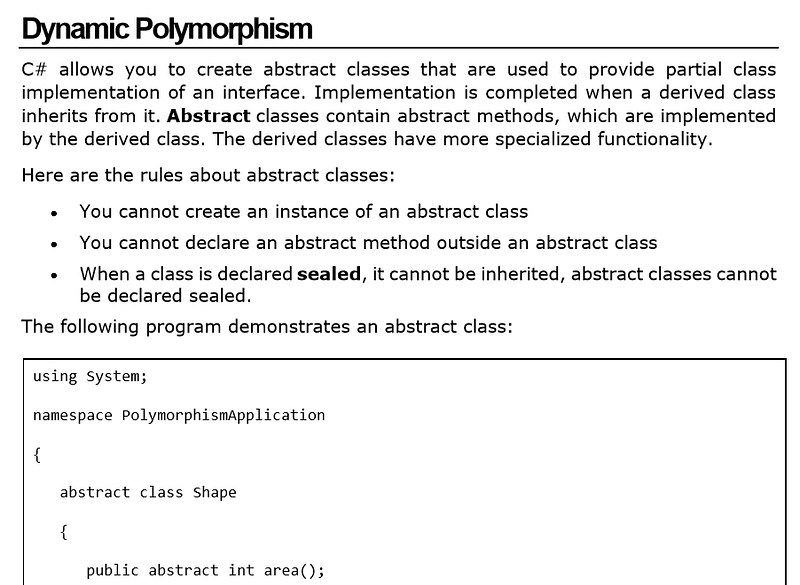
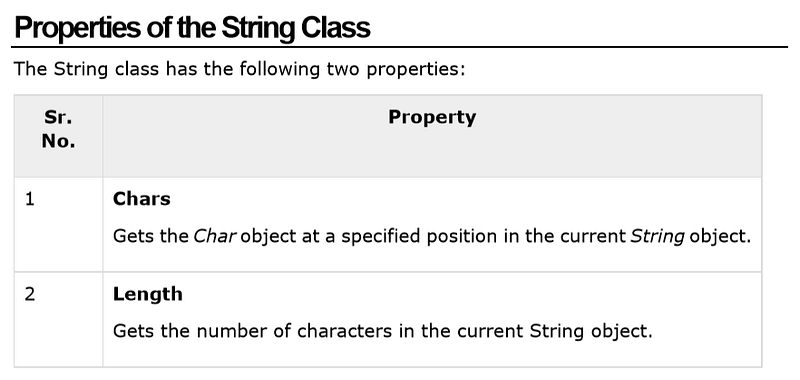
C# PROGRAMMING:Creating a C# program; types in C#; operators; statements and control; classes & objects; inheritance and polymorphism; methods; arrays and strings; interfaces; abstract and base classes.
For Each loop :
For each(orforeach) is acontrol flowstatement for traversing items in acollection. Foreach is usually used in place of a standardforstatement. Unlike other for loop constructs, however, foreach loops[1]usually maintain no explicit counter
C# supports the following access specifiers:
- Public
- Private
- Protected
- Internal
- Protected Internal
An abstract function cannot have functionality.You’re basically saying, any child class MUST give their own version of this method, however it’s too general to even try to implement in the parent class.
A virtual function, is basically saying look, here’s the functionality that may or may not be good enough for the child class. So if it is good enough, use this method, if not, then override me, and provide your own functionality.
StringBuilder is a C# class that can be used to store and manipulate string data types, which when modified returns the same StringBuilder object with modified values rather than returning a new object. The following example demonstrates the difference between a String class and StringBuilder class.
StringBuilder C#: A Basic Example
1
| class Program{static void Main(string[] args){String content = "abcd";content = content + "wxyz";
|
1
| Console.WriteLine(content);
|
1
| StringBuilder content2 = new StringBuilder("abcd");
|
1
| content2 = content2.Append("wxyz");
|
1
| Console.WriteLine(content2);
|
In the above example, first a String type variable is instantiated by storing a string literal value of “abcd”. At this time, the content variable points to the String type object in the memory space that contains “abcd”. In the next line of code, another string literal “wxyz” is appended to the string. What happens is that instead of modifying the object that contains “abcd”, a new object is instantiated in the memory and content variable is made to refer to this new object.
Contrarily, in the above example, a StringBuilder object named content2 is instantiated and assigned a string value “abcd”. Next, the Append method is called on the content2 variable and a string value “xyz” is passed. This appends “wxyz” at the end of StringBuilder object content2. But in this case, a new object is not created in memory; rather, the object that contained the value “abcd” is made to accommodate the appended string “wxyz”.
Unit-5
## **Unit -6** **INTRODUCTION TO ADO .NET:**comparison of ADO and ADO. NET; introduction to data access with ADO.NET; components of ADO.NET; overview of XML; XML and ADO.NET. ## **ActiveX Data Objects (ADO)** In[computing](https://en.wikipedia.org/wiki/Computing),[Microsoft](https://en.wikipedia.org/wiki/Microsoft)’s**ActiveX Data Objects**(**ADO**) comprises a set of[Component Object Model](https://en.wikipedia.org/wiki/Component_Object_Model)(COM)[objects](https://en.wikipedia.org/wiki/Object_%28computing%29)for accessing data sources. A part of[**MDAC**](https://en.wikipedia.org/wiki/MDAC)**(Microsoft Data Access Components),**it provides a[middleware](https://en.wikipedia.org/wiki/Middleware)layer between[programming languages](https://en.wikipedia.org/wiki/Programming_language)and[OLE DB](https://en.wikipedia.org/wiki/OLE_DB)(a means of accessing data stores, whether[databases](https://en.wikipedia.org/wiki/Database)or not, in a uniform manner). ADO allows a[developer](https://en.wikipedia.org/wiki/Software_developer)to write programs that access data without knowing how the database is implemented; developers must be aware of the database for connection only. No knowledge of[SQL](https://en.wikipedia.org/wiki/SQL)is required to access a database when using ADO, although one can use ADO to execute SQL commands directly (with the disadvantage of introducing a dependency upon the type of database used). 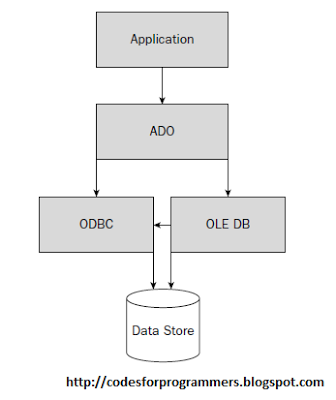 ## **ADO.NET** **ADO.NET**is a data access technology from the[Microsoft](https://en.wikipedia.org/wiki/Microsoft)[.NET Framework](https://en.wikipedia.org/wiki/.NET_Framework)that provides communication between relational and non-relational systems through a common set of components. ADO.NET is a set of computer software components that programmers can use to access data and data services from the database. It is a part of the[base class library](https://en.wikipedia.org/wiki/Base_Class_Library)that is included with the Microsoft .NET Framework 1.ADO.NET is a new, improved, and greatly expanded version of ADO that was developed for the Microsoft .NET initiative 2.It incorporates all of the functionality of ADO and facilitates the transformation of XML documents to and from database data 3.It uses datasets, which is an in-memory, fully-functioned, independent databases 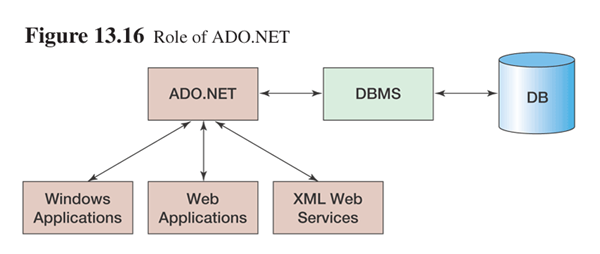 Microsoft™s provides three data providers : — “OLE DB data provider can be used to process any OLE DB-compliant data source — “SQLClient data provider is purpose-built for use with SQL Server — “OracleClient data provider is purpose-built for use with Oracle 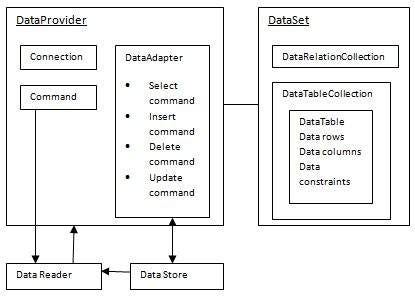 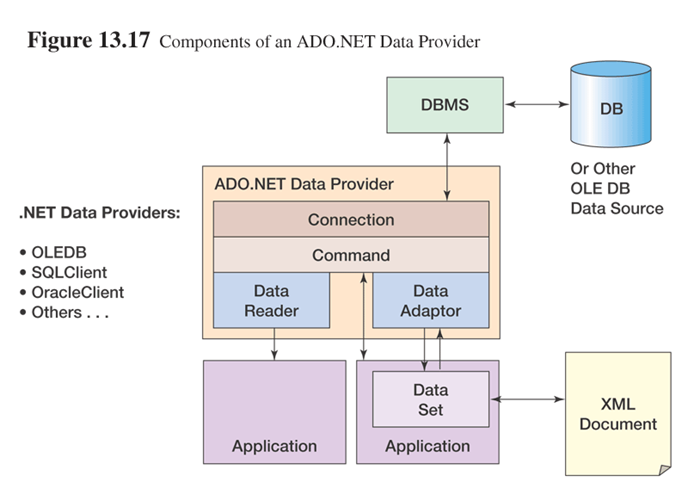 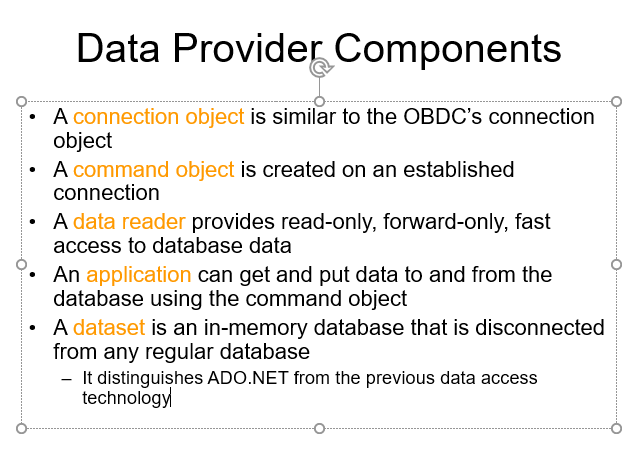 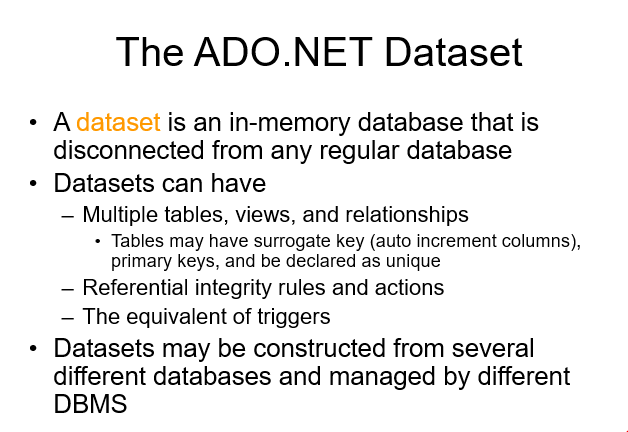 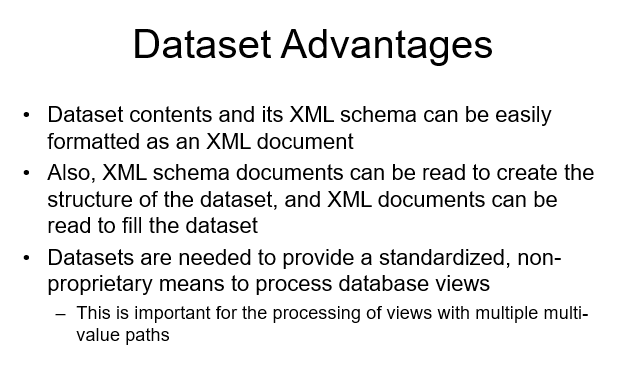 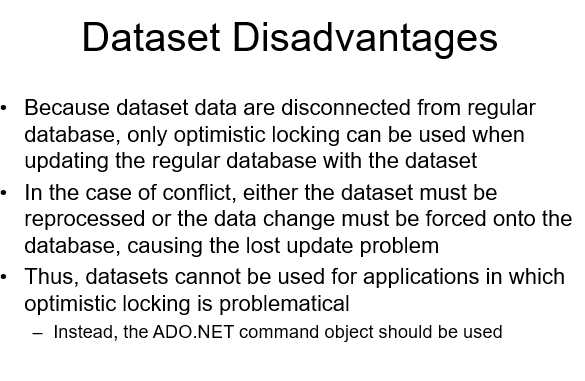 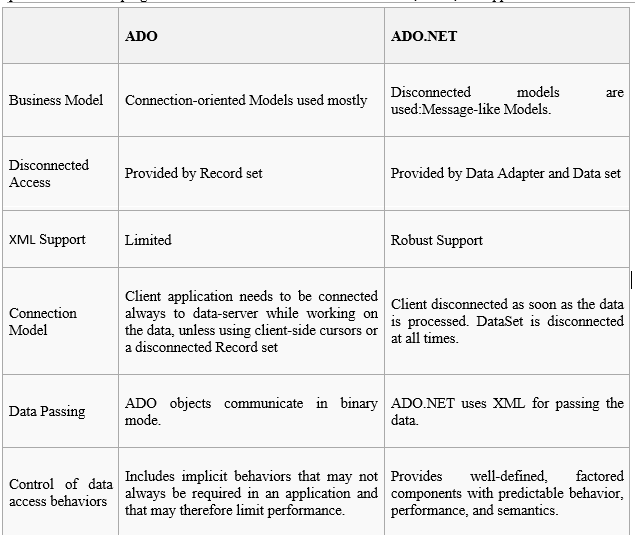 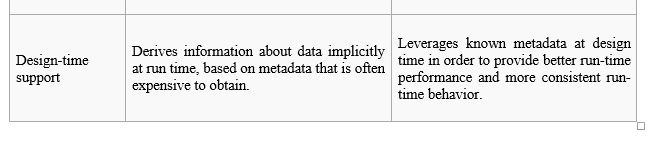 ## XML stands for**E**xtensible**M**arkup**L**anguage and is a text-based markup language derived from Standard Generalized Markup Language (SGML). XML tags identify the data and are used to store and organize the data, rather than specifying how to display it like HTML tags, which are used to display the data. XML is not going to replace HTML in the near future, but it introduces new possibilities by adopting many successful features of HTML. There are three important characteristics of XML that make it useful in a variety of systems and solutions: - **XML is extensible:**XML allows you to create your own self-descriptive tags, or language, that suits your application. - **XML carries the data, does not present it:**XML allows you to store the data irrespective of how it will be presented. - **XML is a public standard:**XML was developed by an organization called the World Wide Web Consortium (W3C) and is available as an open standard. A short list of XML usage says it all: - XML can work behind the scene to simplify the creation of HTML documents for large web sites. - XML can be used to exchange the information between organizations and systems. - XML can be used for offloading and reloading of databases. - XML can be used to store and arrange the data, which can customize your data handling needs. - XML can easily be merged with style sheets to create almost any desired output. - Virtually, any type of data can be expressed as an XML document. There are two approaches to work with XML and ADO. First, you can use ADO.NET to access XML documents. Second, you can use XML and ADO.NET to access XML. Additionally, you can access a relational database using ADO.NET and XML.NET. **Reading XML using Data Set** In ADO.NET, you can access the data using the DataSet class. The DataSet class implements methods and properties to work with XML documents. The following sections discuss methods that read XML data. Link :[https://www.c-sharpcorner.com/uploadfile/mahesh/ado-net-and-xml/](https://www.c-sharpcorner.com/uploadfile/mahesh/ado-net-and-xml/) ## **Unit -7** **Active Server Pages**(**ASP**), later known as**Classic ASP**or**ASP Classic**, is[Microsoft](https://en.wikipedia.org/wiki/Microsoft)'s first[server-side](https://en.wikipedia.org/wiki/Server-side_scripting)[script engine](https://en.wikipedia.org/wiki/Active_Scripting)for[dynamically generated web pages](https://en.wikipedia.org/wiki/Dynamic_web_page). 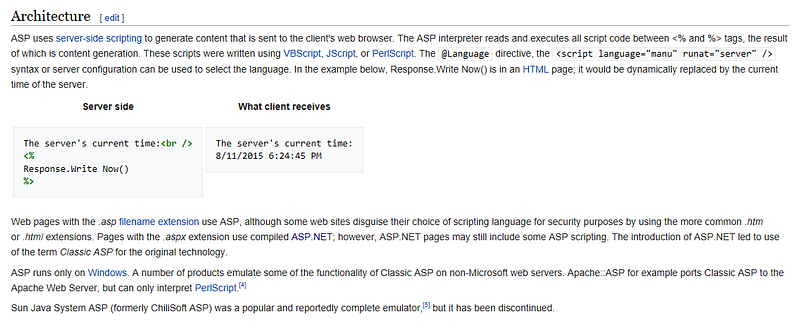 ## ASP.NET **ASP.NET**is an[open-source](https://en.wikipedia.org/wiki/Open_source)[[2]](https://en.wikipedia.org/wiki/ASP.NET#cite_note-2)[server-side](https://en.wikipedia.org/wiki/Server-side_scripting)[web application framework](https://en.wikipedia.org/wiki/Web_application_framework)designed for[web development](https://en.wikipedia.org/wiki/Web_development)to produce[dynamic web pages](https://en.wikipedia.org/wiki/Dynamic_web_page). It was developed by[Microsoft](https://en.wikipedia.org/wiki/Microsoft)to allow[programmers](https://en.wikipedia.org/wiki/Programmer)to build dynamic[web sites](https://en.wikipedia.org/wiki/Web_site),[web applications](https://en.wikipedia.org/wiki/Web_application)and[web services](https://en.wikipedia.org/wiki/Web_service). It was first released in January 2002 with version 1.0 of the[.NET Framework](https://en.wikipedia.org/wiki/.NET_Framework), and is the successor to Microsoft’s[Active Server Pages](https://en.wikipedia.org/wiki/Active_Server_Pages)(ASP) technology. ASP.NET is built on the[Common Language Runtime](https://en.wikipedia.org/wiki/Common_Language_Runtime)(CLR), allowing programmers to write ASP.NET code using any supported[.NET language](https://en.wikipedia.org/wiki/List_of_CLI_languages). The ASP.NET application codes can be written in any of the following languages: - C# - Visual Basic.Net - Jscript - J# ASP.NET is used to produce interactive, data-driven web applications over the internet. It consists of a large number of controls such as text boxes, buttons, and labels for assembling, configuring, and manipulating code to create HTML pages. **Some of the basic advantages of using ASP.NET in web development:** **1.**ASP.NET significantly reduces the amount of code required for building large and complex applications which can increase overall development speed and reduce development costs. 2. Just-in-time compilation, smart caching technologies and native optimization dramatically increase overall application performance. 3. ASP.NET Framework supports varied languages, it allows you to select the language that better applies to your application. 4. ASP.NET provides ability of cross platform migration. 5. ASP.NET provides simplicity making it easy to perform common tasks including configuration and deployment. 6. ASP.NET features vast class library enclosing a large number of common functions and ready-to-use custom web-controls that allow creating professional applications with no need to develop from scratch. 7. ASP.NET ensured high reliability and security due to built-in Windows authentication and per-application configuration. ASP.NET is regularly updated by Microsoft to meet the most up-to-date technology requirements. ## **3. What is the basic difference between ASP and ASP.NET?** The basic difference between ASP and ASP.NET is that ASP is interpreted; whereas, ASP.NET is compiled. This implies that since ASP uses VBScript; therefore, when an ASP page is executed, it is interpreted. On the other hand, ASP.NET uses .NET languages, such as C# and VB.NET, which are compiled to Microsoft Intermediate Language (MSIL).ASP.NET is firmly rooted in XML. 1. ASP is mostly written using VB Script and HTML intermixed. Presentation and business logic is intermixed while ASP.NET can be written in several .NET compliant languages such as C# or VB.NET. 2. ASP has maximum of 4 built in classes like Request, Response, Session and Application whereas ASP.NET using .NET framework classes which has more than 2000 built-in classes. 3. ASP does not have any server based components whereas ASP.NET offers several server based components like Button, TextBox etc. and event driven processing can be done at server. 4. ASP doesn’t support Page level transactions whereas ASP.NET supports Page level transactions. 5. ASP.NET offers web development for mobile devices which alters the content type (wml or chtml etc.) based on the device. 6. ASP.NET allows separation of business and presentation logic because the code need not be included directly in the *.aspx page. 7. ASP.NET uses languages which are fully object oriented languages like C# and also supports cross language support. 8. ASP.NET offers support for Web Services and rich data structures like DataSet which allows disconnected data processing. 9. ASP is interpreted, ASP.NET is compiled. 10. Classic ASP uses a technology called ADO to connect and work with databases. ASP.NET uses the ADO.NET technology . 11. ASP has Mixed HTML and coding logic where in asp.net html and coding part are separated by code behind files. 12. ASP.NET purely object oriented whereas ASP is partially object oriented. 13. For ASP No in-built support for XML whereas in ASP.NET full XML Support for easy data exchange. 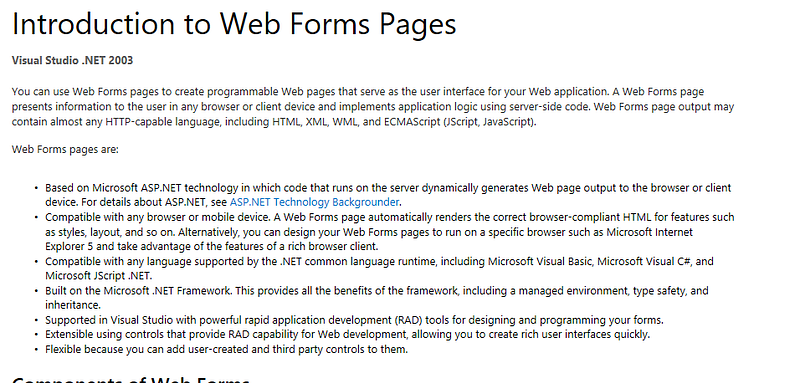 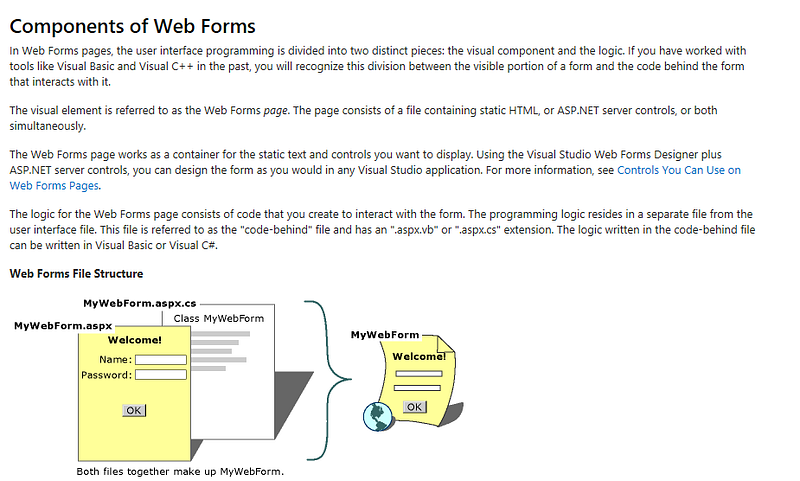 ## What Web Forms Pages Help You Accomplish Web application programming presents challenges that do not typically arise when programming traditional client-based applications. Among the challenges are: - **Implementing a rich Web user interface.**A user interface with a complex layout, a large amount of dynamic content, and full-featured user-interactive objects can be difficult and tedious to design and implement using basic HTML facilities. It is particularly difficult to create a rich user interface for applications likely to run on many different browser and client device platforms. - **Separation of client and server.**In a Web application, the client (browser) and server are different programs often running on different computers (and even on different operating systems). Consequently, the two halves of the application share very little information; they can communicate, but typically exchange only small chunks of simple information. - **Stateless execution.**When a Web server receives a request for a page, it finds the page, processes it, sends it to the browser, and then, effectively, discards all page information. If the user requests the same page again, the server repeats the entire sequence, reprocessing the page from scratch. Put another way, a server has no memory of pages that it has processed. Therefore, if an application needs to maintain information about a page, this becomes a problem that has to be solved in application code. - **Complications with data access.**Reading from and writing to a data source in a traditional Web applications can be complicated and resource-intensive. - **Complications with scalability.**In many cases Web applications designed with existing methods fail to meet scalability goals due to the lack of compatibility between the various components of the application. This is often the single failure point for applications under a heavy growth cycle. - **Intuitive, consistent object model.**The ASP.NET page framework presents an object model that allows you to think of your forms as a unit, not as separate client and server pieces. In this model, you can program the form in a more intuitive way than in traditional Web applications, including the ability to set properties for form elements and respond to events. In addition, ASP.NET server controls are an abstraction from the physical contents of an HTML page and from the direct interaction between browser and server. In general, you can use server controls the way you might work with controls in a client application and not have to think about how to create the HTML to present and process the controls and their contents. - **Event-driven programming model.**Web Forms pages bring to Web applications the familiar model of writing event handlers for events that occur on either the client or server. The ASP.NET page framework abstracts this model in such a way that the underlying mechanism of capturing an event on the client, transmitting it to the server, and calling the appropriate method is all automatic and invisible to the implementer. The result is a clear, easily written code structure that supports event-driven development. - **.NET Framework scalable server performance.**The ASP.NET page framework allows you to scale your Web application from one computer with a single processor to a multi-computer “Web farm” cleanly and without complicated changes to the application’s logic. Different books and different organizations provide different definitions to Web Services. Some of them are listed here. - A web service is any piece of software that makes itself available over the internet and uses a standardized XML messaging system. XML is used to encode all communications to a web service. For example, a client invokes a web service by sending an XML message, then waits for a corresponding XML response. As all communication is in XML, web services are not tied to any one operating system or programming language — Java can talk with Perl; Windows applications can talk with Unix applications. - Web services are self-contained, modular, distributed, dynamic applications that can be described, published, located, or invoked over the network to create products, processes, and supply chains. These applications can be local, distributed, or web-based. Web services are built on top of open standards such as TCP/IP, HTTP, Java, HTML, and XML. - Web services are XML-based information exchange systems that use the Internet for direct application-to-application interaction. These systems can include programs, objects, messages, or documents. - A web service is a collection of open protocols and standards used for exchanging data between applications or systems. Software applications written in various programming languages and running on various platforms can use web services to exchange data over computer networks like the Internet in a manner similar to inter-process communication on a single computer. This interoperability (e.g., between Java and Python, or Windows and Linux applications) is due to the use of open standards. To summarize, a complete web service is, therefore, any service that: - Is available over the Internet or private (intranet) networks - Uses a standardized XML messaging system - Is not tied to any one operating system or programming language - Is self-describing via a common XML grammar - Is discoverable via a simple find mechanism ## Components of Web Services The basic web services platform is XML + HTTP. All the standard web services work using the following components - SOAP (Simple Object Access Protocol) - UDDI (Universal Description, Discovery and Integration) - WSDL (Web Services Description Language) 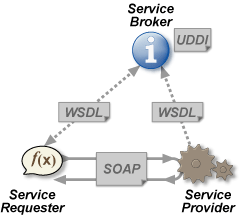 ## Reference - [Original Medium article](https://medium.com/@harshityadav95/c-beginner-d115a3df706b)