Struts in Java
Struts in Java
Unit -7
Apache Struts 1is an open-source web application framework for developing Java EE web applications. It uses and extends the Java Servlet API to encourage developers to adopt a model view controller (MVC) architecture. It was originally created by Craig McClanahan and donated to the Apache Foundation in May, 2000. Formerly located under the Apache Jakarta Project and known asJakarta Struts, it became a top-level Apache project in 2005.
In a standardJava EEweb application,
- the client will typically call to the server via aweb form.
- The information is then either handed over to aJava Servletwhich interacts with a database and produces anHTML-formatted response, or it is given to aJavaServer Pages(JSP) document
- intermingles HTML and Java code to achieve the same result.
Both approaches are often considered inadequate for large projects because they mix application logic with presentation and make maintenance difficult.
The goal of Struts is to separate themodel(application logic that interacts with a database) from theview(HTML pages presented to the client) and thecontroller(instance that passes information between view and model). Struts provides the controller (a servlet known asActionServlet) and facilitates the writing of templates for the view or presentation layer (typically in JSP, butXML/XSLTandVelocityare also supported). The web application programmer is responsible for writing the model code, and for creating a central configuration filestruts-config.xmlthat binds together model, view, and controller.
- Requests from the client are sent to the controller in the form of “Actions” defined in the configuration file;
- if the controller receives such a request it calls the corresponding Action class that interacts with the application-specific model code.
- The model code returns an “ActionForward”, a string telling the controller what output page to send to the client.
- Information is passed between model and view in the form of specialJavaBeans. A powerful custom tag library allows it from the presentation layer to read and write the content of these beans without the need for any embedded Java code.
ModelViewController or MVC as it is popularly called, is a software design pattern for developing web applications. A Model View Controller pattern is made up of the following three parts:
- Model — The lowest level of the pattern which is responsible for maintaining data.
- View — This is responsible for displaying all or a portion of the data to the user.
- Controller — Software Code that controls the interactions between the Model and View.
MVC is popular as it isolates the application logic from the user interface layer and supports separation of concerns. Here the Controller receives all requests for the application and then works with the Model to prepare any data needed by the View. The View then uses the data prepared by the Controller to generate a final presentable response. The MVC abstraction can be graphically represented as follows.
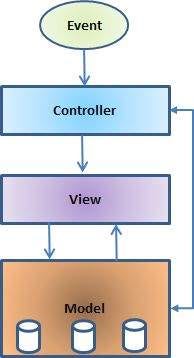
The model
The model is responsible for managing the data of the application. It responds to the request from the view and it also responds to instructions from the controller to update itself.
The view
A presentation of data in a particular format, triggered by a controller’s decision to present the data. They are script based templating systems like JSP, ASP, PHP and very easy to integrate with AJAX technology.
The controller
The controller is responsible for responding to user input and perform interactions on the data model objects. The controller receives the input, it validates the input and then performs the business operation that modifies the state of the data model.
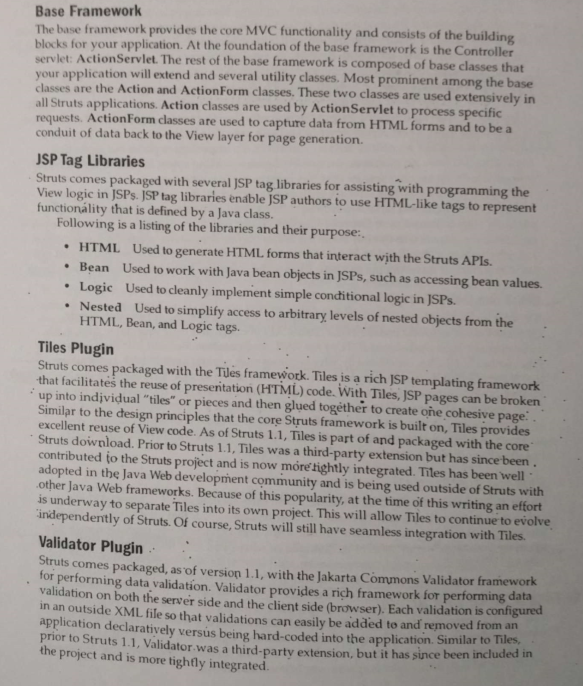
Framework
Struts2 is popular and mature web application framework based on the MVC design pattern. Struts2 is not just the next version of Struts 1, but it is a complete rewrite of the Struts architecture.
Struts 2 framework features
Here are some of the great features that may force you to consider Struts2:
- POJO forms and POJO actions — Struts2 has done away with the Action Forms that were an integral part of the Struts framework. With Struts2, you can use any POJO to receive the form input. Similarly, you can now see any POJO as an Action class.
// POJO = plain old java object
- Tag support — Struts2 has improved the form tags and the new tags allow the developers to write less code.
- AJAX support — Struts2 has recognised the take over by Web2.0 technologies, and has integrated AJAX support into the product by creating AJAX tags, that function very similar to the standard Struts2 tags.
- Easy Integration — Integration with other frameworks like Spring, Tiles and SiteMesh is now easier with a variety of integration available with Struts2.
- Template Support — Support for generating views using templates.
- Plugin Support — The core Struts2 behaviour can be enhanced and augmented by the use of plugins. A number of plugins are available for Struts2.
- Profiling — Struts2 offers integrated profiling to debug and profile the application. In addition to this, Struts also offers integrated debugging with the help of built in debugging tools.
- Easy to modify tags — Tag markups in Struts2 can be tweaked using Freemarker templates. This does not require JSP or java knowledge. Basic HTML, XML and CSS knowledge is enough to modify the tags.
- Promote less configuration — Struts2 promotes less configuration with the help of using default values for various settings. You don’t have to configure something unless it deviates from the default settings set by Struts2.
- View Technologies: — Struts2 has a great support for multiple view options (JSP, Freemarker, Velocity and XSLT)
Architecture
From a high level, Struts2 is a pull-MVC (or MVC2) framework. The Model-View-Controller pattern in Struts2 is realized with following five core components:
- Actions
- Interceptors
- Value Stack / OGNL
- Results / Result types
- View technologies
Struts 2 is slightly different from a traditional MVC framework in that the action takes the role of the model rather than the controller, although there is some overlap.
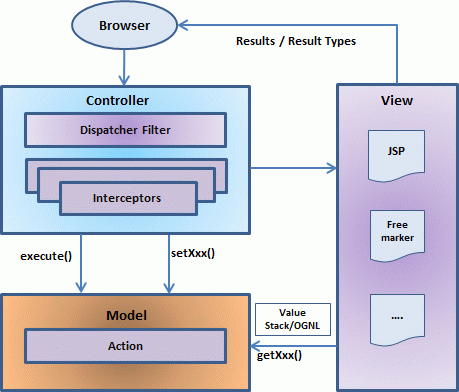
The above diagram depicts theModel,View andController to the Struts2 high level architecture. The controller is implemented with a Struts2 dispatch servlet filter as well as interceptors, the model is implemented with actions, and the view as a combination of result types and results. The value stack and OGNL provide common thread, linking and enabling integration between the other components.
Apart from the above components, there will be a lot of information that relates to configuration. Configuration for the web application, as well as configuration for actions, interceptors, results, etc.
This is the architectural overview of the Struts 2 MVC pattern. We will go through each component in more detail in the subsequent chapters.
Request life cycle
Based on the above digram, one can explain the user’s request life cycle in Struts 2 as follows:
- User sends a request to the server for requesting for some resource (i.e pages).
- The FilterDispatcher looks at the request and then determines the appropiate Action.
- Configured interceptors functionalities applies such as validation, file upload etc.
- Selected action is executed to perform the requested operation.
- Again, configured interceptors are applied to do any post-processing if required.
- Finally the result is prepared by the view and returns the result to the user.
Creating Hello World Using Structs
- Start your Eclipse and then go withFile > New > Dynamic Web Projectand enter project name asHelloWorldStruts2and set rest of the options as given in the following screen:
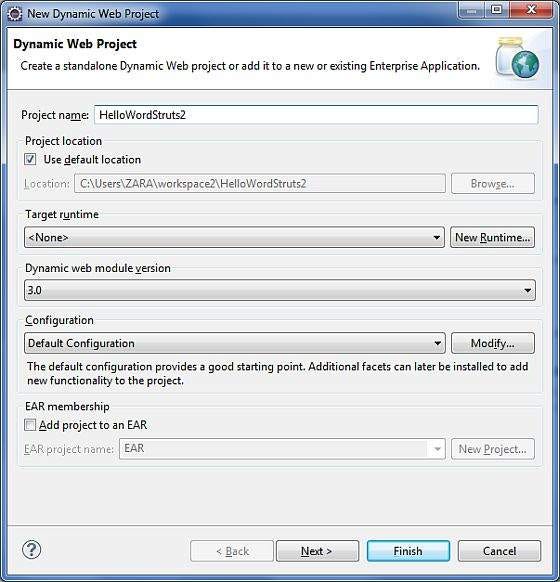
Select all the default options in the next screens and finally checkGenerate Web.xml deployment descriptoroption. This will create a dynamic web project for you in Eclipse. Now go withWindows > Show View > Project Explorer, and you will see your project window something as below:
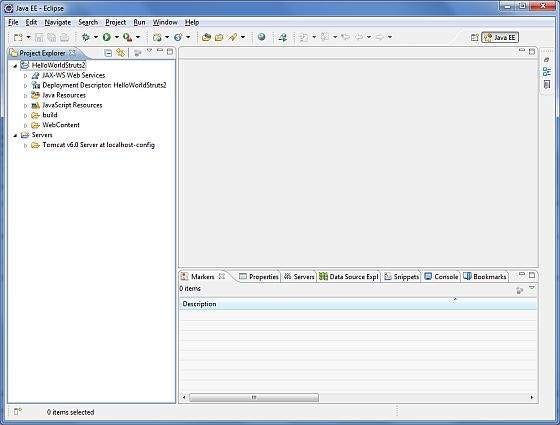
Now copy following files from struts 2 lib folderC:\struts-2.2.3\libto our project’sWEB-INF\libfolder. To do this, you can simply drag and drop all the following files into WEB-INF\lib folder.
- commons-fileupload-x.y.z.jar
- commons-io-x.y.z.jar
- commons-lang-x.y.jar
- commons-logging-x.y.z.jar
- commons-logging-api-x.y.jar
- freemarker-x.y.z.jar
- javassist-.xy.z.GA
- ognl-x.y.z.jar
- struts2-core-x.y.z.jar
- xwork-core.x.y.z.jar
Create Action Class:
Action class is the key to Struts 2 application and we implement most of the business logic in action class. So let us create a java file HelloWorldAction.java underJava Resources > srcwith a package namecom.tutorialspoint.struts2with the contents given below.
The Action class responds to a user action when user clicks a URL. One or more of the Action class’s methods are executed and a String result is returned. Based on the value of the result, a specific JSP page is rendered.
1
package com.tutorialspoint.struts2;
1
public class HelloWorldAction{   private String name;
1
   public String execute() throws Exception {      return "success";   }      public String getName() {      return name;   }
1
   public void setName(String name) {      this.name = name;   }}
This is a very simple class with one property called “name”. We have standard getters and setter methods for the “name” property and an execute method that returns the string “success”.
The Struts 2 framework will create an object of the HelloWorldAction class and call the execute method in response to a user’s action. You put your business logic inside execute method and finally returns the String constant. Simply saying for for each URL, you would have to implement one action class and either you can use that class name directly as your action name or you can map to some other name using struts.xml file as shown below.
Create a View
We need a JSP to present the final message, this page will be called by Struts 2 framework when a predefined action will happen and this mapping will be defined in struts.xml file. So let us create the below jsp fileHelloWorld.jspin the WebContent folder in your eclipse project. To do this, right click on the WebContent folder in the project explorer and selectNew >JSP File.
1
<%@ page contentType="text/html; charset=UTF-8" %><%@ taglib prefix="s" uri="/struts-tags" %><html><head><title>Hello World</title></head><body>   Hello World, <s:property value="name"/></body></html>
The taglib directive tells the Servlet container that this page will be using the Struts 2 tags and that these tags will be preceded by s. The s:property tag displays the value of action class property “name> which is returned by the methodgetName()of the HelloWorldAction class.
Create main page:
We also need to createindex.jspin the WebContent folder. This file will serve as the initial action URL where a user can click to tell the Struts 2 framework to call the a defined method of the HelloWorldAction class and render the HelloWorld.jsp view.
1
<%@ page language="java" contentType="text/html; charset=ISO-8859-1"   pageEncoding="ISO-8859-1"%><%@ taglib prefix="s" uri="/struts-tags"%>   <!DOCTYPE html PUBLIC "-//W3C//DTD HTML 4.01 Transitional//EN" "http://www.w3.org/TR/html4/loose.dtd"><html><head><title>Hello World</title></head><body>   <h1>Hello World From Struts2</h1>   <form action="hello">      <label for="name">Please enter your name</label><br/>      <input type="text" name="name"/>      <input type="submit" value="Say Hello"/>   </form></body></html>
Thehelloaction defined in the above view file will be mapped to the HelloWorldAction class and its execute method using struts.xml file. When a user clicks on the Submit button it will cause the Struts 2 framework to run the execute method defined in the HelloWorldAction class and based on the returned value of the method, an appropriate view will be selected and rendered as a response.
Configuration Files
We need a mapping to tie the URL, the HelloWorldAction class (Model), and the HelloWorld.jsp (the view) together. The mapping tells the Struts 2 framework which class will respond to the user’s action (the URL), which method of that class will be executed, and what view to render based on the String result that method returns.
So let us create a file calledstruts.xml. Since Struts 2 requires struts.xml to be present in classes folder. So create struts.xml file under the WebContent/WEB-INF/classes folder. Eclipse does not create the “classes” folder by default, so you need to do this yourself. To do this, right click on the WEB-INF folder in the project explorer and selectNew > Folder. Your struts.xml should look like:
1
<?xml version="1.0" encoding="UTF-8"?><!DOCTYPE struts PUBLIC   "-//Apache Software Foundation//DTD Struts Configuration 2.0//EN"   "http://struts.apache.org/dtds/struts-2.0.dtd"><struts><constant name="struts.devMode" value="true" />   <package name="helloworld" extends="struts-default">           <action name="hello"             class="com.tutorialspoint.struts2.HelloWorldAction"             method="execute">            <result name="success">/HelloWorld.jsp</result>      </action>   </package></struts>
Few words about the above configuration file. Here we set the constantstruts.devModetotrue, because we are working in development environment and we need to see some useful log messages. Then, we defined a package calledhelloworld. Creating a package is useful when you want to group your actions together. In our example, we named our action as “hello” which is corresponding to the URL/hello.actionand is backed up by theHelloWorldAction.class. Theexecutemethod ofHelloWorldAction.classis the method that is run when the URL/hello.actionis invoked. If the outcome of theexecutemethod returns “success”, then we take the user toHelloWorld.jsp.
Next step is to create aweb.xmlfile which is an entry point for any request to Struts 2. The entry point of Struts2 application will be a filter defined in deployment descriptor (web.xml). Hence we will define an entry oforg.apache.struts2.dispatcher.FilterDispatcher class in web.xml. The web.xml file needs to be created under the WEB-INF folder under WebContent. Eclipse had already created a skelton web.xml file for you when you created the project. So, lets just modify it as follows:
1
<?xml version="1.0" encoding="UTF-8"?><web-app xmlns:xsi="http://www.w3.org/2001/XMLSchema-instance"   xmlns="http://java.sun.com/xml/ns/javaee"    xmlns:web="http://java.sun.com/xml/ns/javaee/web-app_2_5.xsd"   xsi:schemaLocation="http://java.sun.com/xml/ns/javaee    http://java.sun.com/xml/ns/javaee/web-app_3_0.xsd"   id="WebApp_ID" version="3.0">      <display-name>Struts 2</display-name>   <welcome-file-list>      <welcome-file>index.jsp</welcome-file>   </welcome-file-list>   <filter>      <filter-name>struts2</filter-name>      <filter-class>         org.apache.struts2.dispatcher.FilterDispatcher      </filter-class>   </filter>
1
   <filter-mapping>      <filter-name>struts2</filter-name>      <url-pattern>/*</url-pattern>   </filter-mapping></web-app>
We have specified index.jsp to be our welcome file. Then we have configured the Struts2 filter to run on all urls (i.e, any url that match the pattern /*)
Enable Detailed Log:
You can enabled complete logging functionality while working with Struts 2 by creatinglogging.propertiesfile underWEB-INF/classesfolder. Keep the following two lines in your property file:
1
org.apache.catalina.core.ContainerBase.[Catalina].level = INFOorg.apache.catalina.core.ContainerBase.[Catalina].handlers = \                              java.util.logging.ConsoleHandler
The default logging.properties specifies a ConsoleHandler for routing logging to stdout and also a FileHandler. A handler’s log level threshold can be set using SEVERE, WARNING, INFO, CONFIG, FINE, FINER, FINEST or ALL.
That’s it. We are ready to run our Hello World application using Struts 2 framework.
Execute the Application
Right click on the project name and clickExport > WAR Fileto create a War file. Then deploy this WAR in the Tomcat’s webapps directory. Finally, start Tomcat server and try to access URLhttp://localhost:8080/HelloWorldStruts2/index.jsp.This will give you following screen:
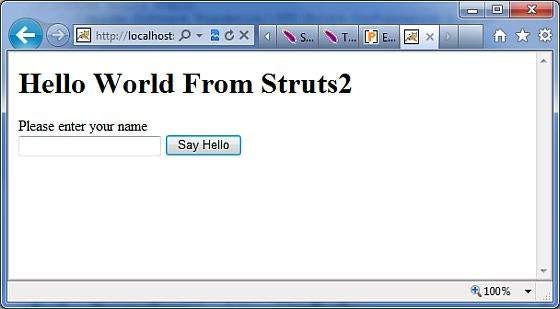
Enter a value “Struts2” and submit the page. You should see the next page
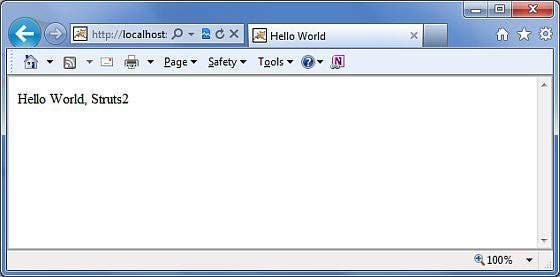
Note that you can defineindexas an action in struts.xml file and in that case you can call index page ashttp://localhost:8080/HelloWorldStruts2/index.action.Check below how you can define index as an action:
1
<?xml version="1.0" encoding="UTF-8"?><!DOCTYPE struts PUBLIC   "-//Apache Software Foundation//DTD Struts Configuration 2.0//EN"   "http://struts.apache.org/dtds/struts-2.0.dtd"><struts><constant name="struts.devMode" value="true" />   <package name="helloworld" extends="struts-default">
1
      <action name="index">            <result >/index.jsp</result>      </action>
1
      <action name="hello"             class="com.tutorialspoint.struts2.HelloWorldAction"             method="execute">            <result name="success">/HelloWorld.jsp</result>      </action>
1
   </package></struts>