SSH Passkeys: One Public Identity, Many Devices
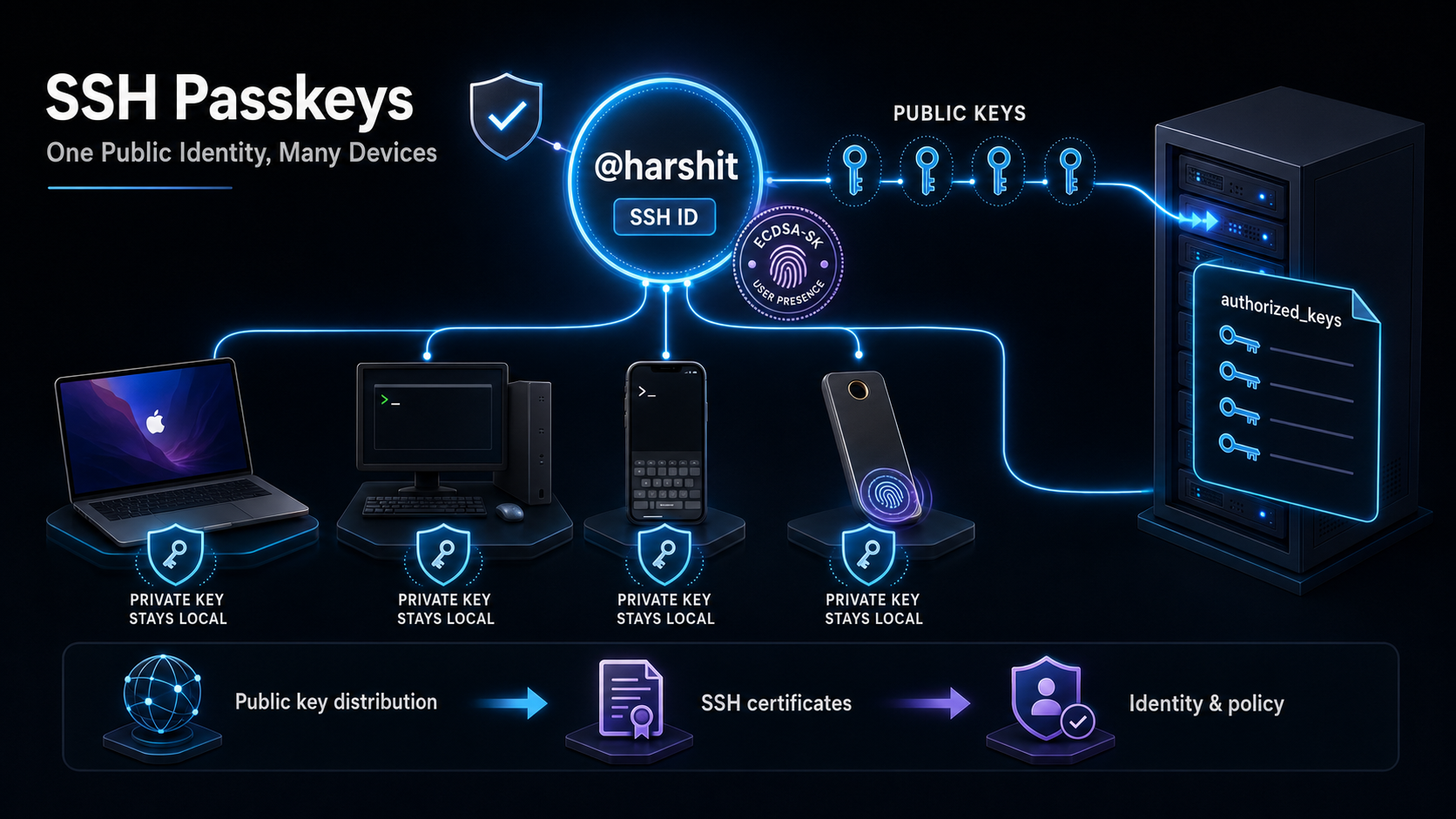
SSH ID
SSH access has a deceptively simple problem.
You own a laptop, a desktop, perhaps a work machine, a phone-connected terminal, and maybe a hardware security key. Every one of those devices can generate its own SSH key pair. That is good: private keys stay local. But it creates operational friction. Every server needs to know every public key you may use.
SSH ID makes that public-key distribution problem smaller.
It provides a stable URL for @harshit that publishes the public keys associated with that identity:
1
curl -fsSL https://sshid.io/harshit >> ~/.ssh/authorized_keys
Run this on a server you administer to append the published public keys to the account’s ~/.ssh/authorized_keys file. From that point, any corresponding private key held on one of Harshit’s trusted devices can authenticate to that account.
Treat the URL as a source of authorization. Review the keys before adding them to a sensitive server, and use a trusted HTTPS connection.
The important distinction: public distribution, private custody
A public SSH key is designed to be shared. It cannot be used to log in by itself. Authentication succeeds only when the client proves possession of its matching private key.
That means the useful split is:
| Component | Where it lives | What it does |
|---|---|---|
| Public key | SSH ID and the server’s authorized_keys | Identifies which private keys the server will accept |
| Private key | The original device or hardware authenticator | Creates the cryptographic proof during login |
| SSH ID profile | A signed public-key directory | Gives servers a single place to retrieve approved public keys |
The private keys do not need to travel through SSH ID for this design to work. The server only receives public material and a signature during the normal SSH authentication exchange.
Why this feels like one distributed SSH key
It is not literally one key copied everywhere. That would be a security downgrade.
Instead, it is one identity backed by multiple device-bound keys. Your Mac can have its key. Your Windows computer can have a different one. A security key can have another. All are published under the same SSH ID and treated as valid ways to prove the same operator identity.
This gives you two things at once:
- Device isolation: losing one device does not expose every other device.
- Operational simplicity: a new server can trust the entire approved key set with one retrieval command.
When a device is replaced or revoked, remove its public key from the SSH ID profile and refresh the server’s authorized-key list according to your access-change process.
The trust story: signed keys
The page’s public keys are signed by @harshit’s encryption key. That signature is the integrity mechanism: it lets a verifier distinguish a legitimate published key from an arbitrary key someone tried to insert into the list.
But do not confuse signed publication with automatic server trust. The first time you choose to fetch this identity, you are deciding that this profile is an authorization source for that server account. For important infrastructure, verify the identity and signing fingerprint through an independent, trusted channel before onboarding it.
ECDSA-SK: the key that asks for you
The strongest option here is generally ECDSA-SK: an SSH FIDO security-key credential with user presence verification.
Normal SSH keys are files. Protect the file well and it is a strong credential, but malware or a copied private key may be able to use it without you physically approving each login.
ECDSA-SK changes the shape of the proof:
- The private credential is bound to a security authenticator, often hardware-backed.
- The SSH client asks the authenticator to sign the login challenge.
- The authenticator requires user presence before it signs.
- Only then does the server receive a valid response.
On Apple devices, this can use platform authentication such as Touch ID or Face ID where supported by the device, operating system, and SSH client. On Windows, it can integrate with Windows Hello in supported configurations. The key point is not the biometric itself; it is that the authenticator refuses to sign until a human is present.
Select ECDSA-SK in SSH ID or Termius whenever your device and target environment support it.
Setting it up
Server: authorize the published keys
On the server, add the SSH ID public-key set to the account that should accept logins:
1
curl -fsSL https://sshid.io/harshit >> ~/.ssh/authorized_keys
Before doing this on production infrastructure, inspect the response and ensure ~/.ssh and authorized_keys have secure ownership and permissions. Do not use this command blindly against an identity you have not verified.
Termius: authenticate using SSH ID
When creating or editing a host in Termius:
- Open the host’s authentication settings.
- Choose SSH ID as the host authentication method.
- Select the appropriate identity, preferably its ECDSA-SK credential.
- Authenticate with the device prompt when connecting.
Operational guidance
SSH ID simplifies onboarding; it does not remove the need for access hygiene.
- Use separate Unix accounts where people need separate audit trails.
- Prefer short-lived access, configuration management, or a controlled refresh process for production fleets.
- Remove a lost or retired device’s public key promptly.
- Keep an emergency, independently managed break-glass path for critical systems.
- Disable password SSH login once key-based access is tested, where your recovery process allows it.
- Never publish, paste, upload, or back up the private portion of an SSH key as if it were public data.
SSH passkeys are not magic. They are better key management: many securely held private keys, one auditable public identity, and hardware-backed proof when it matters.
Alternatives to SSH ID
SSH ID is a lightweight public-key distribution service. Its closest substitutes publish a stable set of public keys. Other products solve a different, larger problem: issuing short-lived credentials, brokering access, enforcing SSO, or keeping SSH off the public Internet.
Choose the category before choosing the product.
| Option | Model | Best fit | Trade-off |
|---|---|---|---|
| GitHub user keys | Public keys attached to a developer account | Personal servers and developer-centric homelabs | Static keys; GitHub becomes part of the trust chain |
| GitLab public keys | Similar public-account key directory | Teams already standardized on GitLab | Same static-key lifecycle problem |
| Smallstep / step-ca | Self-managed SSH certificate authority | A small team that wants standard OpenSSH certificates | You operate the CA and its identity integration |
| HashiCorp Vault SSH | Signed SSH certificates or one-time passwords | Infrastructure already using Vault | More moving parts than a key directory |
| Teleport | Identity-aware access platform with short-lived certificates | Larger fleets needing SSO, MFA, audit trails, and session control | A complete access plane, not a tiny drop-in |
| Tailscale SSH | Tailnet identity and policy controls SSH reachability | Private networks, laptops, and homelabs | Requires a Tailscale network on clients and hosts |
| Cloudflare Access for Infrastructure | Tunnelled, policy-controlled SSH with ephemeral certificates | Internet-facing infrastructure without inbound SSH ports | Depends on Cloudflare’s Zero Trust stack |
Best Mentions
1. GitHub or GitLab: the pragmatic public directory
For many developers, GitHub is already a public key registry. A server can fetch a user’s public keys from a stable profile endpoint, such as:
1
curl -fsSL https://github.com/USERNAME.keys >> ~/.ssh/authorized_keys
GitLab offers a comparable pattern. This is the simplest alternative when the identity is already managed on that platform.
The limitation is important: this remains long-lived public-key distribution. It does not give you certificate expiry, per-session MFA, centralized authorization policy, or a complete audit trail. It is close to SSH ID in spirit, but it uses a source-control account as the identity anchor.
2. Tailscale SSH: authorize through the private network
Tailscale SSH combines private network reachability with identity-aware SSH policy. Hosts and users join a tailnet, and policy decides who may connect to which host and account.
The attractive property is that you usually do not expose port 22 publicly at all. A machine can be reachable only through the private mesh, while authentication and authorization are governed by tailnet identity.
This is excellent for a homelab, distributed personal devices, and small teams. It is less suitable if you need ordinary SSH access from unmanaged machines that cannot join the tailnet.
3. Cloudflare Access: tunnel SSH through a Zero Trust edge
Cloudflare Access for Infrastructure provides another identity-aware route. A Cloudflare Tunnel connects the server outward; users authenticate through Access policies; the platform can issue short-lived SSH certificates and record SSH command activity.
The operational benefit is clear: the server does not need an Internet-facing inbound SSH port. The decision is made at the access layer, before a user reaches the host.
It is a good option for remote infrastructure and browser-based operations. It is a bigger architectural dependency than SSH ID, so assess availability, policy ownership, and vendor fit.
A simple decision rule
- Use SSH ID, GitHub keys, or GitLab keys when you are managing a personal server or homelab and want an easy way to consolidate trusted public keys.
- Use Smallstep or an OpenSSH CA when you own the infrastructure and want expiring, standards-based SSH access without adopting a large access platform.
- Use Vault when SSH authorization belongs inside your existing secrets and policy system.
- Use Teleport, Tailscale SSH, or Cloudflare Access when identity, private connectivity, MFA, access logs, and organization-wide policy matter more than maintaining plain
authorized_keysfiles.
The progression is deliberate: public keys solve distribution; certificates solve lifecycle; access platforms solve identity, policy, and audit. SSH ID belongs in the first category—and that is precisely why it stays simple.