How Mobile Push Notifications Actually Work: A Backend Engineer’s Guide to Signal vs. State Synchronization
A deep dive into mobile push notifications as a distributed state synchronization problem operating across APNs, iOS background governors, and backend event pipelines.
Today, I want to take a deep dive into a feature that almost every software engineer underestimates: Mobile Push Notifications.
Context : Lifafa is an email client like apple mail or gmail app or outlook mail app for phone
On the surface, it sounds like a trivial feature:
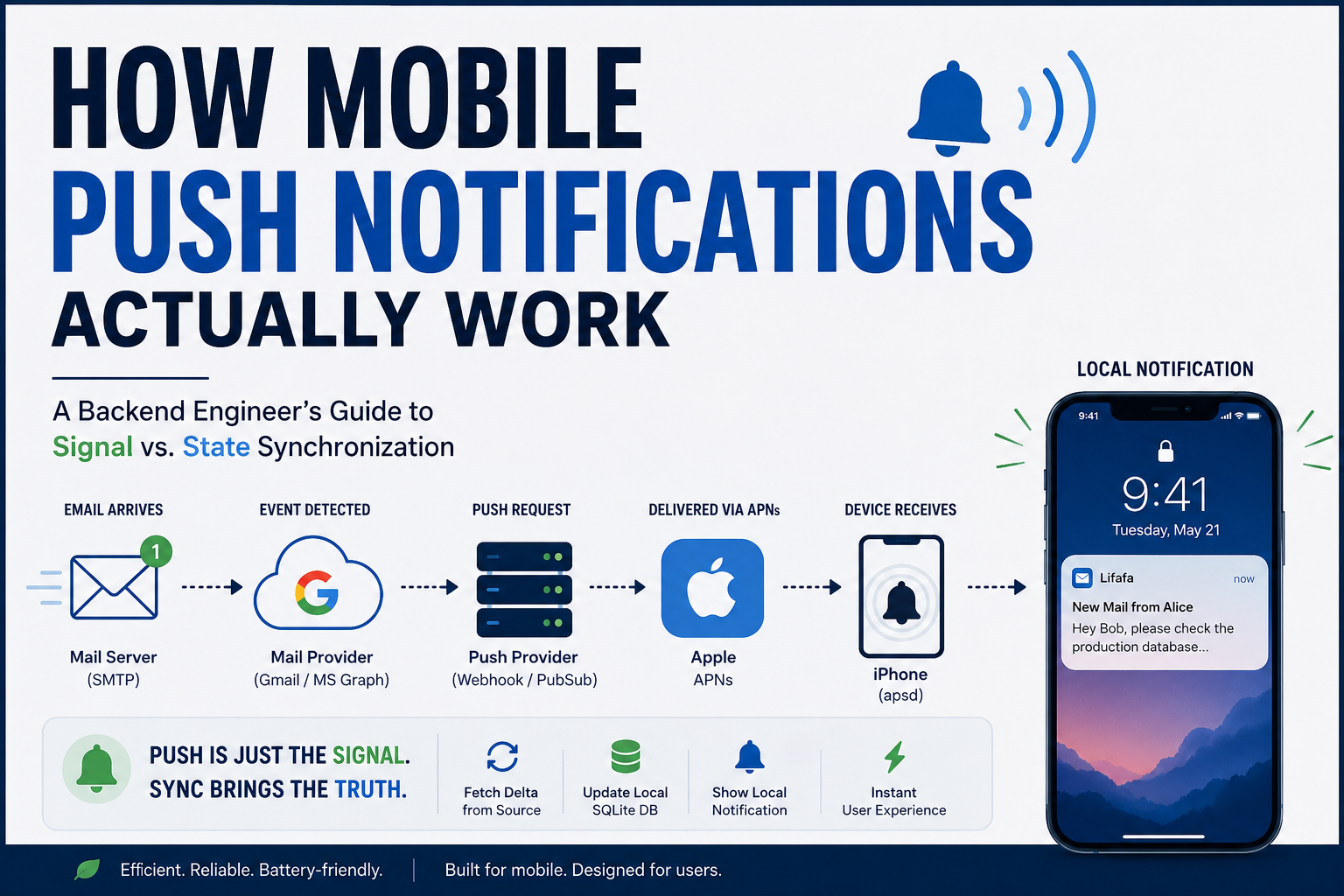
An email arrives → the phone buzzes → the user sees a notification banner.
Simple, right? Wrong.
When you look under the hood as a backend engineer, you quickly realize this isn’t a notification feature at all. It is a distributed state synchronization problem operating across network boundaries, strict power constraints, and operating system governors.
Using Lifafa—an iOS email client—as our case study, let me break down how this architecture actually works under the hood, layer by layer, from network sockets to database transactions.
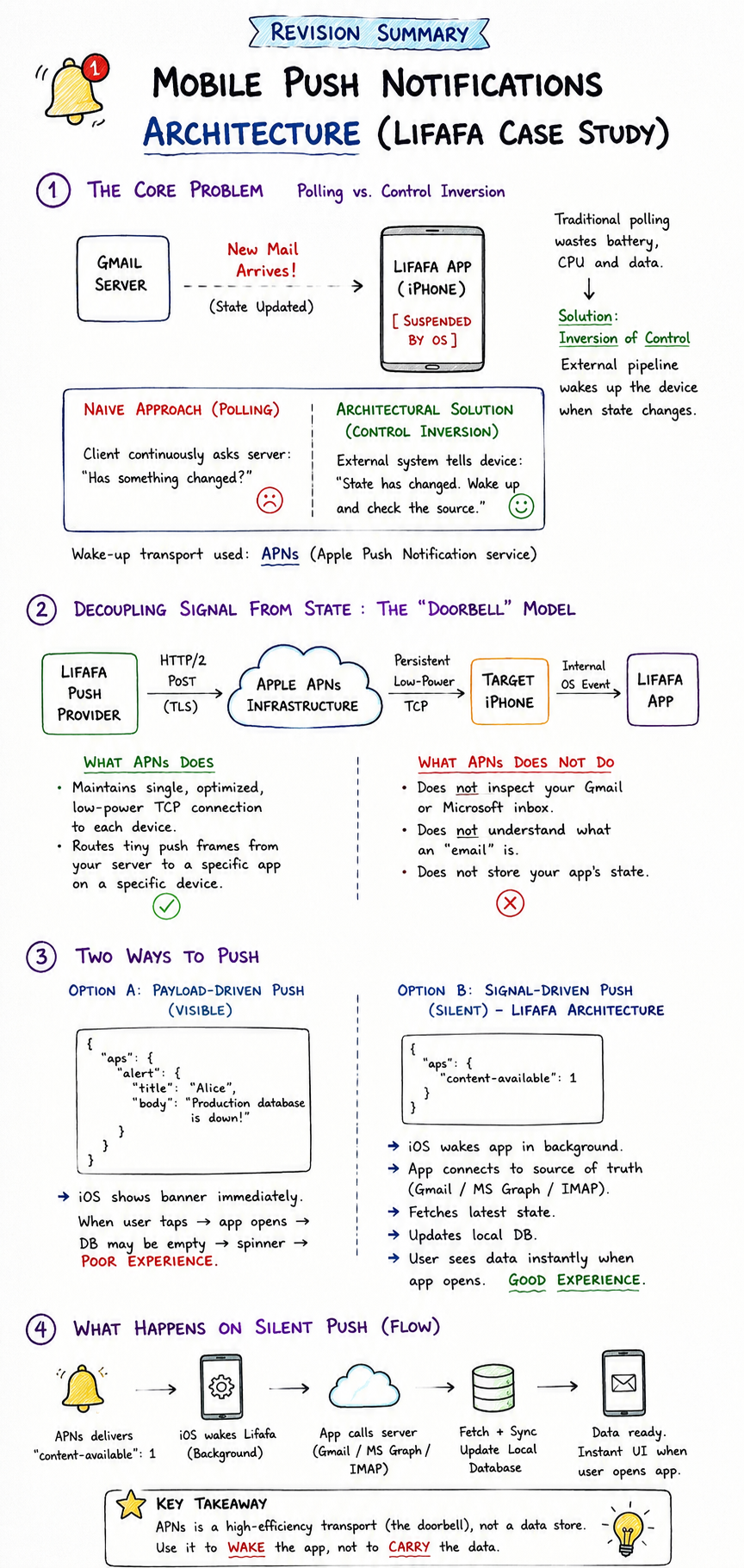
1. The Core Problem: Polling vs. Control Inversion
Let’s start with the fundamental problem.
Suppose a user links their Gmail account to Lifafa. They read their inbox, close the app, and lock their iPhone. A few minutes later, a new email arrives on Google’s servers. Gmail knows about it immediately. But Lifafa on the iPhone is sitting in memory, completely suspended by iOS.
1
2
3
4
5
[ Gmail Server ]                     [ Lifafa App (iPhone) ]
       │                                        │
       │  New Mail Arrives!                     │  [SUSPENDED BY OS]
       │  (State Updated)                       │  (No CPU execution,
       │                                        │   No active networking)
How does Lifafa discover this new state?
Why Polling Fails on Mobile
In a traditional backend-to-backend system, a service might open a persistent TCP socket or poll an endpoint every few seconds: “Is there new data? How about now?”
This model works fine for a server running inside a cloud container connected to main power. It is a disaster on mobile devices.
If 100 apps on your phone maintained open TCP sockets and polled their respective backends every 5 seconds, your phone’s battery would drain in two hours, the CPU would overheat, and your cellular data would evaporate.
Because of this, operating systems like iOS enforce aggressive resource management. When an app goes into the background, the OS suspends its execution context.
The Inversion of Control
To solve this, we must invert the relationship:
- Naive Approach (Polling): The client continuously asks the server: “Has something changed?”
- Architectural Solution (Control Inversion): An external delivery pipeline alerts the device: “State has changed on the server. Wake up and check the source of truth.”
That external wake-up transport is APNs (Apple Push Notification service).
2. Decoupling Signal from State: The “Doorbell” Model
A common misconception among developers is that APNs handles application data or monitors third-party servers.
It does not. APNs is purely a high-efficiency pub/sub transport network managed by Apple.
1
2
3
4
5
6
7
8
9
10
11
12
13
14
15
16
17
18
┌─────────────────────────┐
│  Lifafa Push Provider   │
└────────────┬────────────┘
             │ (HTTP/2 POST request over TLS)
             ▼
┌─────────────────────────┐
│   Apple APNs Infrastructure
└────────────┬────────────┘
             │ (Persistent low-power TCP connection)
             ▼
┌─────────────────────────┐
│      Target iPhone      │
└────────────┬────────────┘
             │ (Internal OS event dispatch)
             ▼
┌─────────────────────────┐
│       Lifafa App        │
└─────────────────────────┘
What APNs Does
- Maintains a single, optimized, low-power TCP connection to every active Apple device.
- Routes tiny push frames from your backend server to a specific app instance on a specific physical device.
What APNs Does NOT Do
- It does not inspect your Gmail or Microsoft inbox.
- It does not understand what an “email” is.
- It does not store your application’s state.
This leads us to a key architectural design choice: Payload-Driven Pushes vs. Signal-Driven (Silent) Pushes.
Option A: The Payload-Driven Push (Visible)
The backend sends a push containing the actual email text in the payload:
1
2
3
4
5
6
7
8
{
  "aps": {
    "alert": {
      "title": "Alice",
      "body": "Production database is down!"
    }
  }
}
APNs delivers it, and iOS displays the banner immediately. But what happens when the user taps that banner? The app opens, its local SQLite database is still empty, and the user stares at a loading spinner while the app fetches the email body over the network. That is a poor user experience.
Option B: The Signal-Driven Push (Silent) — The Lifafa Architecture
Instead of putting payload data in APNs, we treat APNs purely as a wake-up signal (a remote doorbell).
1
2
3
4
5
{
  "aps": {
    "content-available": 1
  }
}
When iOS receives "content-available": 1:
- It temporarily un-suspends Lifafa in the background.
- Lifafa opens an HTTPS connection directly to the source of truth (Gmail / MS Graph / IMAP).
- Lifafa fetches the updated state and writes it directly to its local SQLite database.
- Lifafa schedules a Local Notification.
1
2
3
4
5
6
7
8
9
10
11
12
13
14
15
16
Silent Push Received
        │
        ▼
iOS grants background CPU time
        │
        ▼
Lifafa fetches delta directly from Gmail (HTTPS)
        │
        ▼
Local SQLite DB updated (Inbox state synced)
        │
        ▼
Lifafa schedules Local Notification
        │
        ▼
User taps banner ──► App opens INSTANTLY with data already loaded!
3. The Full End-to-End Scenario: From Network Packets to SQLite
Let’s trace the full journey of a single email arriving in real-time, detailing every protocol, network boundary, and system state along the way.
1
2
3
4
5
6
7
8
9
10
11
12
13
14
15
16
 [Alice]
    │
    │ 1. SMTP (Port 587/25)
    ▼
[Gmail MTA] ─── 2. Webhook / PubSub ───► [Lifafa Push Provider]
                                                │
                                                │ 3. HTTP/2 POST (TLS)
                                                ▼
   [Lifafa App] ◄── 5. App Wake-up ◄─── [Apple APNs]
        │                (Background)           │
        │                                       │ 4. Persistent TCP Socket
        │ 6. HTTPS REST                         ▼
        ├───► [Gmail API]                [iPhone / apsd]
        │        (Fetch Delta)
        ▼
[Local SQLite DB] ─── 7. UNNotification ───► [Lock Screen Banner]
Step 1: Mail Ingestion (SMTP)
- Alice sends an email to
bob@gmail.com. - Her mail client uses SMTP (Port 587) to hit her outbound provider, which routes the message via MX lookup over SMTP (Port 25) to Google’s MTA.
- Gmail writes the message to its storage layer and updates Bob’s account state index (
historyId: 98412).
Step 2: Event Ingestion (Google Pub/Sub / Webhook)
- Gmail detects the state change on Bob’s account.
- Because Bob linked his account to Lifafa, Gmail’s infrastructure emits a Cloud Pub/Sub message or HTTP Webhook event to Lifafa’s backend Push Provider Service:
1
2
3
4
{
  "emailAddress": "bob@gmail.com",
  "historyId": "98412"
}
Step 3: Device Lookup & APNs Frame Dispatch (HTTP/2)
- The Lifafa Push Provider receives the webhook and queries its user mapping table:
1
2
3
SELECT apns_device_token
FROM user_devices
WHERE account_id = 'bob@gmail.com';
- The database returns Bob’s active APNs routing token (
a7f93c...8b1e). - The Push Provider opens a multiplexed HTTP/2 connection over TLS to Apple’s push gateway (
api.push.apple.com:443) and posts the silent frame:
1
2
3
4
5
POST /3/device/a7f93c...8b1e HTTP/2
Host: api.push.apple.com
authorization: bearer <JWT_PROVIDER_TOKEN>
apns-push-type: background
apns-priority: 5
1
2
3
4
5
{
  "aps": {
    "content-available": 1
  }
}
Step 4: Routing over the Mobile Network (TCP)
- APNs validates the JWT signature and maps the token to Bob’s physical device.
- APNs transmits the frame across Apple’s persistent, encrypted TCP socket connected to Bob’s iPhone.
- The system daemon on the iPhone (
apsd—Apple Push Notification service daemon) receives the packet over cellular/Wi-Fi.
Step 5: Operating System Resource Evaluation
apsdunpacks the frame and identifies"content-available": 1.- The iOS Kernel evaluates system conditions:
- Is the battery critically low?
- Has Lifafa exceeded its allocated background execution budget?
- If checks pass, iOS un-suspends Lifafa, grants it a short execution budget (~30 seconds), and invokes its background handler.
Step 6: State Sync & Reconciliation (HTTPS / SQLite)
- Lifafa wakes up in the background. It does not trust the push payload for mailbox data.
- Lifafa opens an HTTPS REST session directly to Google’s API using Bob’s OAuth 2.0 token:
1
GET https://gmail.googleapis.com/gmail/v1/users/me/history?startHistoryId=98411
- Gmail returns the delta changes containing the new message ID.
- Lifafa executes a second call (
GET /gmail/v1/users/me/messages/{id}), parses the payload, and executes an atomic transaction on its local SQLite database:
1
2
3
4
5
BEGIN TRANSACTION;
INSERT INTO messages (id, thread_id, sender, snippet, timestamp)
VALUES ('msg_101', 'th_404', 'alice@domain.com', 'Hey Bob...', 1770511665);
UPDATE mailbox_meta SET unread_count = unread_count + 1;
COMMIT;
Step 7: Local Notification Triggering
- With the local database state fully reconciled, Lifafa invokes the native iOS
UNUserNotificationCenterAPI to schedule a Local Notification. - iOS renders the alert banner on Bob’s lock screen.
Step 8: User Action
- Bob taps the notification banner.
- iOS brings Lifafa into the foreground.
- Because the message was already fetched and committed to local SQLite during Step 6, the screen renders instantly. Zero network lag, zero loading spinners.
4. Key Backend Engineering Pitfalls
When designing systems around push notification pipelines, keep these critical backend realities in mind:
1. A Silent Push Is NOT an Instant RPC
Do not treat silent pushes as synchronous Remote Procedure Calls. You cannot write backend code assuming:
1
executeFunctionOnPhoneNow()
iOS is a resource governor. If a user’s phone is in Low Power Mode or thermal throttling, iOS may delay, batch, or drop silent pushes entirely.
Rule: Treat push notifications as hints, not guarantees. Your client logic must be idempotent. Do not write logic like “Increment unread count by 1 on push.” Instead, write: “On push, fetch state from server and set local count equal to server count.”
2. Device Token Lifecycles
APNs Device Tokens are not static constants. They rotate when:
- A user restores their phone from a backup.
- The application is reinstalled or updated.
- Operating system security policies trigger an update.
Your backend Push Provider must gracefully handle invalid token responses from Apple (410 Unregistered or 400 BadDeviceToken) and update or prune device mappings immediately to avoid throttling.
3. Distributed Boundary Nuances
Because this flow crosses multiple independent systems (Gmail → Push Provider → APNs → iOS Kernel → Lifafa App), network requests can fail, arrive out of order, or deliver duplicate events.
Relying on state synchronization (fetching deltas via version numbers or historyId sequence numbers) rather than event counting ensures that your application remains consistent regardless of network anomalies.
Conclusion
What looks like a simple UI feature on a smartphone is actually a multi-stage distributed system.
APNs provides the delivery transport, your backend webhook infrastructure acts as the event bridge, the mail server remains the single source of truth, and the mobile client acts as the local state reconciler.