Beginners Concepts in Kubernetes
Beginners Concepts in Kubernetes
What is Kubernetes
- Checkout thisIllustrated-Childrens-Guide-to-Kubernetes.pdfor watch video of same if you are audio visual person
here is the best Explain like i am 5 (ELIF5) definition of Kubernetes
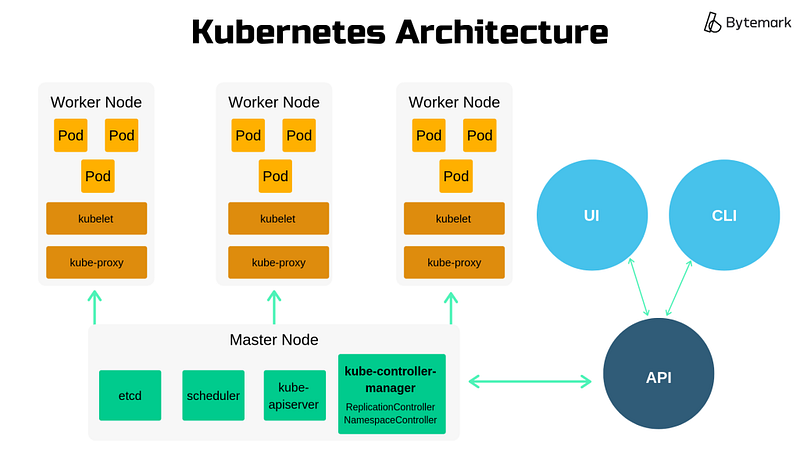
Whats Kuberenetes made of ?
Why do we need a service?
Kubernetes podsare ephemeral in nature.Deploymentobject(s) can create and destroy pods dynamically. Each pod does have its own IP address, hence in a deployment, the set of pods running change all the time, so do the IP address for the pods.
This leads to a problem: if some set of pods (call them “backends”) provides functionality to other pods (call them “frontends”) inside your cluster, how do the frontends find out and keep track of which IP address to connect to , because the front end might want to connect to a pod for a backend request that was destroyed and another pod was created whose IP the frontend does not know.
So our connection between frontend ,backend and data service all communicating via services would look like this :
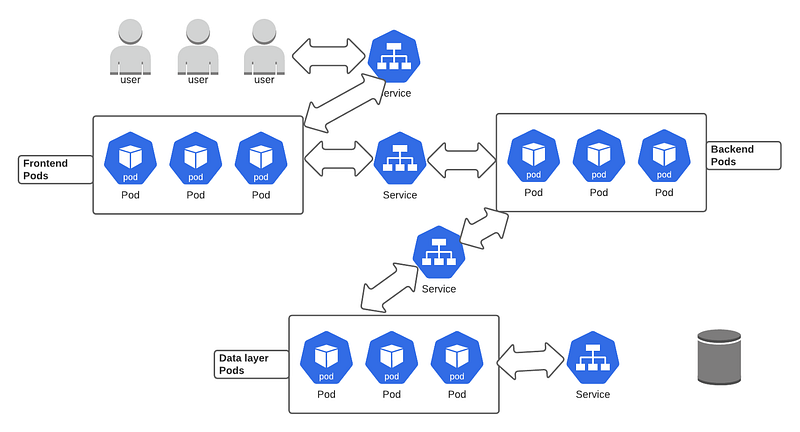
Suppose there were no services the pods would have to connect with other pods or any other object by themselves. Services enable connectivity between the group of pods. They also enable loose coupling between microservices in applications.
How does pod communicate ?
Let’s say we deployed a pod that is hosting an application. Can one directly talk to the pod using its IP address? Something like http://10.264.0.2?
Well, not really , as the pod IP is local IP , issued by the network or machine the pods is running on similar to what you run when you run your local machine localhost while making a website , your friend cannot open the website you are running on your localhost.
So with pods its same scenario which looks like this :
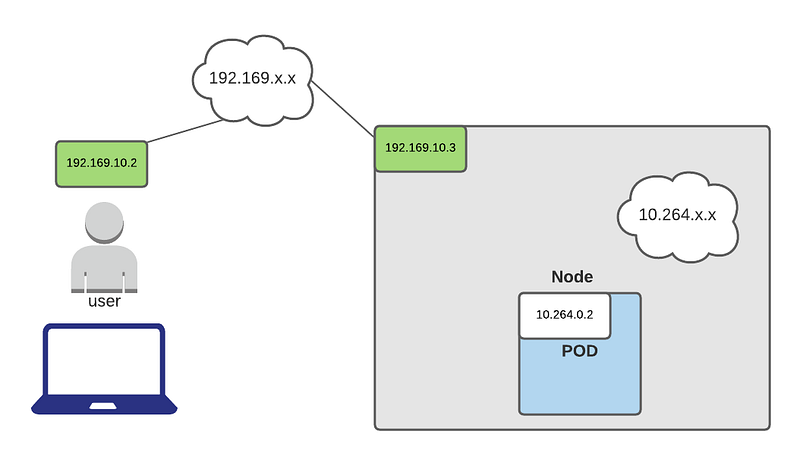
Clearly, the user cannot talk with the pod as they are in a separate network. So what are the options for the users to reach the application hosted in the pod?
Solution :
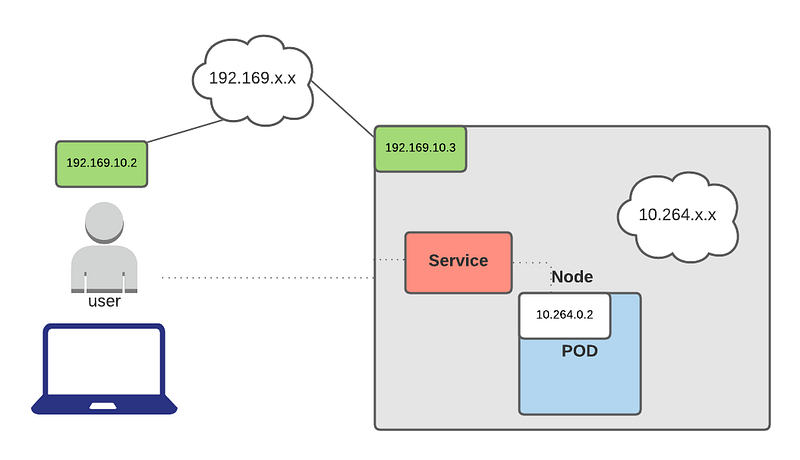
This is where the service object in K8s helps; it’s like the glue that connects different objects in K8s (similar to what routers do in networking, i.e., connect different networks). The service is like a virtual server and has its own IP address within the K8s cluster it resides in. So it doesn’t make sense to use Pod IP addresses directly. With a Service, you get a stable IP address that lasts for the life of the Service, even as the IP addresses of the member Pods change
What is a Service ?
The idea of aServiceis to group a set of Pod endpoints into a single resource. You can configure various ways to access the grouping. By default, you get a stable cluster IP address that clients inside the cluster can use to contact Pods in the Service.
A Service identifies its member Pods with a selector. For a Pod to be a member of the Service, the Pod must have all of the labels specified in the selector. Alabelis an arbitrary key/value pair that is attached to an object.
Different Type of Service
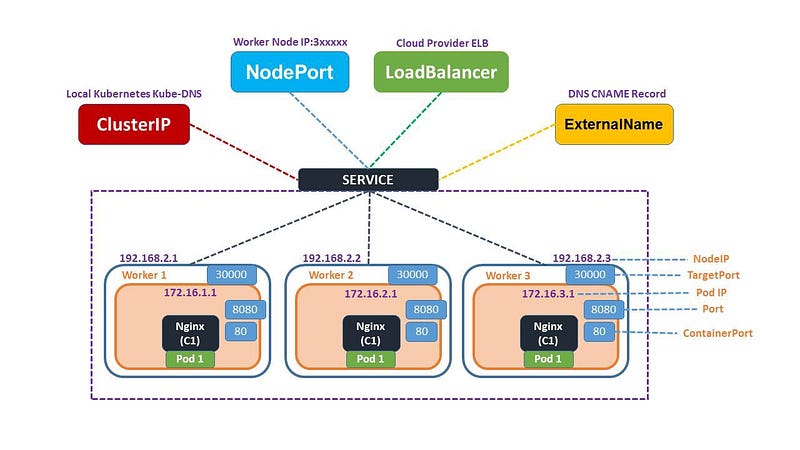
Kubernetes allows us to specify what kind of service we want by specifying the “servicetypes” tag in the .yaml file
- ClusterIP (default):Internal clients send requests to a stable internal IP address.
- NodePort:Clients send requests to the IP address of a node on one or more
nodePortvalues that are specified by the Service.TheNodePorttype is an extension of theClusterIPtype. So a Service of typeNodePorthas a cluster IP address. - LoadBalancer:Clients send requests to the IP address of a network load balancer.he
LoadBalancertype is an extension of theNodePorttype. So a Service of typeLoadBalancerhas a cluster IP address and one or morenodePortvalues. - ExternalName:Internal clients use the DNS name of a Service as an alias for an external DNS name.
- Headless:You can use aheadless servicewhen you want a Pod grouping, but don’t need a stable IP address.
Cluster IP
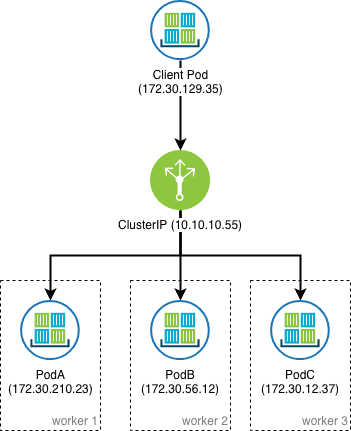
- When you create a Service of type
ClusterIP, Kubernetes creates a stable IP address that is accessible from nodes in the cluster. - This service is accessed using kubernetes proxy.
1
apiVersion: v1kind: Servicemetadata:  name: my-cip-servicespec:  selector:    app: metrics    department: sales  type: ClusterIP  ports:  - protocol: TCP    port: 80    targetPort: 8080
- which will create a service with cluster IP but no external IP
1
NAME             TYPE        CLUSTER-IP      EXTERNAL-IP   PORT(S)my-cip-service   ClusterIP   10.11.247.213   none          80/TCP
- Clients in the cluster call the Service by using the cluster IP address and the TCP port specified in the
portfield of the Service manifest - The request is forwarded to one of the member Pods on the TCP port specified in the
targetPortfield - For the preceding example, a client calls the Service at
10.11.247.213on TCP port 80. - The request is forwarded to one of the member Pods on TCP port 8080
- The member Pod must have a container that is listening on TCP port 8080.
- If there is no container listening on port 8080, clients will see a message like “Failed to connect” or “This site can’t be reached”.
Node Port
- When you create a Service of type
NodePort, Kubernetes gives you anodePortvalue. - NodePort service helps expose the Service on each Node’s IP at a static port (the
NodePort)
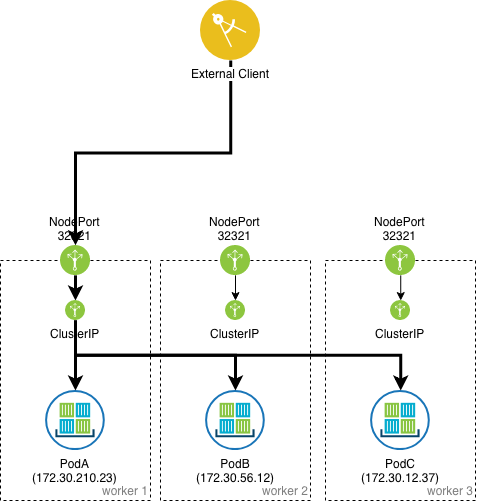
- Then the Service is accessible by using the IP address of any node along with the
nodePortvalue.
1
apiVersion: v1kind: Servicemetadata:  name: my-np-servicespec:  selector:    app: products    department: sales  type: NodePort  ports:  - protocol: TCP    port: 80    targetPort: 8080
- After you create the Service, you can use
kubectl get service -o yamlto view its specification and see thenodePortvalue.
1
spec:  clusterIP: 10.11.254.114  externalTrafficPolicy: Cluster  ports:  - nodePort: 32675    port: 80    protocol: TCP    targetPort: 8080
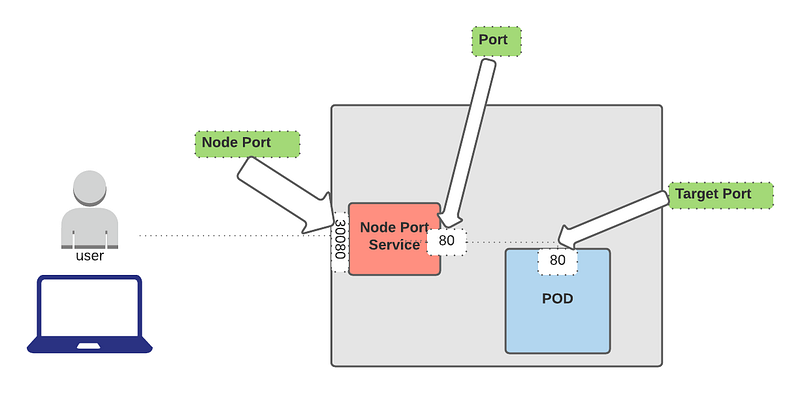
- External clients call the Service by using the external IP address of a node along with the TCP port specified by
nodePort - The request is forwarded to one of the member Pods on the TCP port specified by the
targetPortfield. - For example, suppose the external IP address of one of the cluster nodes is
203.0.113.2. Then for the preceding example, the external client calls the Service at203.0.113.2on TCP port 32675. - The request is forwarded to one of the member Pods on TCP port 8080. The member Pod must have a container listening on TCP port 8080.
- The
NodePortService type is an extension of theClusterIPService type. So internal clients have two ways to call the Service:
1
Note: You can specify your own nodePort value in the 30000--32767 range. However, it's best to omit the field and let Kubernetes allocate a nodePort for you. This avoids collisions between Services.
Use
clusterIPandport.Use a node’s IP address and
nodePort.
- For some cluster configurations, theexternal HTTP(S) load balanceruses a Service of type
NodePort - An external HTTP(S) load balancer is a proxy server, and is fundamentally different from thenetwork load balancer
Load Balancer
- Exposes the service via the cloud provider’s load balancer.
- For clusters running onpublic cloudproviders like AWS or Azure, creating a load LoadBalancer service provides an equivalent to a clusterIP service,
- extending it to an external load balancer that is specific to the cloud provider.
- Kubernetes will automatically create the load balancer, provide firewall rules if needed, and populate the service with the external IP address assigned by the cloud provider.
ExternalName
- ExternalName services are similar to other Kubernetes services; however, instead of being accessed via a clusterIP address,
- it returns a CNAME record with a value that is defined in the externalName: parameter when creating the service.
— — — — — — — — — — — — — — — — — — — — — — — — — — — — — —
Service vs Ingress vs Load Balancer
- A Kubernetes
LoadBalanceris a type ofService. - A Kubernetes
Ingressis not a type ofService. It is a collection of rules. An Ingress Controller in your cluster watches forIngressresources, and attempts to update the server side configuration according to the rules specified in theIngress. - Load Balancerstend to be a little simpler than Ingresses.
- Ingresses might come with nice features like TLS/HTTPS termination and limited HTTP routing.
- Unlike all the above examples, Ingress is actually NOT a type of service. Instead, it sits in front of multiple services and act as a “smart router” or entrypoint into your cluster.
- An ingress is really just a set of rules to pass to a controller that is listening for them. You can deploy a bunch of ingress rules, but nothing will happen unless you have a controller that can process them.
- You can deploy a bunch of ingress rules, but nothing will happen unless you have a controller that can process them.
- AnIngress Controlleris simply a pod that is configured to interpret ingress rules. One of the most popular ingress controllers supported by kubernetes is nginx. In terms of Amazon, ALBcan be usedas an ingress controller.
- ALoadBalancerservice could listen for ingress rules, if it is configured to do so.
- You can do a lot of different things with an Ingress, and there are many types of Ingress controllers that have different capabilities.
- The default GKE ingress controller will spin up aHTTP(S) Load Balancerfor you. This will let you do both path based and subdomain based routing to backend services.
- Ingress is probably the most powerful way to expose your services, but can also be the most complicated.
- There are many types of Ingress controllers, from theGoogle Cloud Load Balancer,Nginx,Contour,Istio, and more.
- There are also plugins for Ingress controllers, like thecert-manager, that can automatically provision SSL certificates for your services.
- Ingress is the most useful if you want to expose multiple services under the same IP address, and these services all use the same L7 protocol (typically HTTP). You
Things to look up
- Helm , Helm Chart
- Kubernetes’ liveliness and readiness probes , Startup probe
- Calico for CNI
- Conntrack and netfilter
Reference
- https://miguelmota.com/blog/kubernetes-explained-like-im-five/
- https://medium.com/swlh/kubernetes-services-part-1-399a0dd05211
- https://betterprogramming.pub/3-years-of-kubernetes-in-production-heres-what-we-learned-44e77e1749c8
- https://cloud.google.com/kubernetes-engine/docs/concepts/service
[Kubernetes Ingress Tutorial for Beginners simply explained Kubernetes Tutorial 22](https://www.youtube.com/watch?v=80Ew_fsV4rM&ab_channel=TechWorldwithNana) - https://platform9.com/blog/understanding-kubernetes-loadbalancer-vs-nodeport-vs-ingress/
- https://web.media.mit.edu/~holbrow/post/kubernetes-what-is-the-difference-between-a-loadbalancer-and-an-ingress/