Connecting to Linux|Ubuntu running in Virtual Machine to Terminal in Windows |WSL
Connecting to Linux|Ubuntu running in Virtual Machine to Terminal in Windows |WSL
Connecting to Linux|Ubuntu running in Virtual Machine to Terminal in Windows |WSL
After have installed Ubuntu, login your virtual Machine ubuntu with username and password inserted during the installation:
Install openssh-server
1
sudo apt-get update
1
sudo apt-get install openssh-server
Now Stop the Virtual Machine and go to the Network Setting of your Virtual Machine
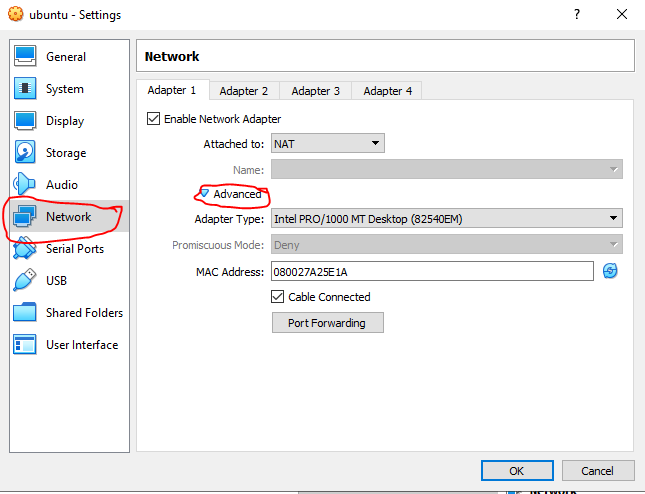
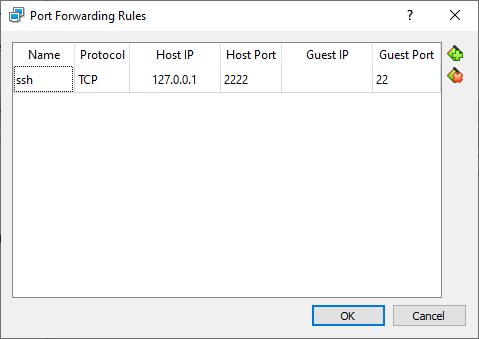
Click on the Advanced Option and add the following rule:
Start your Virtual Machine:
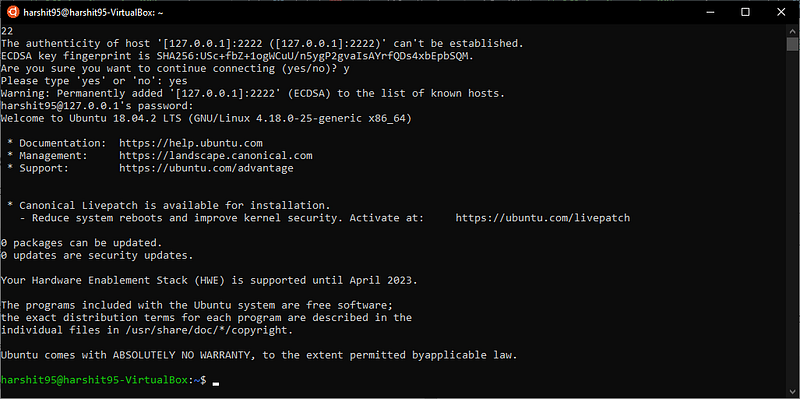
When your VM is started, open your terminal and try to connect:
1
ssh yourusername@127.0.0.1 -p 2222
and you will be inside your Virtual Machine
Reference
This post is licensed under CC BY 4.0 by the author.