Install Docker on Ubuntu 20.04 in Linux || Hello world in Docker in Ubuntu
Install Docker on Ubuntu 20.04 in Linux || Hello world in Docker in Ubuntu
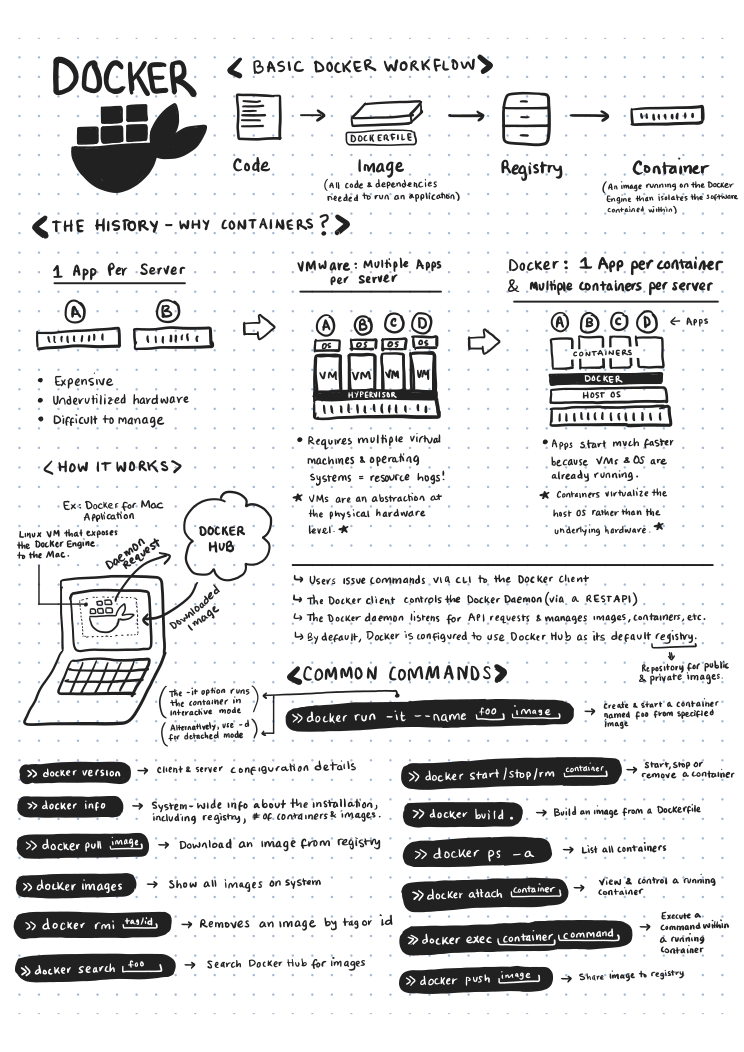
Dockers
- Why Docker ?
- What is Docker Container
- Docker with ML
- Why we should learn Docker
Setting up and Installing docker in Ubuntu
Step 1: Installing Docker
If you go to ubuntuinstallation page of dockerthere are multiple ways to install it the by first updating the package , importing the keys and then installing files one by one
Alternatively
First , Clean your system of any other docker files
1
$ sudo apt-get remove docker docker-engine docker.io containerd runc
Second , Install Docker usingconvenience script[link]
1
$ sudo apt install curl$ curl -fsSL https://get.docker.com -o get-docker.sh$ sudo sh get-docker.sh
which should take care of all the dependecies and install docker after the installation is complete you can check the version installed using the command
1
$ sudo docker version
and it should print something like this :
1
harshit95@harshit95-ThinkPad:~$ sudo docker versionClient: Docker Engine - Community Version:           19.03.12 API version:       1.40 Go version:        go1.13.10 Git commit:        48a66213fe Built:             Mon Jun 22 15:45:44 2020 OS/Arch:           linux/amd64 Experimental:      false
1
Server: Docker Engine - Community Engine:  Version:          19.03.12  API version:      1.40 (minimum version 1.12)  Go version:       go1.13.10  Git commit:       48a66213fe  Built:            Mon Jun 22 15:44:15 2020  OS/Arch:          linux/amd64  Experimental:     false containerd:  Version:          1.2.13  GitCommit:        7ad184331fa3e55e52b890ea95e65ba581ae3429 runc:  Version:          1.0.0-rc10  GitCommit:        dc9208a3303feef5b3839f4323d9beb36df0a9dd docker-init:  Version:          0.18.0  GitCommit:        fec3683
Step 2 :
Installing a docker image from docker hub and running it
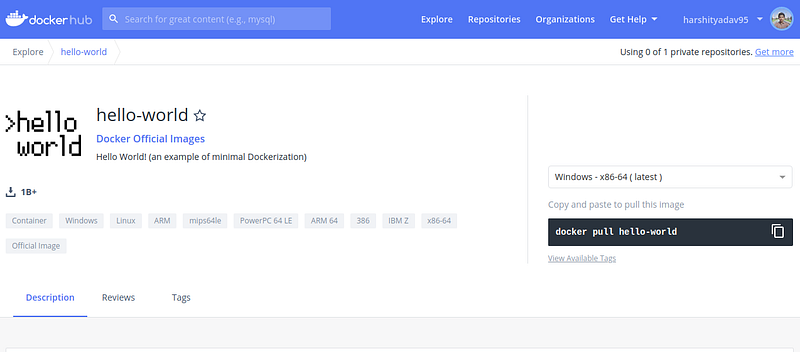
Docker Hub Hello World Image
Now to install this “ Hello-world” docker image in you system
1
$ sudo docker pull hello-world
If successfull you will get message like
1
Using default tag: latestlatest: Pulling from library/hello-world0e03bdcc26d7: Pull complete Digest: sha256:d58e752213a51785838f9eed2b7a498ffa1cb3aa7f946dda11af39286c3db9a9Status: Downloaded newer image for hello-world:latestdocker.io/library/hello-world:latest
Step 3:
Now to run the image
1
$ sudo docker run hello-world
If everything goes well you will see the following output :
1
Hello from Docker!This message shows that your installation appears to be working correctly.
1
To generate this message, Docker took the following steps: 1. The Docker client contacted the Docker daemon. 2. The Docker daemon pulled the "hello-world" image from the Docker Hub.    (amd64) 3. The Docker daemon created a new container from that image which runs the    executable that produces the output you are currently reading. 4. The Docker daemon streamed that output to the Docker client, which sent it    to your terminal.
1
To try something more ambitious, you can run an Ubuntu container with: $ docker run -it ubuntu bash
1
Share images, automate workflows, and more with a free Docker ID: https://hub.docker.com/
1
For more examples and ideas, visit: https://docs.docker.com/get-started/
Congrats you just run a Hello World in Docker
Reference :
- https://www.youtube.com/watch?v=fqMOX6JJhGo
- https://realpython.com/django-development-with-docker-compose-and-machine/