Video coming soon. Start with the reading below.
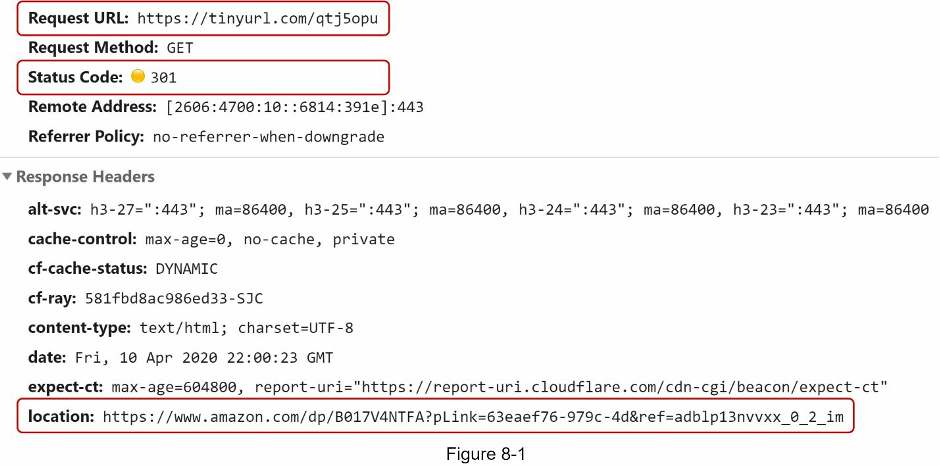
Figure 8-1 shows what happens when you enter a tinyurl onto the browser. Once the server receives a tinyurl request, it changes the short URL to the long URL with 301 redirect.
The detailed communication between clients and servers is shown in Figure 8-2.
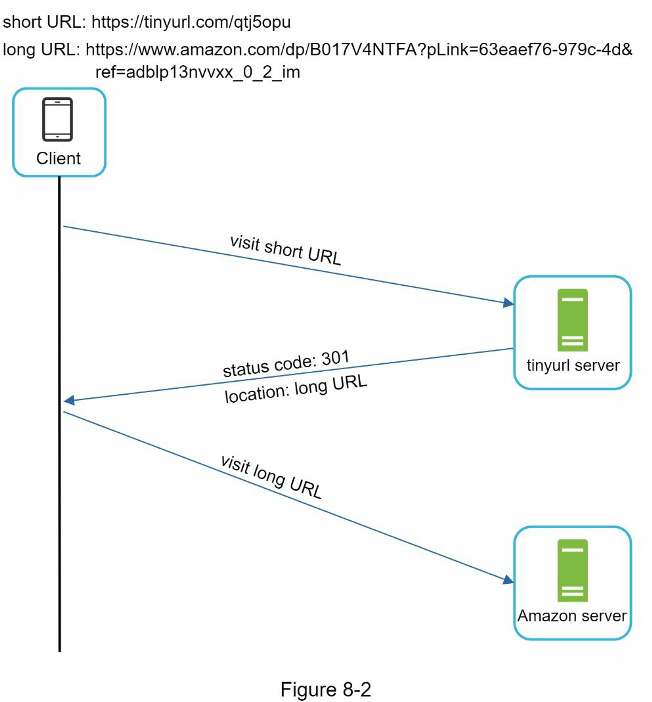
One thing worth discussing here is 301 redirect vs 302 redirect.
301 redirect. A 301 redirect shows that the requested URL is “permanently” moved to the long URL. Since it is permanently redirected, the browser caches the response, and subsequent requests for the same URL will not be sent to the URL shortening service. Instead, requests are redirected to the long URL server directly.
302 redirect. A 302 redirect means that the URL is “temporarily” moved to the long URL, meaning that subsequent requests for the same URL will be sent to the URL shortening service first. Then, they are redirected to the long URL server.
Each redirection method has its pros and cons. If the priority is to reduce the server load, using 301 redirect makes sense as only the first request of the same URL is sent to URL shortening servers. However, if analytics is important, 302 redirect is a better choice as it can track click rate and source of the click more easily.
The most intuitive way to implement URL redirecting is to use hash tables. Assuming the hash table stores <shortURL, longURL> pairs, URL redirecting can be implemented by the following:
- Get longURL: longURL = hashTable.get(shortURL)
- Once you get the longURL, perform the URL redirect.