Video coming soon. Start with the reading below.
We have discussed how to collect user contact info, send, and receive a notification. A notification system is a lot more than that. Here we discuss additional components including template reusing, notification settings, event tracking, system monitoring, rate limiting, etc.
Notification template
A large notification system sends out millions of notifications per day, and many of these notifications follow a similar format. Notification templates are introduced to avoid building every notification from scratch. A notification template is a preformatted notification to create your unique notification by customizing parameters, styling, tracking links, etc. Here is an example template of push notifications.
BODY: You dreamed of it. We dared it. [ITEM NAME] is back — only until [DATE]. CTA: Order Now. Or, Save My [ITEM NAME]
The benefits of using notification templates include maintaining a consistent format, reducing the margin error, and saving time.
Notification setting Users generally receive way too many notifications daily and they can easily feel overwhelmed. Thus, many websites and apps give users fine-grained control over notification settings. This information is stored in the notification setting table, with the following fields:
user_id bigInt channel varchar # push notification, email or SMS opt_in boolean # opt-in to receive notification
Before any notification is sent to a user, we first check if a user is opted-in to receive this type of notification.
Rate limiting To avoid overwhelming users with too many notifications, we can limit the number of notifications a user can receive. This is important because receivers could turn off notifications completely if we send too often.
Retry mechanism When a third-party service fails to send a notification, the notification will be added to the message queue for retrying. If the problem persists, an alert will be sent out to developers.
Security in push notifications For iOS or Android apps, appKey and appSecret are used to secure push notification APIs [6]. Only authenticated or verified clients are allowed to send push notifications using our APIs. Interested users should refer to the reference material [6].
Monitor queued notifications A key metric to monitor is the total number of queued notifications. If the number is large, the notification events are not processed fast enough by workers. To avoid delay in the notification delivery, more workers are needed. Figure 10-12 (credit to [7]) shows an example of queued messages to be processed.
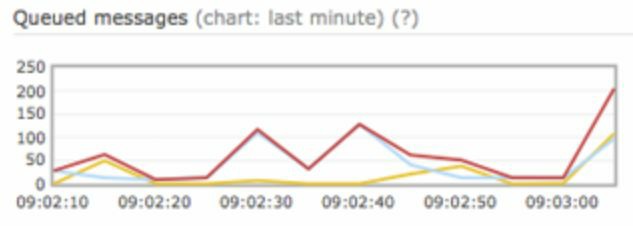
Figure 10-12
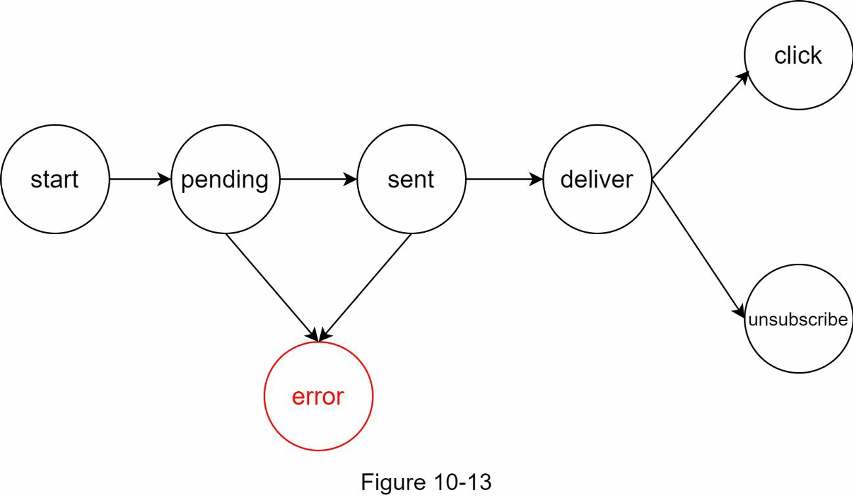
Events tracking Notification metrics, such as open rate, click rate, and engagement are important in understanding customer behaviors. Analytics service implements events tracking. Integration between the notification system and the analytics service is usually required. Figure 10-13 shows an example of events that might be tracked for analytics purposes.