SECTION VIDEOStep 2 - Propose high-level design and get buy-in
COMING SOONVideo coming soon. Start with the reading below.
Instead of showing the high-level design diagram from the beginning, we will use a slightly different approach. We will start with something simple: build everything in a single server. Then, gradually scale it up to support millions of users. By doing this exercise, it will refresh your memory about some important topics covered in the book.
Let us start with a single server setup as listed below:
- A web server to upload and download files.
- A database to keep track of metadata like user data, login info, files info, etc.
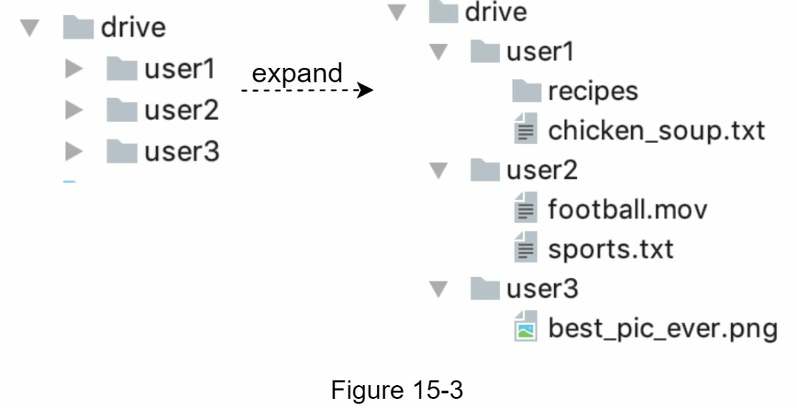
- A storage system to store files. We allocate 1TB of storage space to store files. We spend a few hours setting up an Apache web server, a MySql database, and a directory called drive/ as the root directory to store uploaded files. Under drive/ directory, there is a list of directories, known as namespaces. Each namespace contains all the uploaded files for that user. The filename on the server is kept the same as the original file name. Each file or folder can be uniquely identified by joining the namespace and the relative path.
Figure 15-3 shows an example of how the /drive directory looks like on the left side and its expanded view on the right side.
Progress is saved on this device.