SECTION VIDEODownload flow
COMING SOONVideo coming soon. Start with the reading below.
Download flow is triggered when a file is added or edited elsewhere. How does a client know if a file is added or edited by another client? There are two ways a client can know:
- If client A is online while a file is changed by another client, notification service will inform client A that changes are made somewhere so it needs to pull the latest data.
- If client A is offline while a file is changed by another client, data will be saved to the cache. When the offline client is online again, it pulls the latest changes.
Once a client knows a file is changed, it first requests metadata via API servers, then downloads blocks to construct the file. Figure 15-15 shows the detailed flow. Note, only the most important components are shown in the diagram due to space constraint.
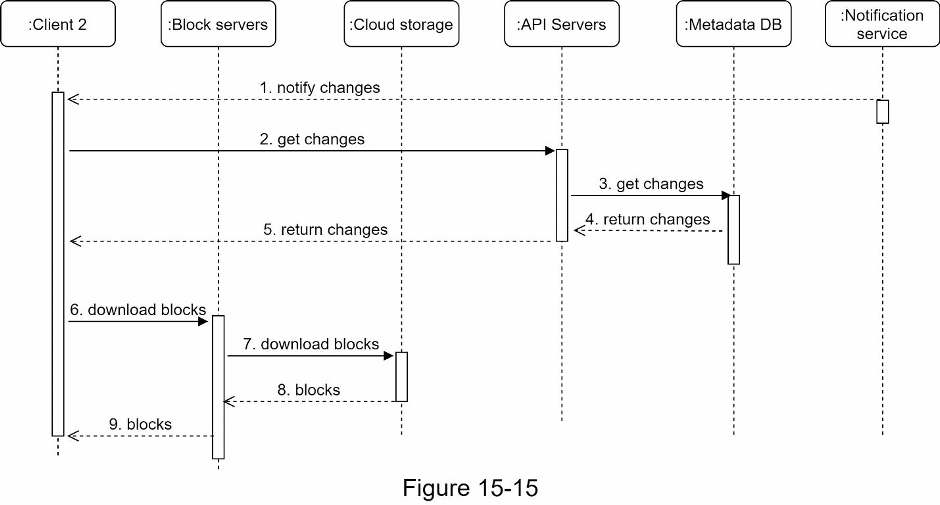
- Notification service informs client 2 that a file is changed somewhere else.
- Once client 2 knows that new updates are available, it sends a request to fetch metadata.
- API servers call metadata DB to fetch metadata of the changes.
- Metadata is returned to the API servers.
- Client 2 gets the metadata.
- Once the client receives the metadata, it sends requests to block servers to download blocks.
- Block servers first download blocks from cloud storage.
- Cloud storage returns blocks to the block servers.
- Client 2 downloads all the new blocks to reconstruct the file.
Progress is saved on this device.