Video coming soon. Start with the reading below.
For large files that are updated regularly, sending the whole file on each update consumes a lot of bandwidth. Two optimizations are proposed to minimize the amount of network traffic being transmitted:
- Delta sync. When a file is modified, only modified blocks are synced instead of the whole file using a sync algorithm [7] [8].
- Compression. Applying compression on blocks can significantly reduce the data size. Thus, blocks are compressed using compression algorithms depending on file types. For example, gzip and bzip2 are used to compress text files. Different compression algorithms are needed to compress images and videos.
In our system, block servers do the heavy lifting work for uploading files. Block servers process files passed from clients by splitting a file into blocks, compressing each block, and encrypting them. Instead of uploading the whole file to the storage system, only modified blocks are transferred.
Figure 15-11 shows how a block server works when a new file is added.
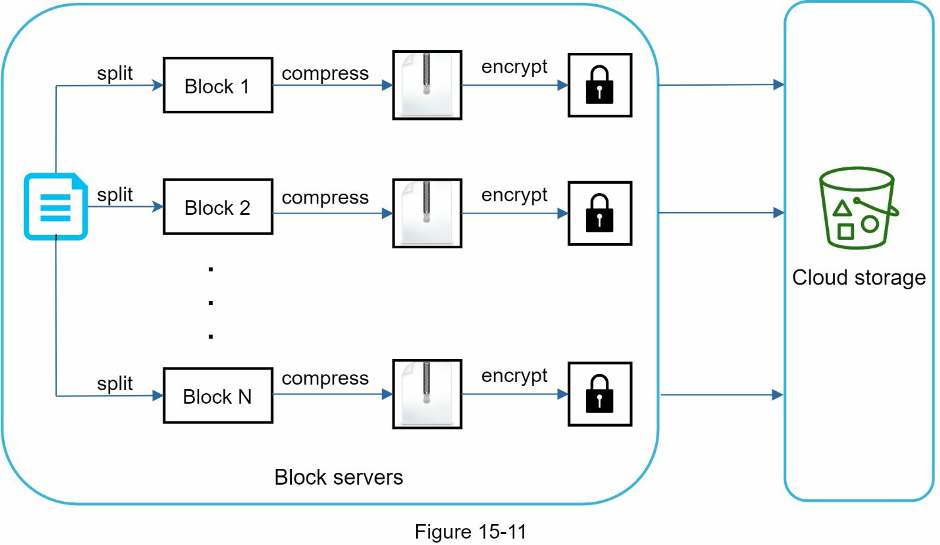
- A file is split into smaller blocks.
- Each block is compressed using compression algorithms.
- To ensure security, each block is encrypted before it is sent to cloud storage.
- Blocks are uploaded to the cloud storage.
Figure 15-12 illustrates delta sync, meaning only modified blocks are transferred to cloud storage. Highlighted blocks “block 2” and “block 5” represent changed blocks. Using delta sync, only those two blocks are uploaded to the cloud storage.
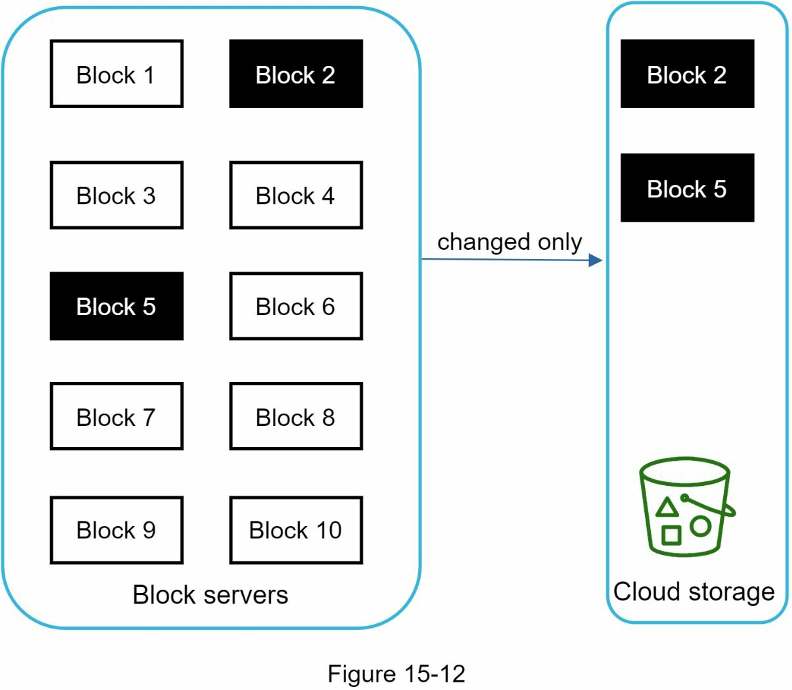
Block servers allow us to save network traffic by providing delta sync and compression.