SECTION VIDEOUpload flow
COMING SOONVideo coming soon. Start with the reading below.
Let us discuss what happens when a client uploads a file. To better understand the flow, we draw the sequence diagram as shown in Figure 15-14.
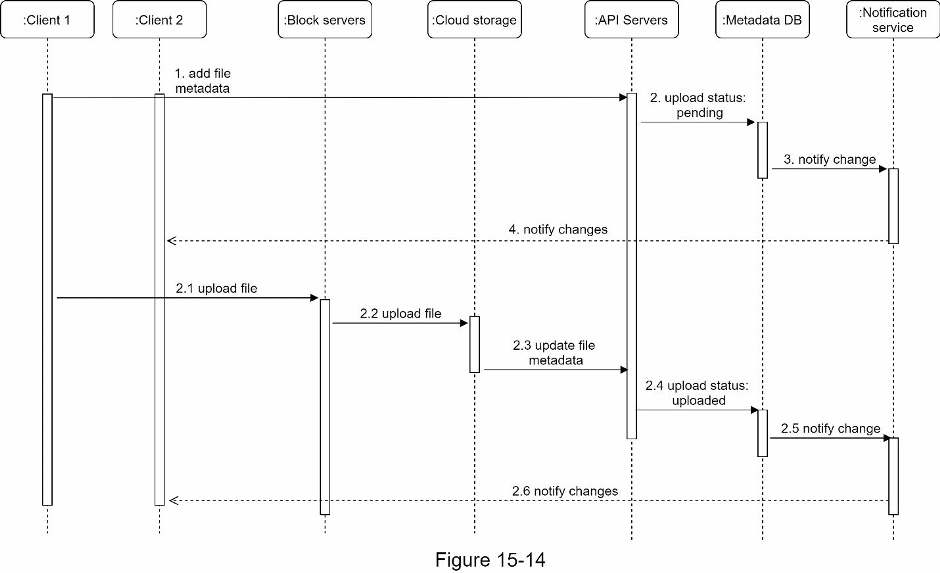
In Figure 15-14, two requests are sent in parallel: add file metadata and upload the file to cloud storage. Both requests originate from client 1.
- Add file metadata. 1. Client 1 sends a request to add the metadata of the new file. 2. Store the new file metadata in metadata DB and change the file upload status to “pending.” 3. Notify the notification service that a new file is being added. 4. The notification service notifies relevant clients (client 2) that a file is being uploaded.
- Upload files to cloud storage. 2.1 Client 1 uploads the content of the file to block servers. 2.2 Block servers chunk the files into blocks, compress, encrypt the blocks, and upload them to cloud storage. 2.3 Once the file is uploaded, cloud storage triggers upload completion callback. The request is sent to API servers. 2.4 File status changed to “uploaded” in Metadata DB. 2.5 Notify the notification service that a file status is changed to “uploaded.” 2.6 The notification service notifies relevant clients (client 2) that a file is fully uploaded. When a file is edited, the flow is similar, so we will not repeat it.
Progress is saved on this device.