Video coming soon. Start with the reading below.
At this point, you ought to have good understanding about the video uploading flow, video streaming flow and video transcoding. Next, we will refine the system with optimizations, including speed, safety, and cost-saving.
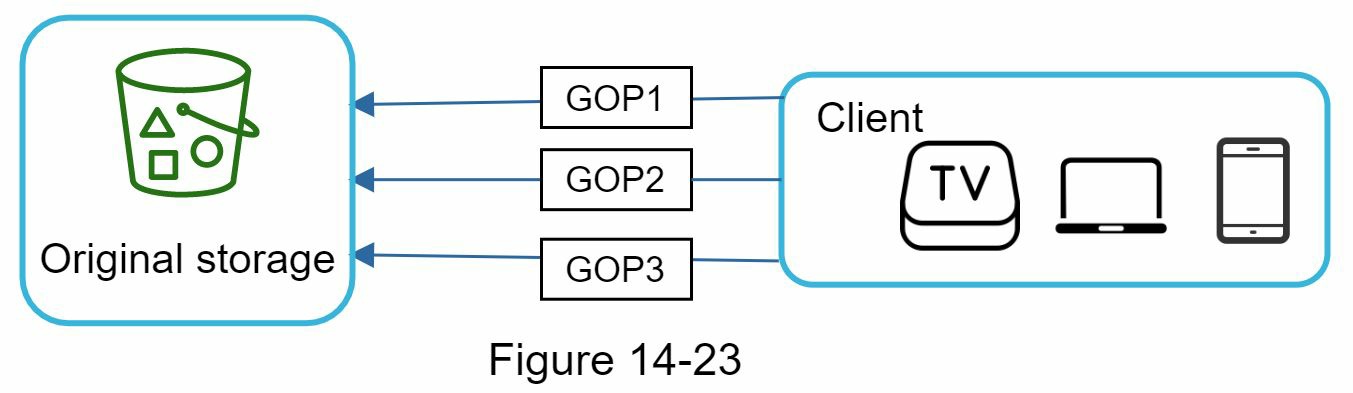
Speed optimization: parallelize video uploading Uploading a video as a whole unit is inefficient. We can split a video into smaller chunks by GOP alignment as shown in Figure 14-22.

This allows fast resumable uploads when the previous upload failed. The job of splitting a video file by GOP can be implemented by the client to improve the upload speed as shown in Figure 14-23.
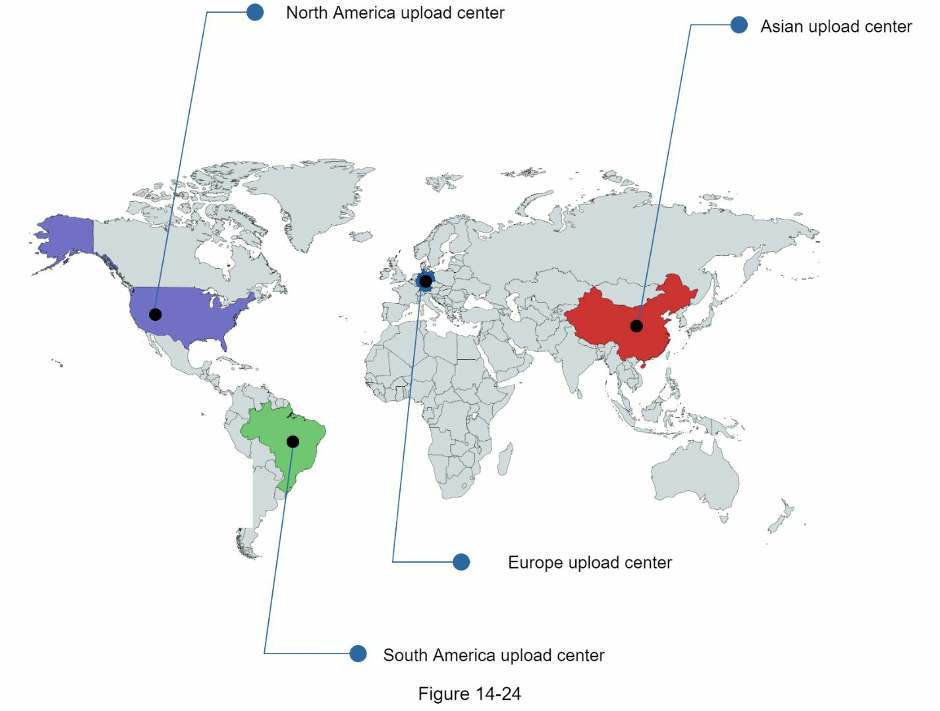
Speed optimization: place upload centers close to users Another way to improve the upload speed is by setting up multiple upload centers across the globe (Figure 14-24). People in the United States can upload videos to the North America upload center, and people in China can upload videos to the Asian upload center. To achieve this, we use CDN as upload centers.
Speed optimization: parallelism everywhere Achieving low latency requires serious efforts. Another optimization is to build a loosely coupled system and enable high parallelism.
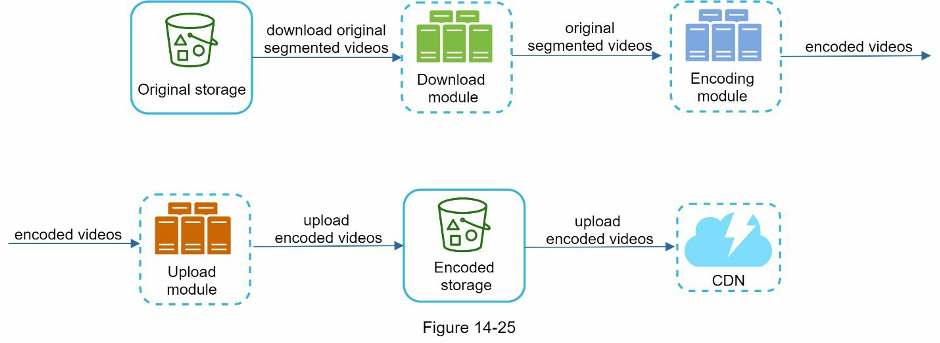
Our design needs some modifications to achieve high parallelism. Let us zoom in to the flow of how a video is transferred from original storage to the CDN. The flow is shown in Figure 14-25, revealing that the output depends on the input of the previous step. This dependency makes parallelism difficult.
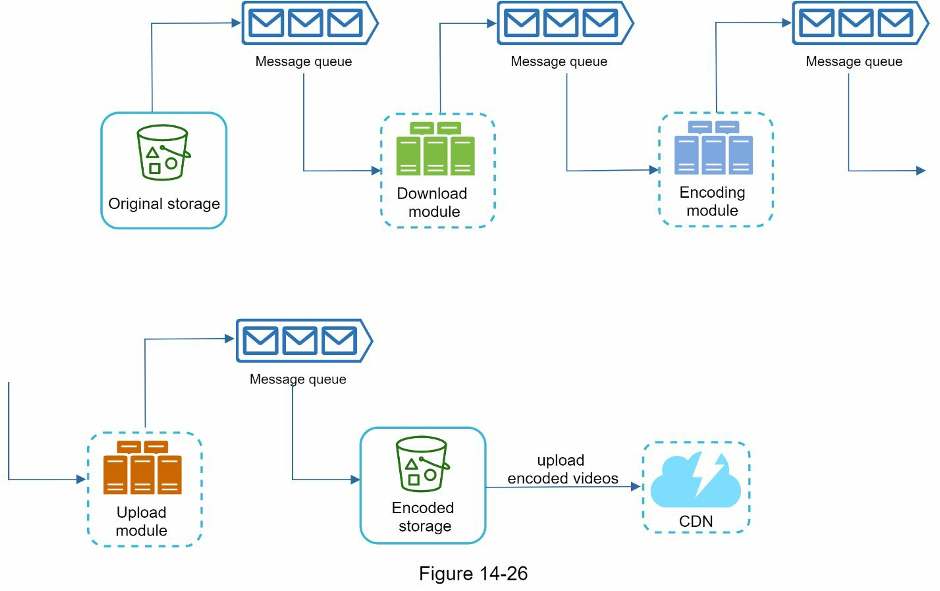
To make the system more loosely coupled, we introduced message queues as shown in Figure
14-26. Let us use an example to explain how message queues make the system more loosely coupled.
- Before the message queue is introduced, the encoding module must wait for the output of the download module.
- After the message queue is introduced, the encoding module does not need to wait for the output of the download module anymore. If there are events in the message queue, the encoding module can execute those jobs in parallel.
Safety optimization: pre-signed upload URL Safety is one of the most important aspects of any product. To ensure only authorized users upload videos to the right location, we introduce pre-signed URLs as shown in Figure 14-27.
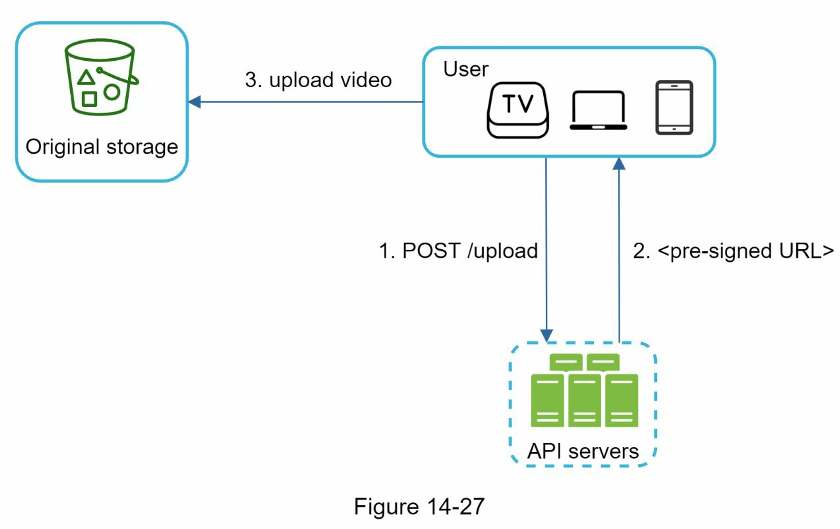
The upload flow is updated as follows:
- The client makes a HTTP request to API servers to fetch the pre-signed URL, which gives the access permission to the object identified in the URL. The term pre-signed URL is used by uploading files to Amazon S3. Other cloud service providers might use a different name. For instance, Microsoft Azure blob storage supports the same feature, but call it “Shared Access Signature” [10].
- API servers respond with a pre-signed URL.
- Once the client receives the response, it uploads the video using the pre-signed URL.
Safety optimization: protect your videos Many content makers are reluctant to post videos online because they fear their original videos will be stolen. To protect copyrighted videos, we can adopt one of the following three safety options:
- Digital rights management (DRM) systems: Three major DRM systems are Apple FairPlay, Google Widevine, and Microsoft PlayReady.
- AES encryption: You can encrypt a video and configure an authorization policy. The encrypted video will be decrypted upon playback. This ensures that only authorized users can watch an encrypted video.
- Visual watermarking: This is an image overlay on top of your video that contains identifying information for your video. It can be your company logo or company name.
Cost-saving optimization CDN is a crucial component of our system. It ensures fast video delivery on a global scale. However, from the back of the envelope calculation, we know CDN is expensive, especially when the data size is large. How can we reduce the cost?
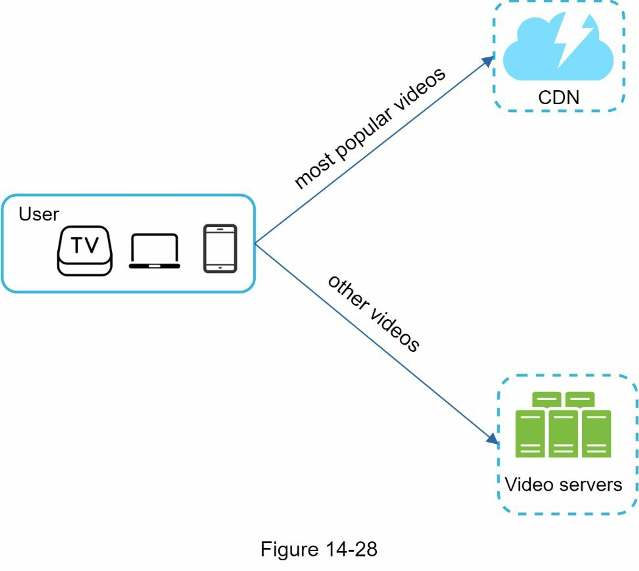
Previous research shows that YouTube video streams follow long-tail distribution [11] [12]. It means a few popular videos are accessed frequently but many others have few or no viewers. Based on this observation, we implement a few optimizations:
- Only serve the most popular videos from CDN and other videos from our high capacity
storage video servers (Figure 14-28).
- For less popular content, we may not need to store many encoded video versions. Short videos can be encoded on-demand.
- Some videos are popular only in certain regions. There is no need to distribute these videos to other regions.
- Build your own CDN like Netflix and partner with Internet Service Providers (ISPs). Building your CDN is a giant project; however, this could make sense for large streaming companies. An ISP can be Comcast, AT&T, Verizon, or other internet providers. ISPs are located all around the world and are close to users. By partnering with ISPs, you can improve the viewing experience and reduce the bandwidth charges.
All those optimizations are based on content popularity, user access pattern, video size, etc. It is important to analyze historical viewing patterns before doing any optimization. Here are some of the interesting articles on this topic: [12] [13].